LaunchBuddy vs Helm: Which App Store Workflow Fits?
Choose LaunchBuddy when the missing layer is a release plan: version-scoped tasks, reusable submission checklists, private iCloud project data, and approval-gated project automation. Choose Helm when the bottleneck is operating App Store Connect: localized metadata, screenshots, TestFlight, reviews, submissions, and command-line Apple workflows.
They aren’t complete substitutes. LaunchBuddy is primarily an app and release workspace with selected App Store Connect features. Helm is a native App Store Connect client for Mac and iPhone. Neither product’s current documentation says it builds, signs, or uploads an app binary, so that step still belongs to Xcode or another Apple-supported upload workflow.
This comparison was checked against both products’ first-party pages on October 21, 2026. Features and prices can change, so verify any deciding workflow before moving a live release.
LaunchBuddy vs Helm at a glance
| Decision area | LaunchBuddy | Helm |
|---|---|---|
| Best fit | Planning app work and repeating a release process | Performing supported App Store Connect operations outside the web portal |
| Release model | Backlog, version-scoped taskboard, status, changelog, and default or custom reusable submission checklists | App Store versions, localized What’s New text, build selection, missing-field launch checklist, submission, and phased release |
| Metadata and media | Plans the work, tracks ASO experiments, and can upload approved release notes with Pro and API credentials | Edits localized listing fields; uploads, reorders, and downloads screenshots and app previews |
| TestFlight | Tracks beta work as release tasks and checklist items | Manages builds, groups, invites, What to Test, feedback, crashes, and beta review |
| Reviews | Pro inbox, replies, AI drafts, and review-to-task | Inbox, filters, templates, translation, AI help, quote cards, CSV export, and CLI replies |
| Automation | macOS-only local MCP server; reads are free and Pro writes create approval proposals | Pro helm-asc CLI for direct App Store Connect workflows from a Mac |
| Devices | iPhone, iPad, and Mac | Mac workstation and iPhone companion |
| Current paid plan | $2.99/month or $19.99/year | $9.99/month |
The shortest decision test is this:
- If you know how to update App Store Connect but lose track of what belongs in the release, start with LaunchBuddy.
- If the release scope is already clear but editing and submitting Apple records is slow, start with Helm.
- If both bottlenecks matter, the tools can share one workflow as long as each record has one owner.
Release planning and App Store operations are different jobs
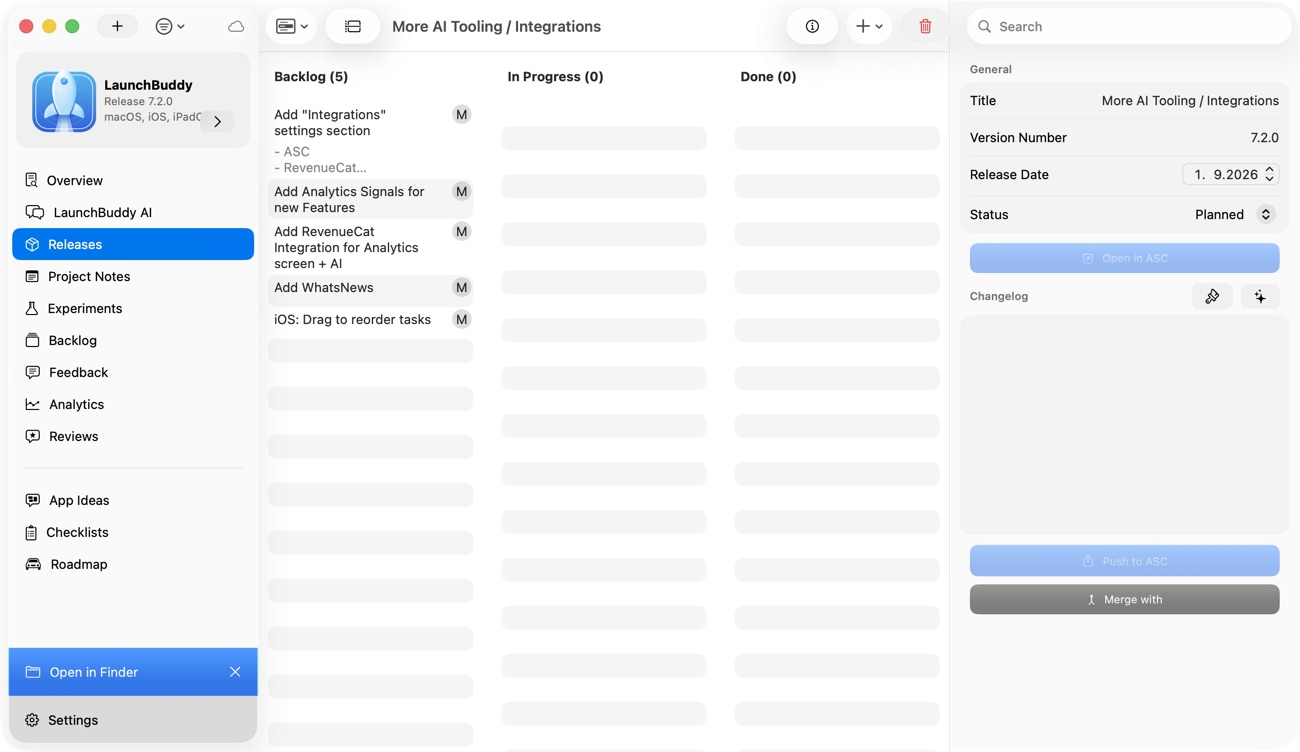
LaunchBuddy starts with the product plan. An app has backlog work, releases, version-scoped tasks, notes, dates, status, and a changelog. A default submission checklist is available on Free; Pro adds custom reusable checklists. Project data syncs through the user’s private iCloud account across iPhone, iPad, and Mac.
Helm starts with Apple’s records. Its release workflow creates a version, edits localized What’s New and promotional text, attaches an already uploaded build, shows missing App Store fields, and can submit, reject, or release. Its launch checklist covers Apple-facing gaps such as build selection, encryption, review information, screenshots, and listing fields.
Those two checklists aren’t equivalent:
- LaunchBuddy’s checklist is a process record. It can include product-specific work such as testing a migration, checking a support page, or verifying an upgrade path. Completing a task records a human decision; LaunchBuddy doesn’t inspect the binary.
- Helm’s launch checklist is an App Store readiness view. It surfaces missing supported version data before submission. Helm also offers release templates, but its public documentation doesn’t describe a version-scoped development backlog or custom release-task system.
Choose the record you need after shipping. LaunchBuddy can preserve why work entered version 3.2 and whether the team followed its own checks. Helm operates the App Store version data that Apple receives.
Helm goes much further inside App Store Connect
Helm’s current feature catalog documents direct workflows that LaunchBuddy does not claim:
- edit app name, subtitle, keywords, tags, promotional text, and localized What’s New;
- upload, reorder, download, and delete screenshots or app previews;
- select builds, choose release behavior, submit versions, and manage phased releases;
- manage TestFlight builds, groups, testers, invites, beta information, feedback, crashes, and beta review;
- manage in-app purchases, subscriptions, offers, in-app events, nominations, and accessibility labels.
LaunchBuddy’s connected scope is deliberately narrower. Pro and App Store Connect API credentials enable its reviews inbox and replies, selected download, revenue, and subscription metrics, review-to-task flow, and approved release-note upload. It doesn’t claim localized metadata editing, screenshot upload, TestFlight administration, purchase configuration, binary upload, or App Review submission.
That boundary makes Helm the stronger choice when App Store Connect itself is the repeated bottleneck. LaunchBuddy is stronger when an Apple record needs to become product work: a one-star review becomes a backlog task, a release result becomes an ASO experiment, or an app-specific check returns on every version.
For the wider system boundary, see LaunchBuddy vs App Store Connect.
TestFlight and reviews reveal the difference
Helm can run the operational TestFlight loop. Its TestFlight documentation covers groups, invitations, public links, What to Test, feedback, crashes, beta App Review, and issue creation in GitHub, Linear, Things, or Tasks. Free includes limited feedback-integration use; Pro makes those integrations unlimited.
LaunchBuddy doesn’t import or administer TestFlight in its verified feature set. To keep a beta finding in LaunchBuddy, record it as a release task or checklist item. That extra handoff is a limitation if TestFlight triage dominates your week, but it also keeps the release decision explicit: fix now, defer to a later version, or reject as out of scope.
Both products work with public App Store reviews, but they close different loops:
| Review job | Better fit |
|---|---|
| Filter, translate, template, export, or reply from a native App Store Connect inbox | Helm |
| Turn review evidence into a task attached to the app plan | LaunchBuddy |
| Draft a response | Both, with their documented Pro and credential requirements |
| Verify the published response and official review state | App Store Connect |
A reply closes the support action. A task preserves the product action. Decide which one your current process keeps losing.
MCP proposals and Helm CLI commands have different authority
The automation comparison is not “AI versus no AI.” It is proposal authority versus App Store Connect command authority.
LaunchBuddy’s local MCP server runs only on macOS. Compatible clients can read project and release context on Free. Supported Pro writes create proposals for LaunchBuddy changes, such as task or release updates. Nothing changes until a person approves the proposal in LaunchBuddy. The server doesn’t expose general App Store Connect administration and can’t build, upload, or submit an app.
Helm Pro includes the helm-asc CLI. Helm documents commands for versions, localizations, screenshots, TestFlight, reviews, purchases, events, and App Store submissions. The CLI uses the signed-in Mac app’s account setup through an App Group-backed connection, so normal use doesn’t require pasting an API key into each shell script.
Helm’s CLI setup guide recommends discovering IDs with reads, using dry runs for bulk work, reviewing generated files in the app, and requiring human approval for high-impact actions in agent instructions. That is good operating guidance, but it isn’t the same control as LaunchBuddy’s product-level approval queue. Helm’s CLI can perform supported Apple writes; LaunchBuddy’s MCP write tools stage supported LaunchBuddy changes for approval.
Use this authority test:
| Required automation | Better starting point |
|---|---|
| Ask an agent what remains in the planned release | LaunchBuddy MCP read |
| Propose completing one release task, with in-app approval required | LaunchBuddy MCP write |
| Bulk-update localized App Store metadata | Helm CLI |
| Manage TestFlight groups or create an App Store submission | Helm CLI |
| Build, sign, or upload the binary | Xcode, CI, or another supported upload tool |
Read the LaunchBuddy MCP server guide before granting a coding client project context. For either tool, test reads first and verify consequential Apple state in App Store Connect.
Plans, credentials, and platform limits
As of October 21, 2026, LaunchBuddy Free supports two apps and two releases, limited project notes, default checklists, iCloud sync, and read tools. Pro costs $2.99 per month or $19.99 per year and adds unlimited apps, releases, and notes; custom checklists; selected App Store Connect features; AI; ASO experiments; and supported approval-gated writes. AI usage limits apply. App Store Connect features require API credentials. One subscription covers iPhone, iPad, and Mac, although MCP and menu-bar features are Mac-only.
Helm’s current pricing page lists $9.99 per month. Free includes six App Store submissions per year, four TestFlight submissions per app per month, one account, one release template, one review template, and limited feedback integrations. Pro removes the documented submission limits and adds multiple accounts, unlimited templates, localization and text tools, deeper review features, and the CLI.
Helm describes macOS as the full workstation and iPhone as the companion. Its current FAQ requires iOS 26 or later and macOS 26 or later. One Helm Pro purchase covers Mac and iPhone. Helm says an Admin App Store Connect key is required for every feature to work; an App Manager key works with a reduced surface and cannot reply to customer reviews.
Don’t compare prices without comparing the unit being limited. LaunchBuddy Free limits the planning portfolio. Helm Free limits App Store and TestFlight submissions plus specific operations. The LaunchBuddy Free vs Pro guide lists LaunchBuddy’s current plan boundaries.
Run one small update through the decision
Use a real but low-risk release, not a feature demo. Suppose version 2.4 contains one bug fix, one onboarding improvement, two localized What’s New fields, refreshed iPhone screenshots, an external beta group, and a public review describing the bug.
Assign one owner to each record before trying either product:
Release scope and app-specific checks:
Build, signing, and binary upload:
Localized metadata and screenshots:
TestFlight groups and beta feedback:
Official submission and release state:
Review response:
Follow-up product task:
Then test the workflow that matches your likely choice.
LaunchBuddy-first trial
- Create release 2.4 and assign only the bug fix and onboarding work.
- Apply a default checklist or a custom Pro checklist.
- Keep screenshots, localization, build upload, TestFlight, and submission as explicit tasks, then perform those actions in Apple’s tools.
- Draft What’s New from completed work and, with Pro plus API credentials, upload only the approved release notes.
- Turn the review into a backlog task if the evidence still requires follow-up.
- Ask MCP for incomplete release work; if using a Pro write, inspect and approve one small proposal.
Helm-first trial
- Confirm the development scope in your existing issue tracker or notes.
- Create the App Store version in Helm, edit localized What’s New, and organize the screenshots.
- Attach the uploaded build, prepare the external TestFlight group, and process beta feedback.
- Use Helm’s launch checklist to resolve missing Apple-facing fields.
- Review the chosen build and customer-facing copy, then submit through Helm.
- Reply to the review and route any remaining product work to your chosen tracker.
Score the result on what remained trustworthy:
Release scope stayed visible:                 /5
App-specific checks were hard to skip:        /5
Localized Apple work required fewer handoffs: /5
TestFlight feedback reached product work:     /5
Automation authority matched the risk:        /5
Official App Store state stayed unambiguous:  /5
A fast submission with lost product context isn’t a clean release. Neither is a perfect taskboard that leaves you copying six localizations by hand.
Can LaunchBuddy and Helm work together?
Yes. A clean combined workflow gives LaunchBuddy the plan and Helm the Apple-facing execution:
LaunchBuddy
  -> scope, development tasks, reusable process checks, changelog draft

Xcode or another supported tool
  -> build, sign, upload binary

Helm
  -> App Store metadata, screenshots, TestFlight, submission, release

App Store Connect
  -> authoritative Apple record
Avoid mirroring every state. “Build uploaded” can be a LaunchBuddy checklist item, but the build’s processing and submission status should remain Apple’s record as surfaced by Helm or App Store Connect. A TestFlight report can stay in Helm until it becomes accepted product work; only then create the corresponding LaunchBuddy task.
If maintaining that ownership rule costs more time than either tool saves, choose one. The broader App Store Connect alternatives guide can help identify whether you need a native client, release workspace, CLI, or CI pipeline.
Choose the missing layer
Choose LaunchBuddy when release scope, app-specific checks, private cross-device project context, and approval-gated project changes are the missing layer. Choose Helm when localized App Store editing, screenshots, TestFlight, reviews, submissions, and CLI access are the recurring friction.
If LaunchBuddy fits the first problem, download it and test the next release on the free plan.