App Store Connect Release Checklist for Indie iOS Developers

An App Store Connect release checklist covers eight things before you click Submit for Review: the version goal, the processed build you will select, the What’s New text, your metadata, screenshots, App Privacy and age rating answers, review notes with demo access, and the release timing. The compact version is at the end of this guide, and each section below explains what to check.
Most of the frustrating rejections come from something small: a missed field, a stale screenshot, a broken support link, or a forgotten review note. Indie developers rarely lack the skill to ship. The trouble is that every release spreads across Xcode, TestFlight, App Store Connect, App Privacy answers, release notes, and a dozen tiny decisions you only remember after submitting.
In LaunchBuddy, every release can carry its own submission checklist next to its tasks, so the list below stays attached to the version it belongs to.
Why App Store Connect releases need a checklist
App Store Connect is powerful, but it is not a project manager. It stores the final version data Apple needs, but it does not always make the work leading up to submission obvious.
A strong App Store Connect release checklist helps you answer:
- Is the right build uploaded, processed, and selected?
- Are the release notes accurate for this exact version?
- Do screenshots match the current UI and supported devices?
- Are App Privacy, age rating, pricing, and availability settings still correct?
- Did you include demo access or reviewer notes for gated features?
- Are support, privacy, and marketing links live before review starts?
When these checks live beside your release tasks, you can move from “I think everything is ready” to “I know exactly what is left.”
1. Confirm the version goal before touching App Store Connect
Start with the release itself. Before editing metadata, define what this version is meant to accomplish:
- Bug fix release
- Feature launch
- Onboarding improvement
- Subscription or in-app purchase update
- Compatibility update for a new iOS version
- Marketing launch tied to a campaign or event
In LaunchBuddy, create a release for the version and attach every remaining task to it. This gives your App Store Connect work context. A screenshot refresh, a TestFlight note, and a backend migration should not live as separate reminders; they are all part of the same release.
2. Upload and verify the right TestFlight build
Your build is the anchor for the submission. Before you spend time polishing metadata, confirm that the build you plan to submit is actually ready.
Check that:
- The version number and build number are correct
- The build is uploaded and processed in App Store Connect
- TestFlight testing covered the flows Apple is likely to review
- In-app purchases, subscriptions, login, notifications, widgets, or extensions work on real devices
- Crash reports and obvious beta feedback have been reviewed
- The correct build is selected for the App Store version
With an App Store Connect integration, LaunchBuddy can help keep release status closer to your task list, so you are not constantly jumping between planning work and App Store Connect just to remember what is ready.
3. Use AI to draft release notes, then edit like a developer
Release notes are easy to postpone because they feel small compared with code. They still matter. They set expectations for users, reviewers, and your future self when you look back at what changed.
AI can speed up the first draft. A practical workflow is:
- Summarize the completed tasks in the release.
- Ask AI for a concise “What’s New” draft.
- Remove internal implementation details.
- Rewrite anything vague into user-facing language.
- Keep the final version honest and specific.
For example, “Refactored networking layer” may be true, but “Improved sync reliability when switching between iPhone and Mac” is more useful to users.
LaunchBuddy’s AI features fit naturally here because your release tasks already describe what changed. Instead of starting from a blank text field in App Store Connect, you can draft from the work you actually completed.
4. Review metadata before every submission
App metadata gets stale faster than you expect. A feature name changes, a pricing page moves, or your positioning improves, but App Store Connect still says what you wrote three versions ago.
Before submitting, review:
- App name and subtitle
- Description
- Keywords
- Promotional text
- Category
- Support URL
- Marketing URL
- Privacy policy URL
- Copyright
Do not rewrite everything for every release. Instead, make metadata review a checklist item. If nothing changed, mark it done. If your new release changes the app’s value proposition, update the fields intentionally.
5. Check screenshots against the current build
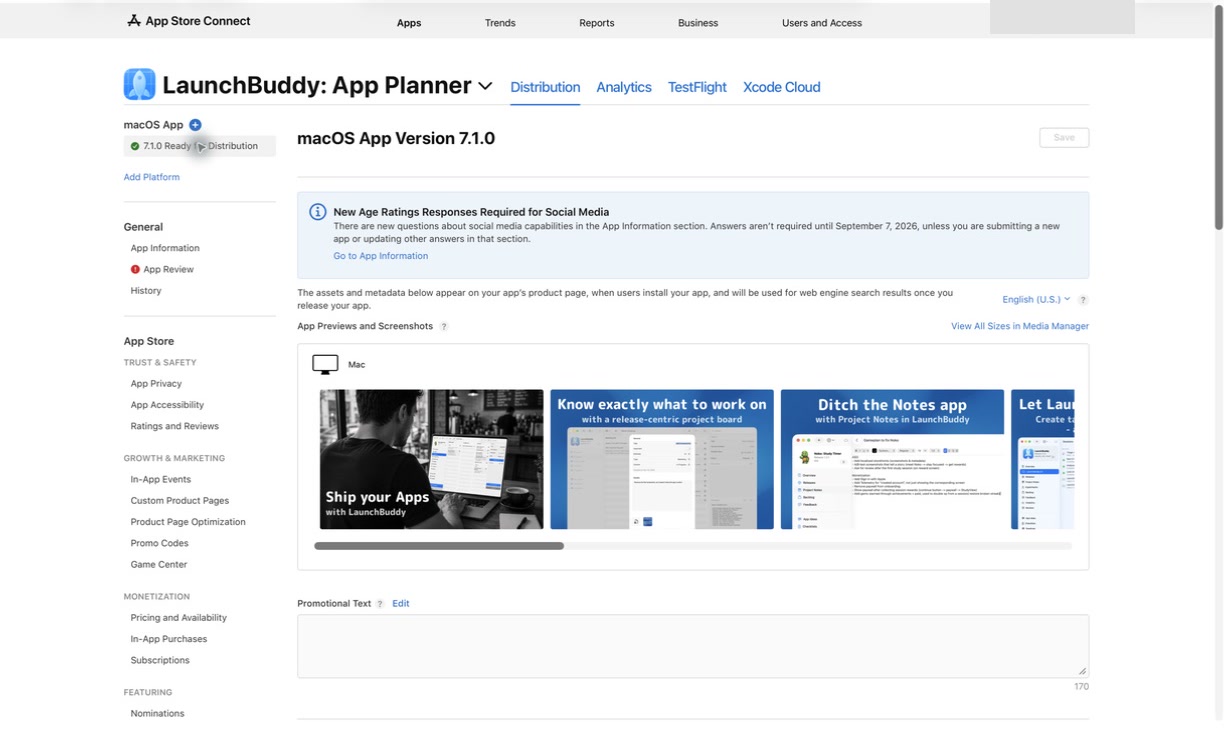
Screenshots are part of the release, not just part of the launch. If your UI changed, your screenshots should not show old navigation, outdated copy, missing features, or screens that no longer exist.
For each supported device size and locale, verify:
- Screenshots match the submitted build
- The first screenshot communicates the main benefit quickly
- Text overlays are still accurate
- Dark mode or light mode choices are intentional
- Subscription screens, paywalls, and feature claims reflect the actual app
- Localized screenshots have no leftover English text unless intentional
If screenshots are not changing for this release, keep a checklist item anyway. “Verified screenshots still match the build” is much safer than assuming they do.
6. Recheck privacy, age rating, and compliance details
Privacy and compliance settings are easy to treat as one-time setup. They are not. New analytics SDKs, account features, user-generated content, subscriptions, or external links can change what you need to disclose.
Before submission, confirm:
- App Privacy answers match the current build
- Tracking disclosures are accurate
- Required permission prompts are explained clearly
- Account deletion requirements are handled if accounts exist
- Age rating answers still match the app
- In-app purchases and subscriptions are configured and attached when needed
- Any regulated content or special hardware requirements are explained
This is where a repeatable checklist pays off. You do not need to remember Apple’s entire review surface from memory each time; you need a trusted process that makes the risky items visible.
7. Prepare App Review notes and demo access
If Apple cannot reach an important part of your app, review can slow down. For apps with accounts, subscriptions, private content, hardware integrations, or non-obvious workflows, App Review notes are not optional busywork. They are how you reduce ambiguity.
Prepare:
- Demo account username and password if login is required
- Steps to reach paid or gated features
- Notes about required hardware or external services
- Explanation of any background behavior
- Contact details that someone actually monitors
- A short description of what changed in this release
Keep this information in your release plan before you paste it into App Store Connect. That makes it reusable for future submissions and easier to improve after review feedback.
8. Choose release timing intentionally
The final App Store Connect release decision is not just “submit now.” You may want automatic release, manual release after approval, scheduled release, or phased rollout.
For indie apps, manual release is often useful when you want to:
- Coordinate a marketing email, social post, or Product Hunt launch
- Verify server-side changes before users update
- Release at a time when you can monitor feedback
- Hold a version until screenshots, website copy, or documentation are ready
Add release timing to your checklist so it is a decision, not a default.
A reusable App Store Connect release checklist
Here is a compact checklist you can adapt for every iOS release:
- Define the version goal and scope
- Finish all release tasks in Xcode and LaunchBuddy
- Upload the build
- Verify the build processed successfully
- Run TestFlight checks on real devices
- Review crashes and beta feedback
- Select the correct build in App Store Connect
- Draft release notes with AI, then edit them manually
- Review app name, subtitle, description, keywords, and promotional text
- Verify screenshots and app previews
- Confirm support, marketing, and privacy URLs work
- Recheck App Privacy and age rating answers
- Confirm pricing, availability, IAPs, and subscriptions
- Add demo credentials or reviewer instructions
- Choose manual, automatic, scheduled, or phased release
- Submit for review
- Track review status and follow-up tasks
Frequently asked questions
How long does App Review take for an iOS update?
Apple says most submissions are reviewed within a day, but first submissions, busy weeks around holidays and new iOS versions, and apps with logins or in-app purchases can take longer. Leave a buffer of a few days before any date you’ve announced, and pick a manual release if the launch moment matters.
Should I use phased release for an App Store update?
Phased release gives the update to users with automatic updates turned on over seven days, starting at 1% and ending at 100%, and you can pause it for up to 30 days in total. Anyone can still download it manually from the App Store, so it limits exposure without hiding the version. Use it for updates with migrations or new purchase flows, and skip it for urgent bug fixes.
Turn every release into a system
The best App Store Connect release checklist is the one you actually use. A plain note is better than memory, but a checklist connected to your real release tasks is better than both.
LaunchBuddy helps indie iOS developers plan releases, track Xcode tasks, manage App Store submission checklists, and stay in sync across iPhone and Mac. With App Store Connect integration and AI-assisted workflows, it is designed for the messy middle between “the code is almost done” and “the update is live.”
If your next release is scattered across Xcode, App Store Connect, Notes, and memory, bring it into one place before you submit.
Want the printable first-submission version? Get the free App Launch Checklist PDF — 25 actions covering first run, purchases, privacy, listing accuracy, and a final rehearsal, delivered to your inbox.