New Your coding agent now knows the plan

LaunchBuddy · iOS app release manager for indie developers Ship your next release without the chaos.

Plan iOS app releases, run App Store submission checklists, reply to reviews, and ask AI that knows your apps. One command center on iPhone, iPad, and Mac.

Start shipping

4.8 on the App Store Free for 2 apps Your data stays in your iCloud

Ready to ship without the chaos?

Start shipping

Free for 2 apps · Pro from $2.99/mo

  • 20,000+ indie developers
  • 4.8 stars App Store rating
  • 3 platforms: iPhone, iPad & Mac
  • $0 to start, free for 2 apps

You built the app. Now you have to ship it.

Reviews live in App Store Connect. Feedback is buried in your DMs. Tasks sit in yet another kanban app. Release notes? Some random doc. The checklist? In your head.

So things slip.

Not Jira. Not a kanban clone. A release command center.

Every review, idea, task, checklist, and release note lands in the version it belongs to, so you always know what ships next and what’s still in the way.

  • Built for indie devs
  • iPhone, iPad & Mac
  • Synced with iCloud

Everything between Build Succeeded and Ready for Sale

Five jobs that used to live in five different tools, now organized around the version you’re shipping.

01 Release planning

Plan releases, not to-do lists.

Every fix and feature is tied to the version it ships in, with a status and a date. Always know what ships next, and what’s still in the way.

  • Taskboards for every version
  • Release status & due dates
  • Free for 2 apps & 2 releases

02 Submission checklists

Nothing slips past Submit.

Add a reusable App Store submission checklist to every release, so screenshots, privacy labels, and What’s New get done before you hit Submit, not after the rejection email.

  • Default checklists included free
  • Custom checklists with Pro
Get the free App Launch Checklist PDF

03 App Store Connect Pro

No more tab-hopping.

Read and reply to reviews, check downloads and revenue, and push release notes to App Store Connect without leaving LaunchBuddy. Connect your API key once.

  • Reviews inbox & replies
  • Analytics dashboard
  • Release notes upload

Requires Pro and an App Store Connect API key.

04 LaunchBuddy AI Pro

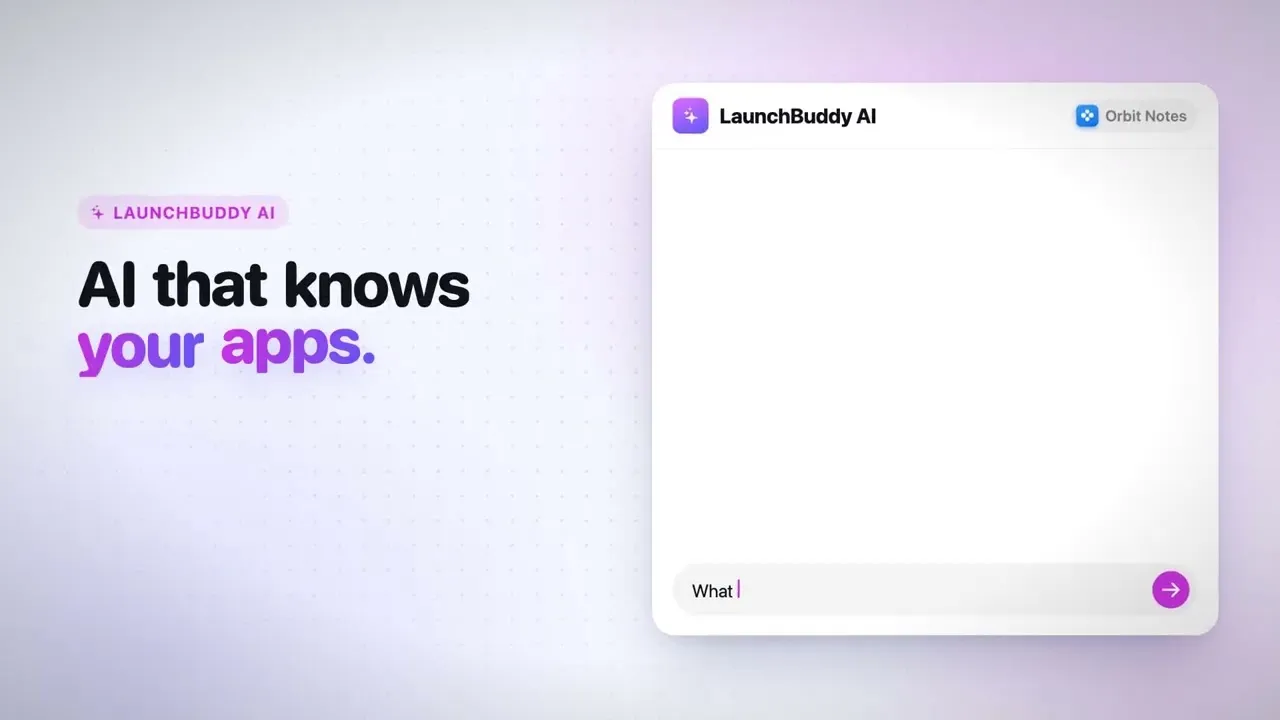
AI that knows your apps.

Ask about reviews, backlog, and releases, or hand it a playbook like “Prepare a release.” It drafts changelogs and review replies, and nothing changes until you approve.

  • App-aware chat
  • Playbooks for releases, reviews & performance
  • Approval before every change

Included with Pro. AI usage limits apply.

05 MCP server for Mac

Your coding agent knows the plan.

Connect Cursor, Claude Code, or Codex to LaunchBuddy’s local MCP server. Agents read your releases, tasks, and checklists, and every change waits for your OK.

  • Localhost-only, on your Mac
  • Read tools are free
  • Write tools with Pro, always approval-gated

Built for how indie devs actually work.

iCloud sync

iPhone, iPad & Mac. Always in sync.

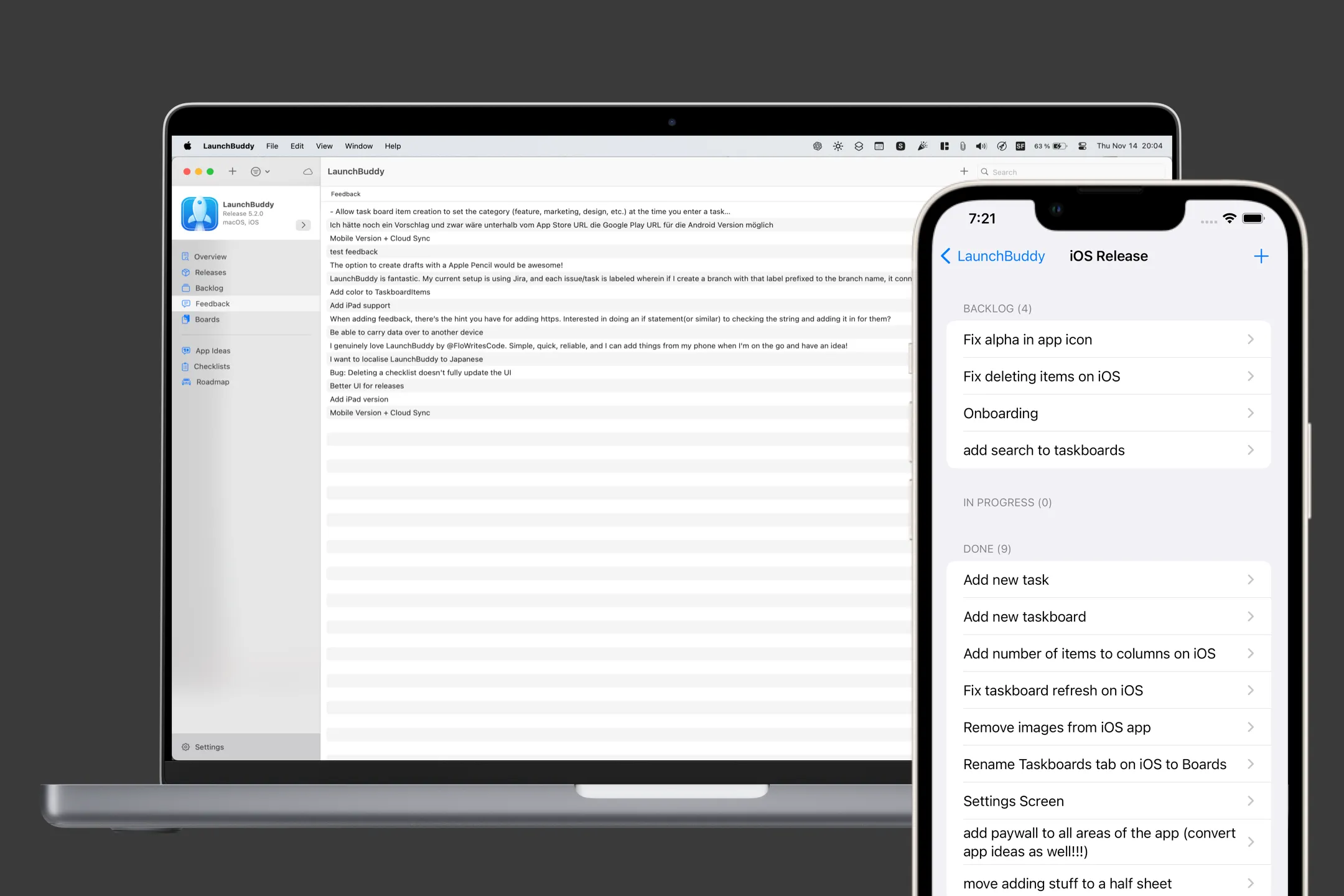
Plan at your desk, reply to a review from the couch, and pick up exactly where you left off. Your private iCloud keeps every project current.

LaunchBuddy on a MacBook showing app feedback, next to an iPhone showing an iOS release board

Widgets

Release status on your Home Screen.

Progress, due date, and checklist completion, including Lock Screen sizes.

Menu bar · Mac

Every release, one click away.

Open tasks, progress, and due dates without opening the main window.

ASO experiments Pro

Test icons, screenshots & copy.

Baseline vs. variant metrics for every experiment, per app.

Privacy

Your data stays in your iCloud.

LaunchBuddy doesn’t host your tasks, releases, or notes on its own servers.

Shortcuts & Siri

Automate the busywork.

Read actions are free. Create and update with Pro, through the approval flow.

LaunchBuddy on Mac: releases, reviews, AI, and ASO experiments.

These are screenshots from the Mac app. The same apps, releases, and tasks are on your iPhone and iPad through iCloud.

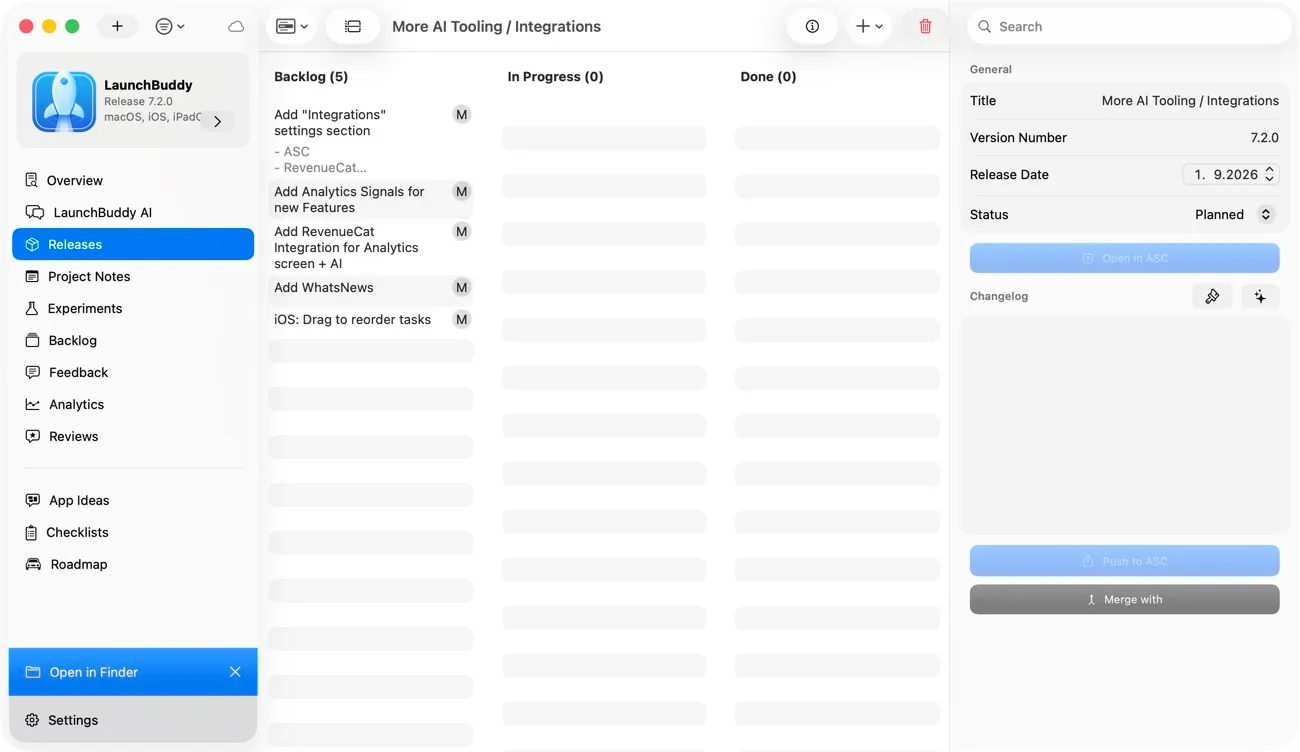
LaunchBuddy on Mac showing the release board for version 7.2.0, with backlog tasks, release date, status, changelog, and a Push to ASC button
Release planning Every version gets its own board. Tasks for the release sit next to its date, status, and changelog. With Pro, push the changelog to App Store Connect once it reads right.
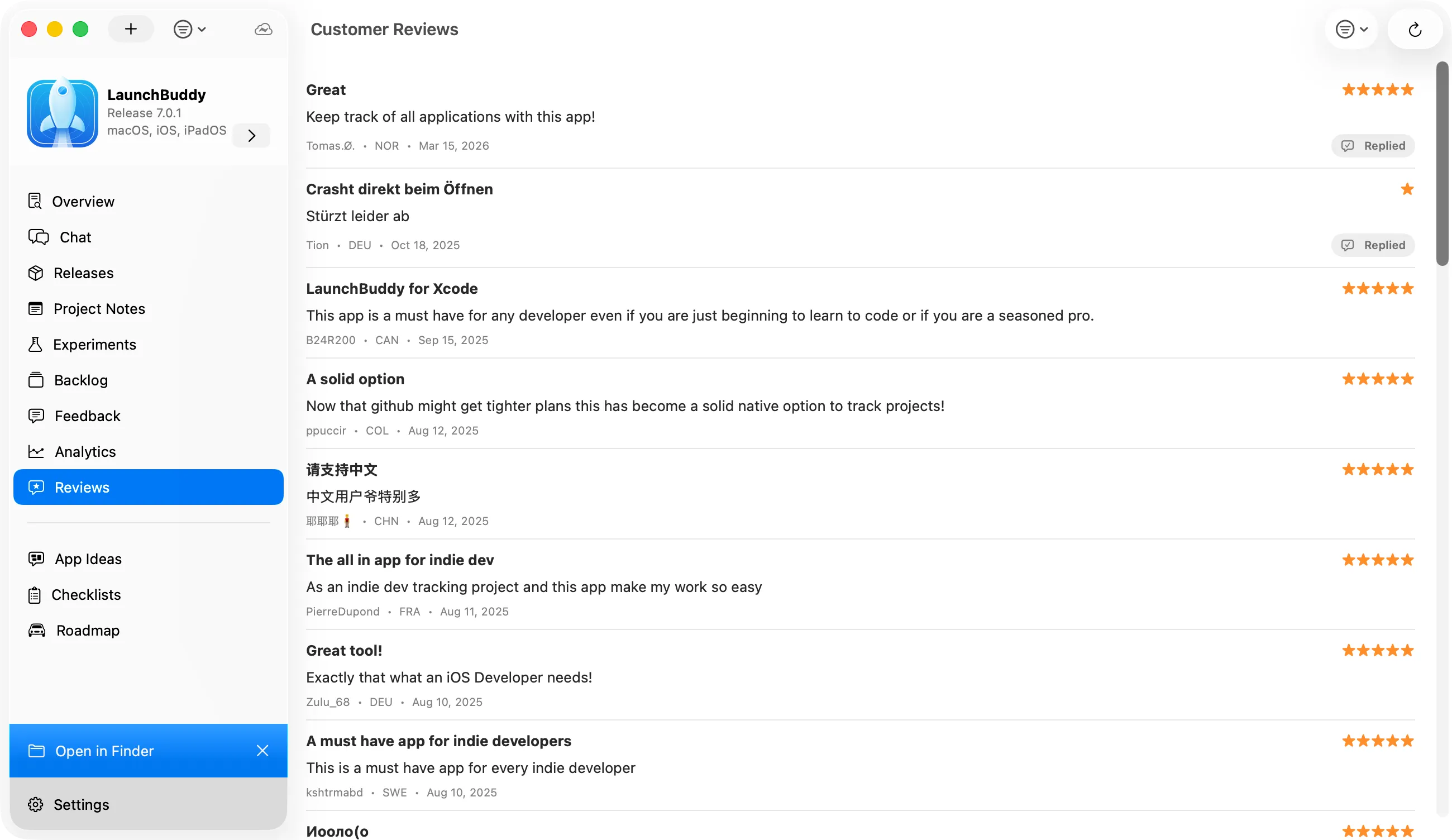
LaunchBuddy App Store review inbox on Mac listing customer reviews with star ratings, countries, dates, and Replied badges
App Store reviews Pro Every review in one inbox. Ratings, countries, and reply status for each app. Draft a reply with AI, edit it, and send it after you approve.
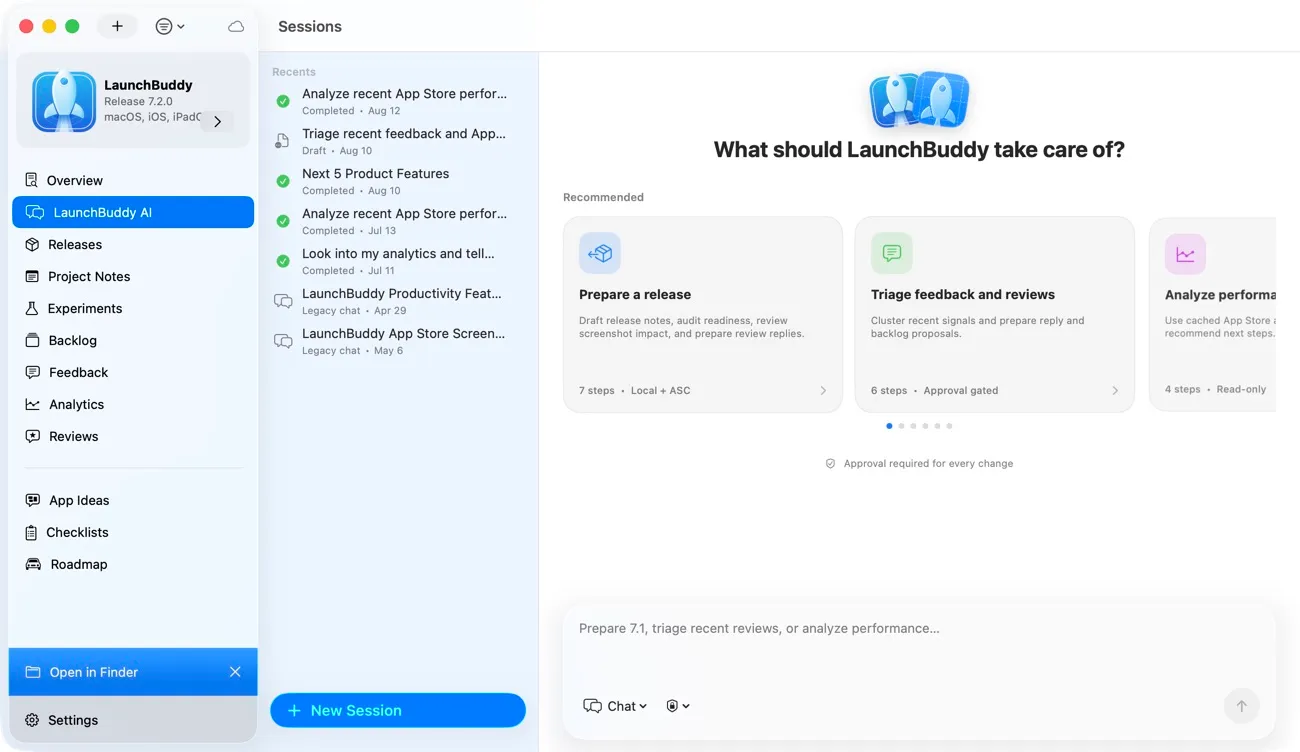
LaunchBuddy AI on Mac with recommended playbooks for preparing a release, triaging feedback and reviews, and analyzing App Store performance
LaunchBuddy AI Pro Playbooks that ask before they change anything. Prepare a release, triage feedback, or read your App Store analytics. Each proposed change waits in an approval queue.
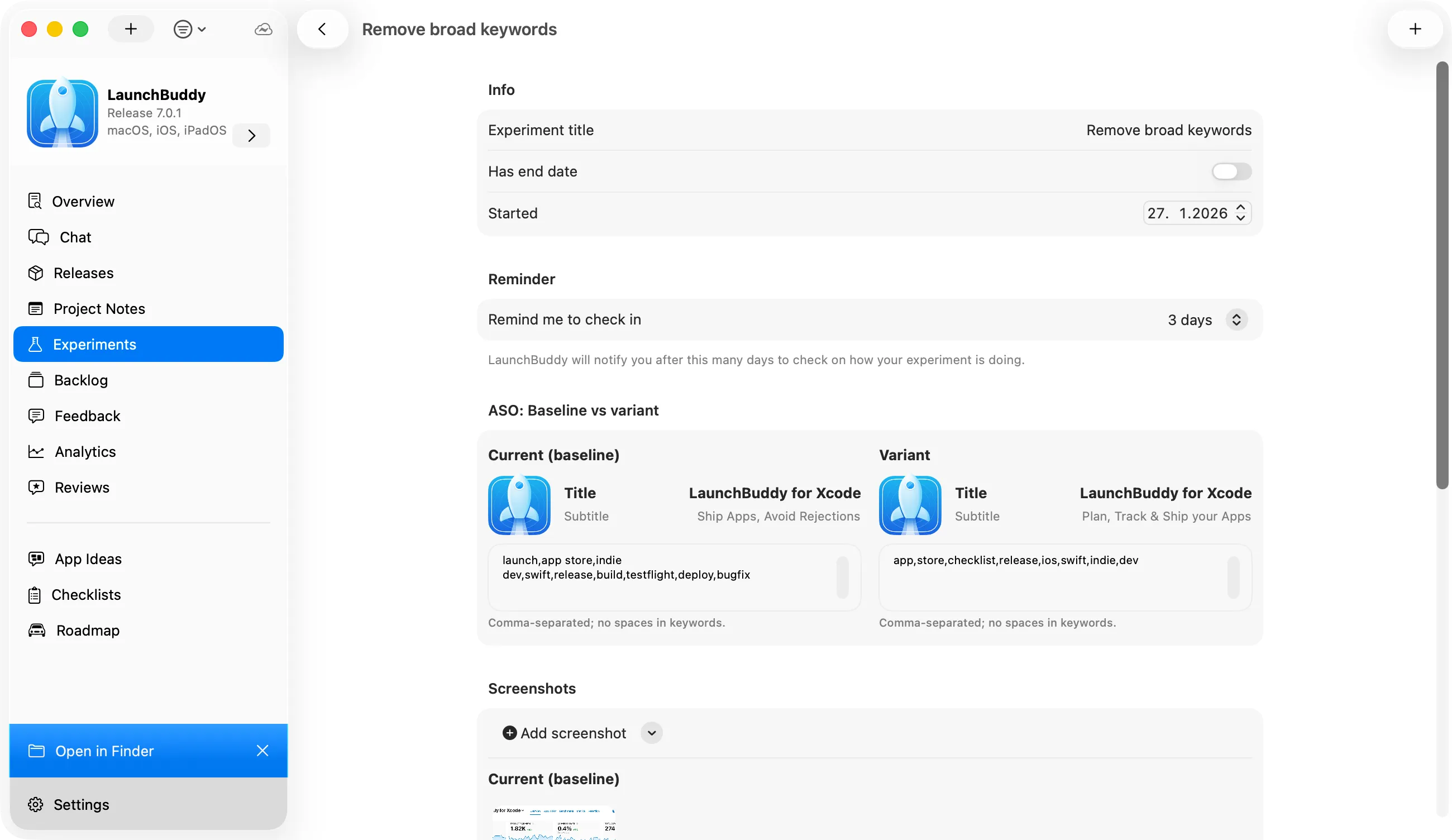
ASO experiment in LaunchBuddy comparing the baseline and variant App Store title, subtitle, and keyword field
ASO experiments Pro Write down what you changed on the App Store. Log the baseline and variant title, subtitle, and keywords, then get a reminder to check how the experiment did.

20,000+ developers use LaunchBuddy

4.8 average on the App Store Read reviews →
  • ★★★★★
    “This is a great app. I use it for my iOS/Mac development to keep track of version & release documentation, bug fixes and enhancements. The developer appears more than willing to listen to customers and make changes as needed.”

    Maarten B. App Store review · US

  • ★★★★★
    “I love having this app to keep track of how my release work in progress is going and my new app ideas. Such a great idea and a great tool!”

    Mark from Mars App Store review · US

  • ★★★★★
    “This app is a must have for any developer even if you are just beginning to learn to code or if you are a seasoned pro.”

    B24R200 App Store review · CA

  • ★★★★★
    “Great app for storing app ideas, picking one to work on and implementing! Simple to understand and a joy to use.”

    HeyFutureJesse App Store review · AU

  • ★★★★★
    “As a new dev. This tool is amazing!”

    Alcarbuccia App Store review · US

  • ★★★★★
    “LaunchBuddy is a great tool to help you organize your projects, keep on top of goals, and actually work towards shipping something on the App Store. Hard recommend.”

    Twiggyweasel App Store review · US

  • ★★★★★
    “This tool makes it super easy to track and plan what you're developing, and syncs between phone and Mac.”

    OBS5561 App Store review · US

  • ★★★★★
    “This app helps me as an indie developer to keep track of the apps I'm working on and capture ideas I want to implement in my apps. A great little tool to organize my work.”

    .holger App Store review · DE

  • ★★★★★
    “This is a great app to organize my apps. I can add release notes, URL's from App Store, website and a social Link from the app.”

    Berkant72 App Store review · DE

Start free. Upgrade when you ship more.

Free covers your side project. Pro unlocks App Store Connect, AI, and unlimited apps. One subscription for iPhone, iPad, and Mac.

Billing period

Free

$0forever

Everything you need to plan and ship your first app.

Download free
  • 2 apps & 2 releases
  • Release planning & taskboards
  • Default App Store submission checklists
  • iCloud sync on iPhone, iPad & Mac
  • Widgets & menu bar release status
  • Shortcuts, Siri & MCP read tools

Pro Everything unlocked

$19.99per year

$2.99per month

That’s $1.67/month, billed yearly.

Billed monthly through the App Store.

Start shipping

Everything in Free, plus

  • Unlimited apps, releases & project notes
  • Custom submission checklists
  • App Store Connect: reviews, analytics & release notes*
  • LaunchBuddy AI: app chat, playbooks & reply drafts**
  • ASO experiments
  • Shortcuts, Siri & MCP write actions, with approval

*Requires an App Store Connect API key. **AI usage limits apply. Subscribe inside the app.

Compare every feature
Features Free Pro $2.99/mo
Core workflow
Release planning & taskboards Organize tasks by version and track what ships next.
App Store submission checklists Reusable checklists that auto-add tasks to every release. Default Custom
iCloud sync Projects stay current across iPhone, iPad, and Mac.
iPhone, iPad & Mac
Portfolio
Apps 2 Unlimited
Releases 2 Unlimited
Project notes Limited Unlimited
App Store Connect
Reviews inbox Read and reply to App Store reviews without opening a browser. —
Analytics dashboard Downloads, revenue, and subscription metrics from ASC. —
Release notes upload Push release notes to App Store Connect from LaunchBuddy. —
Review-to-task Turn 1-star feedback into backlog tasks in one tap. —
LaunchBuddy AI
App Chat Chat with AI that knows your tasks, releases, and review data. —
Idea Chat Brainstorm features and turn ideas into backlog items. —
AI review replies Draft App Store review responses from your app context. —
Power tools
ASO experiments Track icon, screenshot, and copy A/B tests with metrics. —
Widgets & Home Screen reads View apps, release tasks, and release status at a glance.
Widget task completion Complete a task from a widget. —
Shortcuts & MCP reads Inspect LaunchBuddy data from Shortcuts, Siri, and MCP-compatible agents.
Shortcuts & MCP writes Propose LaunchBuddy changes through the automation approval flow. —

LaunchBuddy questions, answered.

Something else on your mind? Ask Flo on X →

Is LaunchBuddy free?

Yes. The free plan covers 2 apps and 2 releases with taskboards, the default App Store submission checklists, and iCloud sync, and it has no time limit. Pro costs $2.99 a month or $19.99 a year and adds unlimited apps, custom checklists, App Store Connect reviews and analytics, ASO experiments, and LaunchBuddy AI.

Learn more: Compare Free and Pro →

What should be on an App Store submission checklist?

At minimum: the release build tested on a real device, a bumped version and build number, screenshots for every required device size, current privacy labels, What’s New text, and review notes or a demo account if the app needs a login. LaunchBuddy attaches a reusable checklist to each release, so these steps don’t depend on memory.

Learn more: The full App Store Connect release checklist →

How do I keep track of releases across several apps?

Give each app its own list of versions and attach every task, checklist, and release note to the version it ships in. LaunchBuddy keeps every app in one dashboard, and its Home Screen widgets and Mac menu bar show each release’s progress, due date, and open tasks.

Learn more: An iOS release management workflow →

How does LaunchBuddy work with App Store Connect?

It sits next to it. App Store Connect is still where your builds, metadata, and submissions live, and LaunchBuddy organizes the work around them: release tasks, checklists, reviews, analytics, and release notes you can push to App Store Connect when they’re approved.

Learn more: LaunchBuddy vs App Store Connect →

Which LaunchBuddy features need an App Store Connect API key?

Only for the App Store Connect features (the reviews inbox, analytics, and release note uploads), which also require Pro. Tasks, checklists, and AI chat work without one. You create the key in App Store Connect under Users and Access, then Integrations; team keys need the Admin role.

Learn more: How to create an App Store Connect API key →

Can I reply to App Store reviews without opening App Store Connect?

Yes, with Pro and an API key. LaunchBuddy collects your reviews in an inbox on iPhone, iPad, and Mac, drafts replies with AI that you edit and approve before sending, and can turn a review into a backlog task.

Learn more: A review management workflow →

Does LaunchBuddy work with Cursor, Claude Code, or Codex?

Yes, on Mac. LaunchBuddy runs a localhost-only MCP server that Cursor, Claude Code, Codex, and other MCP clients can connect to. Read tools are free; write tools need Pro and create proposals that change nothing until you approve them.

Learn more: Set up the LaunchBuddy MCP server →

Does LaunchBuddy run on iPhone, iPad, and Mac?

Yes. It’s a single App Store listing for all three, and one Pro subscription covers every device. iCloud keeps your apps, releases, and tasks in sync, while the MCP server and menu bar features are Mac-only.

Learn more: Running releases from your iPhone →

Where does LaunchBuddy store my data?

In your private iCloud account. LaunchBuddy doesn’t host your tasks, releases, or notes on its own servers, and with Pro you choose which notes and project details the AI may use.

Learn more: How iCloud project sync works →

App Store release guides for indie iOS developers.

All guides →

Ship your next release
without the chaos.

Free for 2 apps. Pro from $2.99/mo when you’re ready for more.

★ 4.8 App Store rating 20,000+ developers iPhone, iPad & Mac