
LaunchBuddy vs App Store Connect: What Indie iOS Developers Need
July 20, 2026
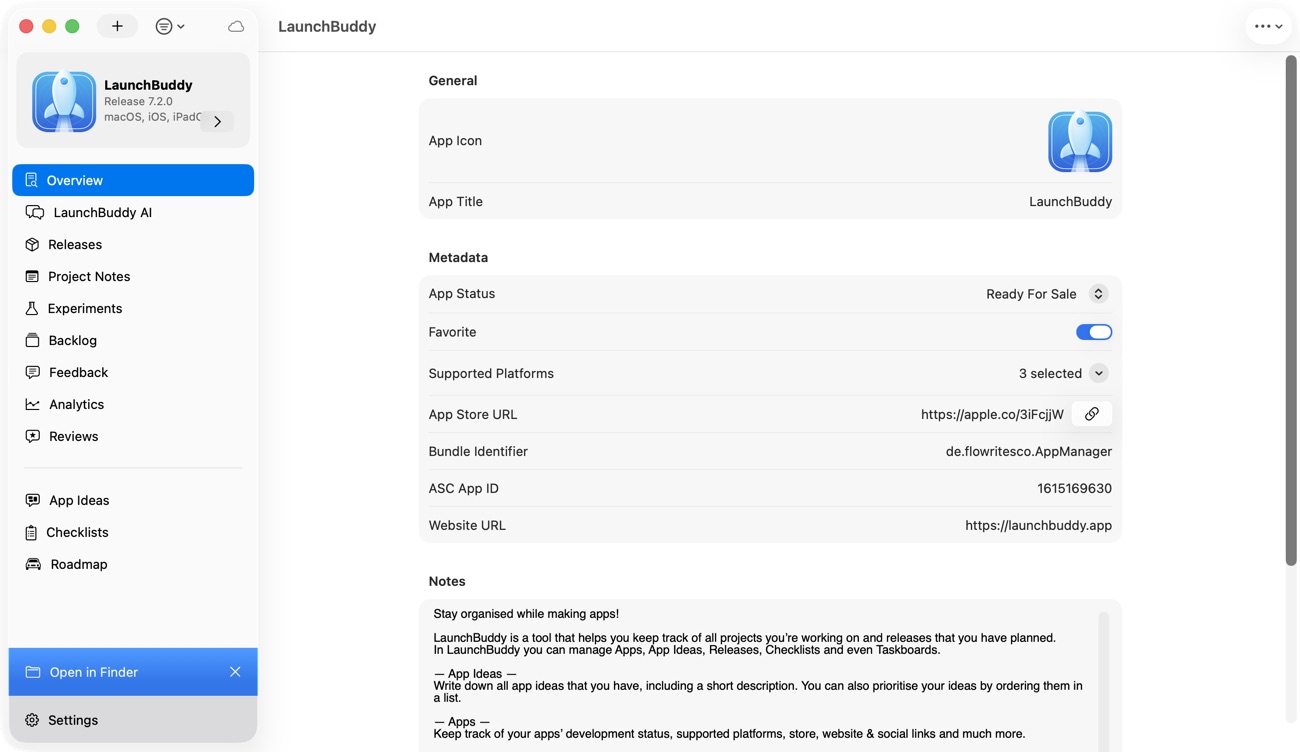
Comparing LaunchBuddy vs App Store Connect is not about choosing one and deleting the other. App Store Connect is Apple’s required infrastructure for managing and distributing apps. LaunchBuddy is a companion that connects release planning, tasks, checklists, selected App Store Connect data, and follow-up work around each app.
Apple’s App Store Connect workflow covers the official lifecycle: create an app record, upload builds, use TestFlight, submit to App Review, release, monitor performance, and respond to reviews. LaunchBuddy organizes the ideas, unfinished work, feedback, and experiments surrounding that lifecycle.
The verdict
You need App Store Connect to distribute through Apple’s App Store. You may benefit from LaunchBuddy when the work around App Store Connect is scattered across Notes, reminders, spreadsheets, and memory.
Use App Store Connect as the system of record for builds, TestFlight, metadata, submission, review status, pricing, availability, agreements, and financial reporting. Use LaunchBuddy as an app-centric planning and workflow layer: shape an idea, organize tasks by release, reuse submission checklists, work with reviews and selected analytics, draft release notes with context, and turn post-launch evidence into the next task.
LaunchBuddy does not replace App Store Connect, Xcode, TestFlight, or required Apple tooling. It does not claim to build, sign, or upload app binaries. Apple’s build upload documentation identifies Xcode, Swift Playgrounds, Transporter, and supported API workflows for that job.
LaunchBuddy vs App Store Connect at a glance
| Area | App Store Connect | LaunchBuddy |
|---|---|---|
| Primary role | Apple’s official app management and distribution system | App-centric project and release workspace for indie developers |
| App records and builds | Creates the official app record; receives and manages uploaded builds | Keeps planning context around the app and its releases |
| TestFlight and App Review | Configures beta testing, selects builds, submits to review, and records status | Tracks the tasks and checklist work that make a release ready |
| Release planning | Stores version and submission fields, but is not a task planner | Groups features, fixes, notes, and checklist items by release |
| Reviews | Official review inbox and public response channel | Pro reviews inbox, AI-assisted drafts, and review-to-task workflow |
| Analytics | Full Apple dashboards, definitions, segmentation, sales, and financial reports | Pro dashboard for downloads, revenue, and subscription metrics near release context |
| Release notes | Official App Store version metadata | Drafts from app/release context and can upload approved release notes with Pro |
| ASO | Official metadata, product pages, and supported optimization features | Tracks icon, screenshot, and copy experiments with baselines and results |
| AI | Not the core project-planning layer | App Chat and Idea Chat grounded in LaunchBuddy task, release, and available review context |
| Devices and sync | Web plus Apple’s App Store Connect app for iPhone and iPad | Native iPhone, iPad, and Mac workflow with private iCloud sync |
| Automation | App Store Connect API for supported Apple resources | Shortcuts plus a macOS, localhost-only MCP server for reads and approval-gated write proposals |
| Required? | Yes, for public App Store distribution | No; it is an optional workflow companion |
App Store Connect has authority over the App Store record. LaunchBuddy keeps the context explaining what you are shipping and what should happen next.
What only App Store Connect can be the source of truth for
Third-party tools can perform some supported actions through Apple’s APIs, but the underlying records and permissions still belong to App Store Connect. Keep Apple’s portal as the authoritative place for:
- Creating the official app record and managing App Store product information
- Receiving uploaded builds and associating a build with an app version
- Configuring internal and external TestFlight testing
- Setting pricing, tax category, storefront availability, pre-orders, and release method
- Managing in-app purchases, subscriptions, and related submissions
- Supplying required metadata, privacy information, age ratings, export-compliance details, and App Review information
- Adding a version to a submission and sending it to App Review
- Reading App Review communications and confirming the official submission status
- Accepting legal agreements and maintaining tax and banking details
- Managing users, roles, app access, and API keys
- Reconciling payments and finalized financial reports
Apple’s publishing overview makes the sequence explicit: choose a build, set pricing and availability, submit, resolve review issues, and release. Its submission documentation distinguishes adding an item for review from submitting the draft to App Review.
LaunchBuddy should complement, not mirror, every App Store Connect field. Its useful layer is the work Apple does not need to store: why a feature belongs in version 2.4, which screenshot needs updating, whether a review became a task, or what an ASO change is testing.
What LaunchBuddy improves around App Store Connect
Ideas become app-specific work
LaunchBuddy’s Idea Chat can explore a feature or product direction and turn useful outcomes into backlog items within an app-centric project.
AI output still needs judgment: a well-written idea is not validated or automatically worth scheduling. The value is preserving the path from idea to backlog to release.
Tasks are scoped to a release
LaunchBuddy groups fixes, features, polish, and launch work by version. Completed tasks provide source material for release notes, while deferred work stays out of claims about the current build.
Submission checks are reusable
App Store Connect validates required fields, but it cannot know every check your app needs. LaunchBuddy provides default submission checklists, while Pro supports custom reusable checklists that add tasks to each release.
A checklist can include app-specific steps such as testing sync, checking a subscription upgrade, refreshing screenshots, validating support links, or preparing reviewer instructions.
Reviews connect to product work
App Store Connect remains the official review and response channel. LaunchBuddy Pro brings reviews into an inbox alongside the app, supports reply workflows, and can turn one-star feedback into a backlog task.
Replying and fixing are separate decisions. A review may need a response, an investigation task, both, or neither. Review-to-task keeps the evidence with the affected app instead of losing it in a cleared inbox.
Analytics lead to experiments and tasks
Apple provides the deeper reporting system. Its overview of reporting tools separates App Analytics, Sales and Trends, and Payments and Financial Reports because engagement estimates, sales trends, and finalized payouts answer different questions.
LaunchBuddy Pro shows selected downloads, revenue, and subscription metrics near the project. It does not replace Apple’s full dashboards, definitions, segmentation, or financial reconciliation. It helps connect a signal to a release, follow-up task, or ASO experiment for an icon, screenshot, or copy hypothesis.
AI starts with app and release context
LaunchBuddy’s App Chat uses task, release, and available cached review context to draft release notes, summarize work, brainstorm follow-up, or propose a review response.
Drafts are not facts. Verify claims against the selected build and review customer-facing replies before publishing.
How LaunchBuddy and App Store Connect fit together
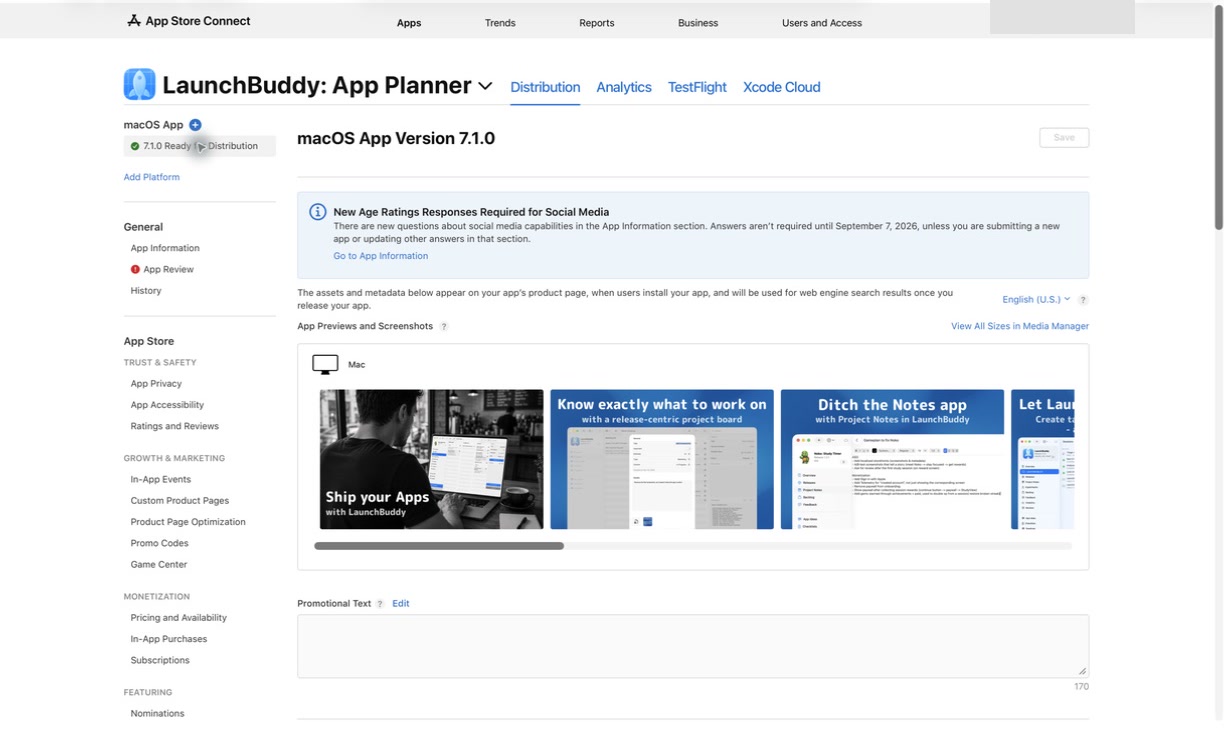
A practical indie workflow gives each tool one clear job.
1. Capture the idea
Record the user problem, expected outcome, constraints, and open questions in the LaunchBuddy app project. Use Idea Chat to explore alternatives, then convert only useful conclusions into backlog tasks.
2. Define the release
Create the next release and attach its features, fixes, ASO work, documentation, and launch tasks. Move nonessential work to the backlog, then apply a reusable checklist with standard submission checks and app-specific risks.
3. Build and test with Apple’s tools
Build, sign, archive, and upload through Xcode or another supported tool. In App Store Connect, confirm processing and configure TestFlight testing. Apple documents TestFlight, build selection, and App Review as part of the official workflow; LaunchBuddy does not replace those services.
During beta testing, put actionable findings into the release. Fix current blockers and assign non-blocking feedback later. Keep the checklist honest: “build uploaded” is not “selected build passed testing.”
4. Prepare the submission
Use completed release tasks to draft “What’s New” text. Edit it for customers, verify it against the chosen build, and use the Pro release-note workflow to upload approved copy when appropriate.
Check screenshots, metadata, privacy answers, age rating, export compliance, support links, pricing, availability, purchases, subscriptions, and reviewer access. The authoritative values remain in App Store Connect.
Then select the correct build in App Store Connect. Apple’s choose-a-build guide notes that one build is associated with an app version and can be changed until submission.
5. Submit and handle App Review
Submit and monitor official state in App Store Connect. If Apple asks a question or rejects the submission, respond there and create any investigation or fix tasks in LaunchBuddy. Apple’s status determines whether the version is waiting, in review, accepted, rejected, or available.
6. Release, learn, and plan again
After release, use Apple’s analytics for detailed investigation and LaunchBuddy for the operating loop:
- Review selected download, revenue, and subscription signals.
- Compare them with the release goal and known changes.
- Read recent customer reviews and draft verified responses.
- Turn actionable review evidence into a task.
- Record an ASO experiment with its baseline, hypothesis, and result.
- Assign the next work to a specific release or leave it in the backlog.
LaunchBuddy uses iCloud to keep projects, releases, and tasks current across iPhone, iPad, and Mac.
API keys, project data, and MCP boundaries
LaunchBuddy’s App Store Connect integration requires an App Store Connect API key for reviews, analytics, and release-note uploads. Core tasks, releases, AI chat, and checklists can be used without connecting Apple data.
Follow Apple’s current App Store Connect API key guidance. Team keys apply across all apps; individual keys follow their user’s access. Use least privilege, protect the private key, prefer a dedicated key, revoke unused credentials, and never commit a .p8 file to Git.
LaunchBuddy project data is stored in your private iCloud account rather than on LaunchBuddy-hosted project servers. Connected AI or automation clients have their own data handling and require separate evaluation.
LaunchBuddy also includes a macOS-only, localhost-only MCP server. Read tools can expose LaunchBuddy release context to compatible clients. Pro write tools create proposals that must be approved or rejected in LaunchBuddy before they apply; they do not directly mutate data. Optional bearer-token authentication is available. MCP does not provide a route around App Store Connect and does not build, sign, or submit an app.
Who benefits from adding LaunchBuddy?
LaunchBuddy is most useful for:
- Solo developers balancing coding, App Store work, support, and marketing
- Small studios managing multiple apps or overlapping release trains
- Developers who repeatedly forget app-specific submission checks
- Anyone whose release notes, feedback, and tasks live in separate tools
- Developers who want reviews and selected analytics closer to product work
- iPhone and Mac users who want one iCloud-synced release workspace
- AI and MCP users who want app/release context with approval boundaries
App Store Connect alone may be enough for an infrequently updated app with a reliable checklist. If the bottleneck is signing, binary upload, or CI/CD, use Xcode, Transporter, Fastlane, or CI.
Frequently asked questions
Does LaunchBuddy replace App Store Connect?
No. App Store Connect remains Apple’s required system for app records, TestFlight, App Review, distribution, agreements, pricing, availability, and official reporting. LaunchBuddy adds planning, context, and selected connected workflows around it.
Can LaunchBuddy submit an iOS build?
The confirmed LaunchBuddy feature set does not claim binary building, signing, or upload. Use Xcode or another Apple-supported upload workflow. LaunchBuddy helps prepare and track the release around that build.
Do I need an App Store Connect API key?
Only for LaunchBuddy’s App Store Connect integration, including reviews, analytics, and release-note uploads. Tasks, releases, checklists, and AI chat work without the Apple connection.
Is LaunchBuddy better than App Store Connect for analytics?
App Store Connect provides full analytics, definitions, segmentation, sales trends, and financial reports. LaunchBuddy puts selected metrics beside releases, tasks, reviews, and ASO experiments for follow-up.
Can LaunchBuddy reply to App Store reviews?
LaunchBuddy Pro includes a reviews inbox and reply workflow through its App Store Connect integration. App Store Connect remains the official channel and source of review state. Review AI drafts before sending them.
What is the simplest setup for an indie developer?
Use Xcode to build and upload, App Store Connect for TestFlight and distribution, and LaunchBuddy for projects, release tasks, reusable checklists, reviews, analytics follow-up, and contextual AI.
Keep Apple as the source of truth—and give the release a home
App Store Connect is indispensable infrastructure. LaunchBuddy is the workflow layer that helps an indie developer arrive there prepared and leave with useful next steps.
If your app records are correct but the ideas, tasks, checklists, reviews, release notes, and experiments around them are scattered, download LaunchBuddy on the App Store and try it on your next release.
