iOS App Release Management for Indie Developers

To manage iOS app releases, decide the scope of each version before you finish it, attach every task, build, and checklist to that version, verify the TestFlight build and App Store Connect metadata against it, write the What’s New text from the work that actually shipped, and track App Review status and follow-up tasks until the update is live. This guide walks through that workflow and ends with a template you can copy.
You may have a finished build in Xcode, a few TestFlight notes, App Store Connect metadata to review, screenshots to verify, and release notes still unwritten. None of those tasks are especially complicated on their own. The hard part is keeping them connected to the same version.
LaunchBuddy is organized the same way: each app has versions, and each version holds its tasks, checklist, release date, and changelog.
What iOS app release management means
iOS app release management is the process of planning, preparing, submitting, and tracking each app version from the first release task to the moment it is available to users.
It includes:
- Defining what belongs in the next version
- Grouping development tasks around that version
- Uploading and verifying TestFlight builds
- Reviewing App Store Connect metadata
- Preparing screenshots, privacy details, and review notes
- Writing accurate “What’s New” copy
- Choosing manual, automatic, scheduled, or phased release
- Tracking App Review status and follow-up work
That is more than a checklist. A checklist tells you what to remember. A release management workflow tells you where every decision belongs.
Why indie iOS developers need a release system
Large teams often have release managers, QA owners, marketing calendars, and internal dashboards. Indie developers usually have Xcode, App Store Connect, Notes, a few reminders, and memory.
That can work for a first launch. It becomes fragile as soon as you have multiple apps, recurring updates, subscriptions, App Store Optimization work, or a release that depends on backend changes.
Without a release system, common problems appear:
- A finished task is not included in the release notes
- A TestFlight build is uploaded but not selected for the App Store version
- Screenshots show UI from an older build
- Metadata no longer matches the app’s positioning
- Privacy details are treated as one-time setup even after features change
- A bug fix ships, but the follow-up task is forgotten
- Review notes are rewritten from scratch every submission
The goal of iOS app release management is not to add process for its own sake. The goal is to make the important parts of shipping visible before they become delays.
Start every release with a clear version boundary
The most useful release management habit is deciding what the next version is before you finish it.
Create a release for the version and attach the work that belongs to it:
- User-facing features
- Bug fixes
- App Store metadata changes
- Screenshot updates
- TestFlight testing tasks
- App Review notes
- Marketing or launch tasks
- Known follow-ups that should not block submission
This gives the version a boundary. If a task is inside the release, it needs to be finished, moved, or intentionally cut. If it is outside the release, it should not quietly become part of the submission at the last minute.
In LaunchBuddy, releases can act as the home for that context. Instead of tracking project work in one place and App Store work somewhere else, the version becomes the organizing unit.
Keep App Store Connect close to the release plan
App Store Connect is the source of truth for Apple submission state, but it is not the best place to manage every task leading up to submission. It tells you which build is selected, which metadata fields exist, and where the version sits in review. It does not know why a task was cut, which screenshot still needs a copy update, or what you promised yourself before submitting.
That is why an App Store Connect integration matters for release management. The more your release plan can stay aware of App Store Connect status, the less time you spend jumping between tools just to answer basic questions:
- Is there a build uploaded for this version?
- Has the build finished processing?
- Which App Store version are we preparing?
- What metadata still needs review?
- Are release notes ready for the selected build?
- Is the version waiting on App Review, developer release, or follow-up work?
For a deeper field-by-field pass, use an App Store Connect release checklist before submission. The release management layer is what makes that checklist reusable across versions.
Use AI where it reduces release friction
AI is useful in iOS app release management when it works from real release context. It should not invent your launch plan, decide what is safe to submit, or replace final developer review.
It can help with the repetitive writing and summarizing work around a release:
- Drafting App Store release notes from completed tasks
- Turning internal task names into user-facing benefits
- Summarizing TestFlight feedback themes
- Suggesting review note wording for gated or non-obvious features
- Rewriting metadata drafts for clarity
- Creating first-pass launch copy from the release scope
The safest AI workflow is simple:
- Collect the release context.
- Ask AI for a draft.
- Compare every claim against the selected build.
- Remove anything vague, unsupported, or too technical.
- Save the final copy with the release.
If release notes are your biggest bottleneck, read the practical guide to AI release notes for iOS apps. The key idea is the same: AI performs best when it is grounded in the work you actually shipped.
A practical iOS app release management workflow
Here is a repeatable workflow for indie iOS developers shipping through TestFlight and App Store Connect.
1. Plan the version
Start by naming the goal of the release. Is it a bug fix, a feature launch, an onboarding improvement, a subscription update, or a compatibility release for a new iOS version?
Then group tasks under that release. Keep the scope honest. A smaller release that ships cleanly is usually better than an open-ended version that keeps absorbing unrelated work.
2. Prepare the build
Before touching App Store metadata, make sure the build itself is ready:
- Version and build numbers are correct
- Archive settings are correct
- Required entitlements and capabilities are configured
- Known blocking bugs are resolved or intentionally deferred
- The build has been uploaded to App Store Connect
- TestFlight processing has completed
The build is the anchor. If the build changes after metadata is written, review the release notes and screenshots again.
3. Test the release, not just the app
Testing a release is different from testing individual features. You are checking that the version is ready to be understood, reviewed, and used.
Include checks for:
- Onboarding and first-run experience
- Upgrade paths from the previous version
- Subscription, login, sync, notification, or purchase flows
- Any feature mentioned in release notes
- Known device sizes and OS versions
- App Review paths that Apple may need to test
If TestFlight feedback changes the scope, update the release plan instead of keeping that context in your head.
4. Review App Store Connect metadata
Metadata review does not always mean rewriting your App Store page. It means confirming that each field still matches the selected build and current positioning.
Check:
- App name and subtitle
- Description
- Keywords
- Promotional text
- Screenshots and app previews
- Support, marketing, and privacy URLs
- App Privacy answers
- Age rating
- Pricing, availability, and in-app purchases
Treat metadata as part of the release, not a separate marketing chore. If the update changes what users can do, your App Store page may need to change too.
5. Draft release notes from completed work
Good release notes come from completed release context, not memory. Start with the finished tasks and translate them into user-facing language.
For example:
| Release task | User-facing note |
|---|---|
| Added App Store Connect status sync | Release progress is easier to track without leaving LaunchBuddy. |
| Fixed project task ordering bug | Tasks now stay in the right order when reviewing a release. |
| Improved AI release note prompt | Drafts are clearer and closer to App Store-ready copy. |
AI can help produce the first version, but final release notes should be edited for accuracy. Users do not need every internal detail. They need to know what changed and why it matters.
6. Submit with review context ready
Before clicking Submit for Review, prepare the context Apple may need:
- Demo account credentials if login is required
- Steps for paid, private, or gated features
- Notes about hardware, external services, or background behavior
- Any important explanation of what changed in this version
- Contact details that someone actually monitors
Save this information with the release. If Apple asks a question or rejects the build, your follow-up starts from a documented version history instead of memory.
7. Track post-submission status and follow-up work
Release management does not end at submission. After the app is waiting for review, approved, pending developer release, or live, there may still be tasks to track:
- Monitor App Review status
- Decide when to manually release
- Verify the live App Store page
- Watch early reviews, crashes, or support messages
- Create follow-up tasks for issues discovered after launch
- Save final release notes and decisions for future reference
This is where a release history becomes useful. Every version teaches you something about your app, your users, and your shipping process.
An iOS app release management template
Use this simple template for each version:
Release:
Version:
Goal:
Target build:

Scope:
- Features:
- Fixes:
- Deferred work:

TestFlight:
- Build uploaded:
- Build processed:
- Internal testing:
- External testing:
- Feedback reviewed:

App Store Connect:
- Build selected:
- Metadata reviewed:
- Screenshots verified:
- Privacy and age rating checked:
- Pricing and IAPs checked:
- App Review notes ready:

AI-assisted tasks:
- Release notes drafted:
- Release notes verified:
- Metadata copy reviewed:

Submission:
- Release option:
- Submitted for review:
- Approved:
- Released:

Follow-up:
- Live page verified:
- Reviews/support monitored:
- Post-release tasks created:
The exact fields can change by app, but the structure should stay consistent: scope, build, testing, metadata, submission, follow-up.
Frequently asked questions
When should a task move to the next version?
Move it when the version goal doesn’t depend on it and it can’t be finished and tested before the build you plan to submit. Moving it on purpose keeps the release notes honest and stops a nice-to-have from delaying a fix users are waiting for.
What should I do after an iOS update is approved?
If you chose a manual release, decide whether to publish now or hold for an announcement. Once it’s live, check the product page, watch crashes and reviews for the first few days, and move deferred or follow-up tasks into the next version before you close this one.
How LaunchBuddy helps manage iOS releases
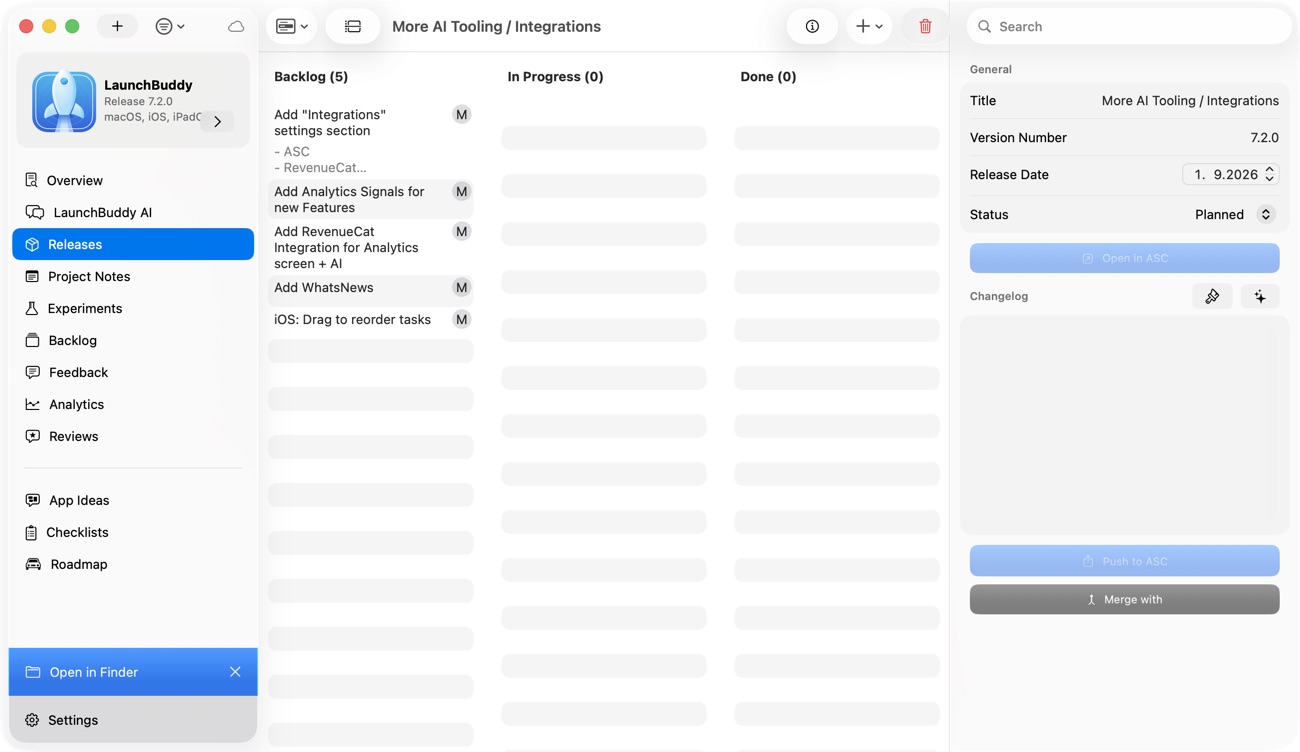
LaunchBuddy brings project management closer to the actual way indie iOS developers ship. A release is not just a date on a calendar. It is a bundle of tasks, checklists, App Store Connect state, notes, and decisions.
With LaunchBuddy, you can:
- Organize Xcode and app tasks by project
- Group work into release versions
- Reuse checklists for App Store submissions
- Track what still needs to happen before review
- Keep release context available across iPhone and Mac
- Use AI features to draft clearer release notes and app store copy
- Connect App Store Connect work to the release instead of managing it separately
That combination matters because shipping is not only a technical step. It is a coordination problem. The better your release context, the easier it is to submit with confidence.
Build a calmer release process
iOS app release management is not about making indie development feel corporate. It is about reducing the number of things you have to remember while you are trying to ship.
Start with the version. Keep the tasks, build, metadata, release notes, review context, and follow-up work connected. Use App Store Connect for submission state, AI for first drafts and summaries, and LaunchBuddy as the place where the release stays organized.
When your next update is ready, you should not have to ask, “What is left?” You should be able to open the release and see the answer.