App Store Release Notes Generator for iOS Apps: A Better AI Workflow
An App Store release notes generator sounds simple: paste a changelog, get polished “What’s New” text, submit the update, and move on.
For indie iOS developers, the real workflow is usually less tidy. The source material for release notes may be spread across Xcode tasks, git commits, TestFlight feedback, App Store Connect status, bug reports, screenshots, and memory. AI can help, but only if the release context is specific enough to keep the draft accurate.
LaunchBuddy is built for that context. It helps iOS developers manage projects, tasks, releases, and checklists, and with App Store Connect integration and AI features, it can give an App Store release notes generator the one thing it needs most: a clear picture of what actually shipped.
Why generic release notes generators fall short
A generic generator can rewrite text, but it usually does not know:
- Which build is selected for the App Store version
- Which tasks were completed in this release
- Which TestFlight feedback changed the final scope
- Which features slipped to the next version
- Which fixes are user-visible
- Which internal refactors should not be mentioned
- Whether App Store metadata or screenshots changed too
- What tone your app normally uses
That context matters. If the generator only sees a git log, it may mention internal implementation details. If it only sees a short prompt, it may invent benefits. If it only sees a changelog, it may miss the TestFlight feedback that shaped the final build.
The best App Store release notes generator is not just a text box. It is a workflow that starts with the release.
Start from release context, not a blank prompt
Before generating release notes, collect the facts that describe the version:
- App name
- Version number
- Selected App Store Connect build
- Main goal of the release
- User-facing features
- User-visible bug fixes
- Performance or reliability improvements
- TestFlight feedback themes
- Important exclusions
- App Review or launch context
This is where a release manager is more useful than a generic note-taking app. In LaunchBuddy, the release can be the container for tasks, checklists, notes, and App Store Connect status. AI can then draft from structured release context instead of loose memory.
That does not mean AI should decide what shipped. It means AI gets better source material, and you get a stronger first draft.
Turn developer work into user-facing benefits
App Store release notes should explain what changed for the user, not what changed in the codebase.
For example:
| Developer context | Better App Store release note |
|---|---|
| Refactored onboarding state machine | Onboarding now resumes more reliably if you leave the app midway through setup. |
| Fixed ASC status refresh bug | Release status now updates more consistently when App Store Connect changes. |
| Added task-to-release grouping | It is easier to see which tasks belong to each upcoming version. |
| Improved TestFlight feedback parsing | Beta feedback is easier to review before you submit the final build. |
| Rebuilt dashboard loading query | Larger projects open faster and feel more responsive. |
AI is useful for this translation step because it can propose user-facing language quickly. The review step is still yours. If the release note says something is faster, clearer, easier, or more reliable, the selected build should support that claim.
A practical prompt for an App Store release notes generator
Use this prompt when you want AI to generate App Store release notes from a release plan:
You are writing App Store release notes for an iOS app.

Audience: existing users and potential new users reading the App Store page.
Tone: clear, friendly, specific, not hype-heavy.
Format: plain text, short paragraphs or simple bullets, no Markdown links.

Release context:
- App name:
- Version:
- Selected build:
- Main goal of this release:
- Completed user-facing features:
- Fixed user-visible bugs:
- Performance or reliability improvements:
- TestFlight feedback that affected the release:
- Changes that should not be mentioned:

Create three options:
1. A short version under 300 characters.
2. A standard version under 700 characters.
3. A detailed version under 1,200 characters.

Rules:
- Only mention changes included in the selected build.
- Translate technical work into user benefits.
- Do not invent features.
- Do not mention internal refactors unless they create a clear user benefit.
- Avoid "bug fixes and performance improvements" unless you make the fixes specific.
The prompt is intentionally strict. An App Store release notes generator should help you write faster, but it should not widen the release beyond what actually shipped.
What to generate for different release types
Different iOS releases need different release-note styles. A good generator should adapt to the shape of the update.
Feature releases
Lead with the new capability and explain why it matters.
This update adds reusable release checklists, so every App Store submission can start from a workflow you already trust.

We also improved project search and fixed a few layout issues on smaller iPhones.
Bug fix releases
Be specific when the fix is user-visible.
This update fixes an issue where release tasks could appear out of order after syncing between devices.

We also improved reliability when opening larger projects.
TestFlight-driven releases
Mention improvements that came from beta feedback without exposing internal tester details.
Thanks to beta feedback, this update makes the new dashboard easier to scan and improves layout behavior on smaller screens.Maintenance releases
If the work is mostly behind the scenes, connect it to stability, compatibility, speed, or preparation for future updates.
This update improves sync reliability and prepares the app for upcoming App Store Connect workflow improvements.The key is to choose a structure that matches the release. A generator should not force every update into the same marketing tone.
Keep App Store Connect constraints in the workflow
The App Store “What’s New” field allows much more text than most users will read. That makes the first lines important.
Before using generated release notes, check:
- Does the opening sentence name the most important user-visible change?
- Are all claims true for the selected build?
- Did you remove internal implementation details?
- Is the text readable as plain text?
- Does it avoid unsupported claims?
- Does the tone match your app?
- Is it useful in the short preview users may see first?
- Did you save the final version with the release?
App Store Connect status matters here. If the selected build changes after AI drafts release notes, the notes need another pass. A release notes generator should be part of the App Store Connect release workflow, not a one-time step before submission.
Use AI with TestFlight feedback carefully
TestFlight feedback can improve release notes because testers often reveal what users will notice first. But feedback should be summarized carefully.
AI can help you:
- Group feedback themes
- Identify user-visible fixes
- Convert rough beta comments into clearer tasks
- Draft release notes from resolved feedback
- Suggest follow-up work for the next version
AI should not treat every tester comment as confirmed truth. A comment like “sync seems slower” may need investigation before it becomes a release note. A screenshot of a layout issue can become a task, but the release note should only mention the improvement after the fix is actually in the selected build.
LaunchBuddy’s value is in keeping that feedback close to the release. The generator can draft from completed work, while unresolved feedback stays visible as follow-up.
Release notes from git commits are useful, but incomplete
Many App Store release notes generators start from git history. That can be helpful, especially if your commits are clean and user-focused.
But git commits often include:
- Refactors
- Dependency updates
- CI changes
- Internal bug names
- Experimental work
- Technical details users do not need
- Changes that were merged but not included in the selected build
If you generate release notes from commits, add a release-management layer before publishing:
- Collect commits since the last released version.
- Remove internal-only changes.
- Match the remaining changes to completed release tasks.
- Check the selected App Store Connect build.
- Add TestFlight feedback that changed the final version.
- Generate release notes from the cleaned context.
- Review every claim before pasting into App Store Connect.
This gives AI a safer input than raw git history alone.
A repeatable AI release notes workflow
For indie developers, a practical workflow can look like this:
1. Create the release
   - Version number
   - Release goal
   - Target build

2. Attach the work
   - Features
   - Bug fixes
   - TestFlight feedback
   - Metadata tasks
   - App Review notes

3. Check App Store Connect
   - Build processed
   - Selected build confirmed
   - Version status reviewed

4. Generate release notes with AI
   - Short option
   - Standard option
   - Detailed option

5. Review the draft
   - Accuracy
   - Tone
   - Plain-text formatting
   - User-visible benefits

6. Submit and save
   - Paste final copy into App Store Connect
   - Save the final notes with the release
   - Create follow-up tasks after launch
The workflow is lightweight, but it prevents the common failure modes: notes for the wrong build, invented features, vague copy, and forgotten beta feedback.
How LaunchBuddy helps generate better App Store release notes
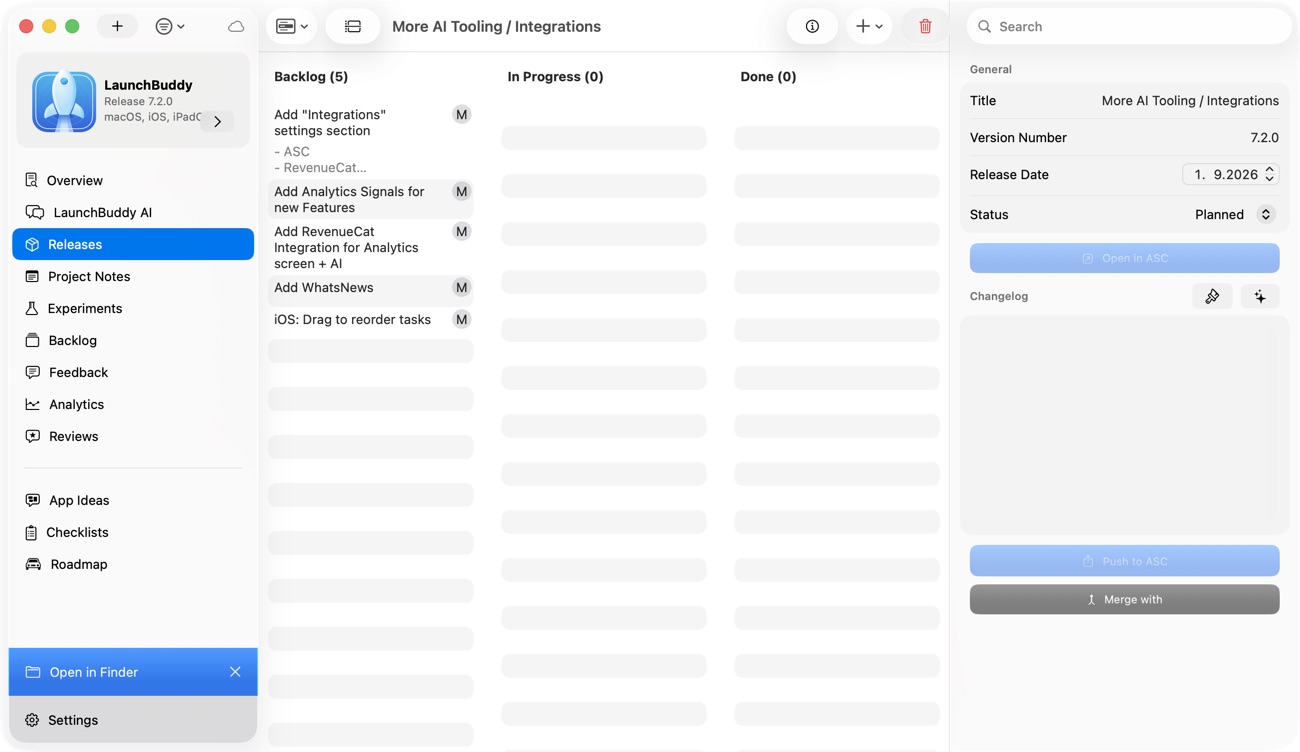
LaunchBuddy is not trying to replace App Store Connect, TestFlight, Xcode, or your CI system. Those tools remain essential.
LaunchBuddy helps with the release-management layer around them:
- Organize Xcode tasks by project and release
- Keep App Store Connect work visible beside the release plan
- Reuse App Store submission checklists
- Track TestFlight feedback as blocking work or future follow-up
- Use AI to draft release notes from completed release context
- Save final launch decisions for future reference
- Keep the workflow available across iPhone and Mac
That is why “App Store release notes generator” is a strong keyword for LaunchBuddy. The best release notes are not generated from a generic prompt. They are generated from a release that is already organized.
Ship clearer updates with less blank-page friction
An App Store release notes generator should do more than make sentences sound polished. It should help you explain the version accurately, clearly, and quickly.
Start with the release. Confirm the selected build. Review TestFlight feedback. Use AI to draft options. Then edit the final copy with the judgment only you have as the developer.
When the release context is organized, AI becomes much more useful. It can turn completed work into App Store-ready language without disconnecting the notes from the build users will actually receive.
That is the workflow LaunchBuddy is designed to support: clearer updates, less context switching, and a calmer path from finished tasks to App Store Connect.