How to Ship Your Side Project Without Losing Track
Side projects die in the gap between “almost done” and “on the App Store.” Not because the idea was bad — because tasks, releases, and launch checklists scatter across Notes, Xcode, and your memory.
LaunchBuddy exists to close that gap. Here is a simple workflow that helps indie developers actually ship.
1. One home for every project
Create a project in LaunchBuddy for each app you are building. Keep tasks, releases, and notes together instead of hunting through scattered tools.
2. Organize work into releases
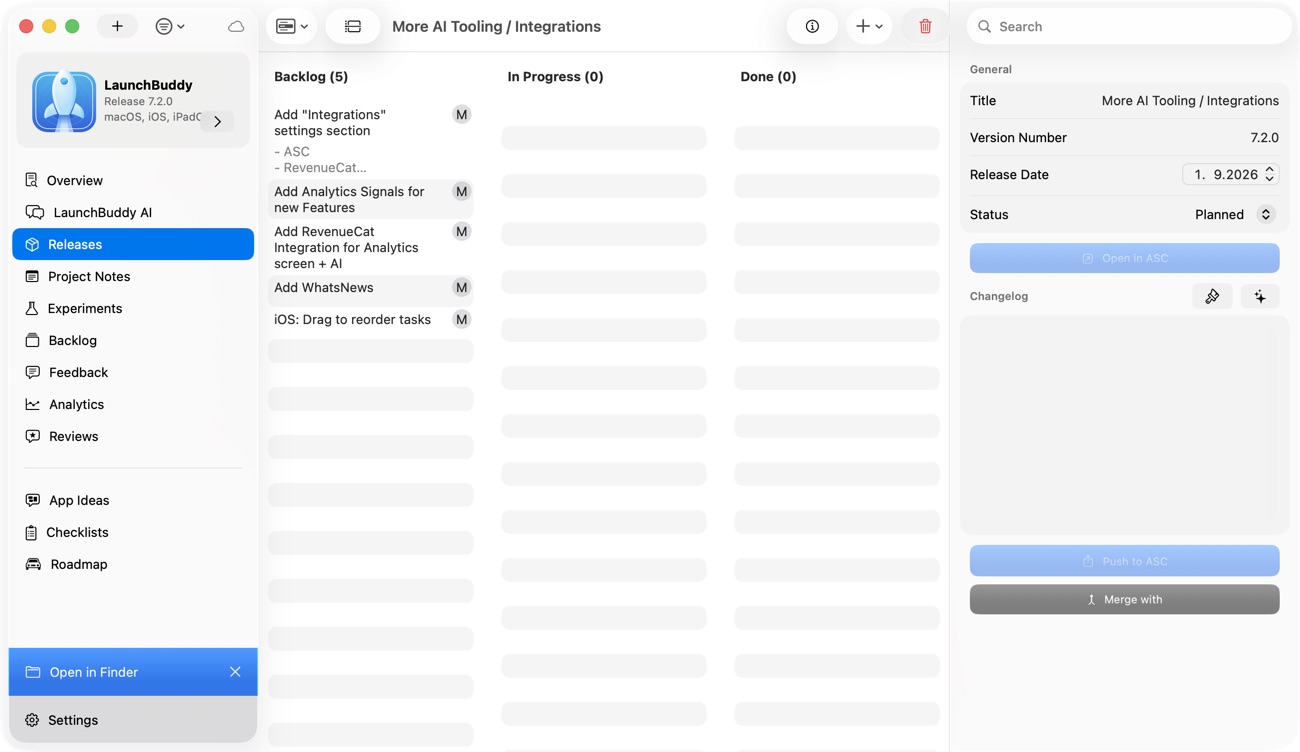
Group tasks into releases so you always know what “done” means for the next version. A release is your shipping boundary — everything inside it should be shippable.
3. Reuse checklists for every launch
App Store submissions repeat the same steps: screenshots, metadata, TestFlight, review notes. Save those as checklists in LaunchBuddy and attach them to releases so nothing gets forgotten.
4. Sync between Mac and iPhone
Capture tasks on the go and review progress at your desk. iCloud sync keeps your projects current across macOS and iOS.
Start shipping
If you have an Xcode project on the back burner, open LaunchBuddy and define your next release today. The hardest part of shipping is knowing exactly what is left — LaunchBuddy makes that visible.