LaunchBuddy vs AppConsul: Which iOS Release Tool Fits?
Choose LaunchBuddy when your main problem is deciding and tracking what belongs in an iOS release. Choose AppConsul when the release is already defined and you want a native Mac workspace for supported App Store Connect operations such as localized metadata, screenshots, versions, build selection, and submission.
They solve adjacent layers rather than replacing each other. LaunchBuddy is an app and release planner with selected App Store Connect features. AppConsul describes itself as a native macOS client for the App Store Connect API. Apple still owns the official app, build, review, and distribution records.
This comparison was checked against both products’ first-party information on October 23, 2026. AppConsul’s site lists a Pro price, but its linked GitHub source and releases pages returned 404 during this review. Verify that an installer and purchase path are available before making it part of a live release.
LaunchBuddy vs AppConsul at a glance
| Decision area | LaunchBuddy | AppConsul |
|---|---|---|
| Best fit | Planning app work, controlling release scope, and repeating an app-specific shipping process | Editing and submitting supported App Store Connect records from a Mac |
| Starting point | An idea, app backlog, or planned version | An app already available to the connected App Store Connect team |
| Release workflow | Version-scoped tasks, status, changelog, notes, and default or custom reusable checklists | Version creation, localized release notes, build selection, pre-flight checks, submission, and release controls |
| Metadata | Plans metadata work; Pro can upload approved release notes | Edits localized name, subtitle, description, keywords, promotional text, URLs, and What’s New |
| Screenshots | Tracks screenshot work as tasks or ASO experiments; no verified screenshot upload | Imports, captures from Simulator, reorders, replaces, and uploads screenshot sets |
| App Store data | Pro reviews, replies, review-to-task, and selected download, revenue, and subscription metrics | Public feature table lists an analytics dashboard; detailed public metric coverage is not specified |
| Automation | Shortcuts and Siri on supported devices; local MCP server on Mac with approval-gated Pro writes | Pro feature table lists release automation, but the public page does not define its triggers or authority |
| Devices | iPhone, iPad, and Mac | Native macOS app |
| Current free boundary | Two apps, two releases, limited project notes, default checklists, iCloud sync, and read actions | One app with the documented core metadata, screenshot, version, analytics, and publish workflow |
| Paid boundary | $2.99/month or $19.99/year; one subscription covers iPhone, iPad, and Mac | Site lists $12.99/month or $99/year for Pro; linked source and release pages were unavailable during this review |
The quick test is simple: if a release fails because its scope and checks are scattered, start with LaunchBuddy. If the plan is clear but App Store Connect editing creates repeated browser work, start with AppConsul.
The central difference is plan versus Apple record
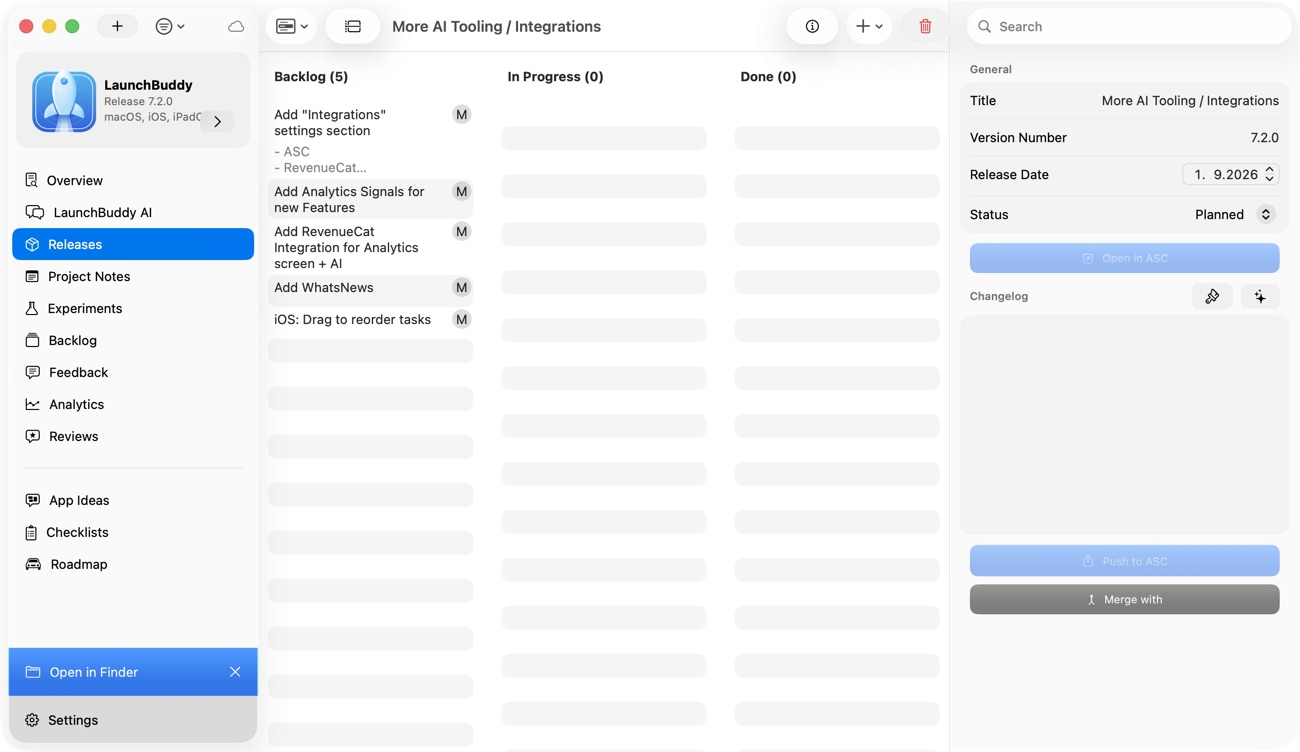
LaunchBuddy starts with product intent. You can keep backlog work with an app, assign accepted work to a version, track release status, and run a reusable submission checklist. A completed task says your team handled a step; it doesn’t prove that Apple’s corresponding record is complete.
AppConsul starts with App Store Connect data. Its official site says it connects through an App Store Connect API key, syncs apps the key can access, and lets you edit supported Apple records from a native Mac interface. Its pre-flight checks can flag missing localized metadata, screenshots, an attached build, age rating, or a resolving privacy URL before submission.
Those checks answer different questions:
- LaunchBuddy: Did we complete our release process, including checks unique to this app?
- AppConsul: Are the supported App Store Connect fields for this version ready?
- App Store Connect: What is the official state Apple currently holds?
A reliable workflow keeps all three answers distinct. For a broader boundary map, read LaunchBuddy vs App Store Connect.
AppConsul is stronger for direct metadata and screenshot work
AppConsul’s official feature page documents direct editing for app name, subtitle, description, keywords, promotional text, marketing and support URLs, and What’s New across Apple locales. It also documents live character counts, offline drafts, and syncing changes when the Mac reconnects.
Its screenshot workflow can import existing sets, reorder them, replace individual images, and upload only changes. The site also says it can capture from a running Simulator. Pro adds a store-asset generator, AI-assisted captions and translation, custom product pages, in-app purchase management, territories and pricing, and release automation.
LaunchBuddy doesn’t claim direct editing for general localized metadata, screenshot generation or upload, custom product pages, in-app purchases, or territory pricing. It can keep those jobs visible inside a release, track an icon, screenshot, or copy experiment, and upload approved release notes with Pro plus App Store Connect credentials. Use the App Store metadata management guide when the bigger problem is deciding what must be reviewed rather than operating each field.
That makes AppConsul the clearer choice when one update requires changes across several locales or screenshot device classes. LaunchBuddy is the clearer choice when the problem is preserving why those changes belong in version 3.2 and what evidence should follow them.
LaunchBuddy is stronger for scope and repeatable release discipline
LaunchBuddy groups features, fixes, notes, and launch work by app version. Default App Store submission checklists are included on Free; Pro adds custom reusable checklists. Project data syncs through the user’s private iCloud account across iPhone, iPad, and Mac.
This matters because Apple’s required fields are only part of a release. A useful app-specific checklist might also include:
- migrate one local database from the previous public version;
- test sign-in recovery on a physical device;
- verify a subscription upgrade and restore path;
- update an in-app help screen;
- prepare support for a known behavior change; and
- compare post-release evidence with the original goal.
AppConsul offers Guided Flows and App Store pre-flight validation. Its public pages don’t describe a general product backlog, version-scoped development taskboard, or custom app-specific release checklist. A missing-field check isn’t proof that the build, support plan, and product scope are ready.
The practical advantage is traceability. LaunchBuddy can retain the path from backlog decision to shipped task to release note and later follow-up. AppConsul can reduce the work of applying supported changes to Apple’s records.
Builds, TestFlight, and submission need precise boundaries
Neither tool replaces the build pipeline. AppConsul’s site explicitly says the build still comes from Xcode or CI; AppConsul syncs available builds and lets you attach one to a version. LaunchBuddy doesn’t build, sign, notarize, or upload app binaries either. Apple documents the supported binary paths in its build upload guide.
AppConsul’s dedicated TestFlight page claims internal and external group management, email or CSV tester imports, invitations, public links, build-expiry warnings, localized What to Test notes, feedback and crash views, and Beta App Review submission. Those are broader operational capabilities than LaunchBuddy’s verified scope. Because the linked AppConsul download was unavailable during this review, treat them as vendor-documented features rather than hands-on verification and test every required operation before moving a real beta.
LaunchBuddy’s verified feature set doesn’t include TestFlight administration or direct beta-feedback import. Track beta work as release tasks and checklist items, then use App Store Connect or another documented client for the actual TestFlight operation. The TestFlight release management guide shows how to keep the beta decision and Apple state from drifting apart.
For submission, AppConsul documents version pre-flight checks and submitting a supported version for review. LaunchBuddy can prepare and track the work but doesn’t submit an app to App Review. In both cases, confirm the chosen build, submission contents, and official status in App Store Connect before treating the release as sent.
Reviews, analytics, and automation are not feature-name matches
LaunchBuddy Pro and App Store Connect API credentials enable its customer-review inbox, replies, review-to-task flow, and a focused analytics dashboard for downloads, revenue, and subscription metrics. Supported AI changes pause for approval. The Mac-only local MCP server offers free reads; Pro write tools create proposals that a person must approve in LaunchBuddy before they apply.
AppConsul’s public comparison table lists an analytics dashboard on Free and Pro but doesn’t define the available metrics or segmentation. Its homepage also doesn’t document a public-review inbox, review-to-task flow, MCP server, Shortcuts actions, or an approval queue. Pro “release automation” is listed without enough public detail to compare triggers, actions, or confirmation behavior.
That absence isn’t proof the installed app lacks a capability. It means the capability isn’t verified well enough to drive a buying decision here. Ask a concrete question instead:
Can this tool perform this exact action?
What Apple role or credential does it require?
Does it read, draft, propose, or apply the change?
Where do I verify the result?
Feature names become useful only after those four answers are clear.
Privacy and credentials have different scopes
AppConsul says App Store Connect API credentials are stored in macOS Keychain and requests go directly from the Mac to Apple’s API without an intermediary server. Because AppConsul begins with Apple data, the API key’s team access and role define an important part of its authority.
LaunchBuddy stores tasks, releases, notes, and other project data in the user’s private iCloud account rather than on LaunchBuddy-hosted project servers. Its App Store Connect features require Pro and API credentials, while core planning, default checklists, and project work don’t require an Apple connection.
Use least privilege with either product. Apple’s API access documentation distinguishes team and individual keys and ties access to roles. Keep the .p8 file out of source control, revoke unused keys, and verify the effective app access before connecting a production account.
Compare the free and paid boundaries, not just the labels
LaunchBuddy Free supports two apps and two releases, limited project notes, default checklists, iCloud sync, widgets, and supported read actions. Pro is $2.99 per month or $19.99 per year and adds unlimited apps, releases, and notes; custom checklists; selected App Store Connect features; AI; ASO experiments; and supported approval-gated writes. AI usage limits apply.
AppConsul’s current public table says Free supports one app and includes its core metadata, screenshot, version, app-details, analytics, publish, Guided Flows, and command-palette features. Its site lists Pro at $12.99 per month or $99 per year, adding unlimited apps, store-asset generation, AI captions and translation, custom product pages, in-app purchase management, territories and pricing, release automation, and priority support.
Price isn’t the only availability check. On October 23, 2026, AppConsul’s official “Get AppConsul” and “Source” links pointed to GitHub release and repository URLs that returned 404. The site may be ahead of a public release or its links may simply be stale; either way, this comparison couldn’t verify a downloadable build or working checkout. Confirm both before choosing it. The LaunchBuddy Free vs Pro guide explains LaunchBuddy’s exact plan prerequisites.
Run the same update through both workflows
Use a small real release instead of comparing polished demos. Suppose version 3.2 contains one crash fix, one onboarding change, revised English and German copy, two new iPhone screenshots, and a review that may describe the crash.
First create an ownership card:
| Record | Owner |
|---|---|
| Scope, development tasks, and app-specific checks | LaunchBuddy or your existing planner |
| Binary build, signing, and upload | Xcode, CI, or another Apple-supported uploader |
| Localized metadata, screenshots, selected build, and submission | AppConsul or App Store Connect |
| Official build, review, and distribution state | App Store Connect |
| Accepted follow-up work | One chosen backlog |
Then test each product against its intended layer.
LaunchBuddy-first pass
- Create version 3.2 and assign only the crash fix and onboarding change.
- Apply the default checklist or a custom Pro checklist.
- Add explicit tasks for the two localizations, screenshots, physical-device test, build upload, and App Store verification.
- Draft What’s New from completed work; with Pro and API credentials, upload only approved release notes.
- Convert the customer review into a backlog task only if it adds actionable evidence.
- Ask an MCP client for incomplete work, then test one low-risk proposal if Pro writes matter to you.
AppConsul-first pass
- Import the app through an appropriately scoped App Store Connect API key.
- Create the version and attach the already uploaded build.
- Edit English and German metadata side by side.
- Replace the changed screenshots and upload the diff.
- Run the documented pre-flight checks and resolve each supported warning.
- Review the selected build and customer-facing copy, then submit the version and verify its state in App Store Connect.
Score the resulting workflow:
Release scope remained explicit:              /5
App-specific checks were difficult to skip:   /5
Localized editing avoided duplicate work:     /5
Screenshot changes were easy to verify:       /5
Tool authority matched the action's risk:     /5
The official Apple state stayed unambiguous:  /5
The score exposes handoff cost. AppConsul may save substantial editing time while leaving product planning untouched. LaunchBuddy may make scope and follow-up trustworthy while leaving direct App Store operations elsewhere.
Can LaunchBuddy and AppConsul work together?
Yes. Their cleanest combined workflow is:
LaunchBuddy
  -> scope, tasks, app-specific checklist, changelog draft

Xcode or CI
  -> build, sign, upload binary

AppConsul
  -> supported metadata, screenshots, build selection, pre-flight, submission

App Store Connect
  -> authoritative Apple record
Avoid copying every Apple status into LaunchBuddy. A checklist item can record that someone verified “build attached,” but App Store Connect should remain authoritative for which build is attached and whether Apple is reviewing it. Likewise, keep an AppConsul warning in its source until it becomes accepted product work; then create one LaunchBuddy task with the relevant evidence.
Choose the layer that is actually missing
Choose LaunchBuddy when you need a durable app backlog, version scope, app-specific release checks, cross-device planning, selected review and analytics follow-up, or approval-gated project automation. Choose AppConsul when the repeated pain is editing localized App Store records, managing screenshot sets, attaching builds, running supported pre-flight checks, and submitting from a Mac.
If release planning is the missing layer, download LaunchBuddy and test the next update on the free plan.