LaunchBuddy vs Blitz: Which Release Workflow Fits?
LaunchBuddy vs Blitz is a choice between release context and direct execution. Choose LaunchBuddy when you need app backlogs, version-scoped taskboards, reusable submission checklists, and MCP changes that always become approval proposals. Choose Blitz when you want an MCP-connected Mac app that lets an agent operate the simulator and perform supported App Store Connect, signing, build, screenshot, TestFlight, and submission work.
They can complement each other, but they aren’t interchangeable. LaunchBuddy’s MCP server reads and proposes changes to the LaunchBuddy plan; it doesn’t build, sign, upload, or submit an app. Blitz reaches further into Apple’s release toolchain, but its public materials don’t position it as a product backlog or version-scoped planning system.
This comparison was checked against LaunchBuddy’s product facts and website plus Blitz’s website, source repository, and current release on November 19, 2026. Blitz is evolving, so verify a deciding capability in the installed version before using it on a live release.
LaunchBuddy vs Blitz at a glance
| Decision area | LaunchBuddy | Blitz |
|---|---|---|
| Primary job | App and release planning with selected App Store Connect workflows | Agent-driven Apple-platform development and App Store Connect execution |
| Planning model | Apps, backlogs, version-scoped taskboards, release status, due dates, and reusable submission checklists | Local projects connected to simulator, build, signing, screenshots, App Store Connect, TestFlight, and submission tools |
| MCP reads | Next-release status, task and checklist progress, backlog tasks, cached reviews, and approval status | Project and app state, simulator/device state, App Store Connect context, and other tool-specific reads |
| MCP writes | Pro tools create LaunchBuddy approval proposals; they don’t mutate data directly | Gateable mutation categories can execute after native approval; category permissions can suppress later prompts |
| Apple operations | Selected Pro workflows for reviews, analytics, review-to-task, and release-note upload | Broader metadata, screenshots, purchases, subscriptions, TestFlight, signing, build, upload, and submission operations |
| Simulator and build | Not supported | Simulator interaction plus build and signing workflows; Xcode is still required |
| Platforms | iPhone, iPad, and Mac; MCP hosting is Mac-only | Mac-only |
| Project storage | Private iCloud for LaunchBuddy tasks, releases, and notes | Local project registry under ~/.blitz/projects |
| Price | Free for two apps and two releases; Pro is $2.99/month or $19.99/year | Free and open source under Apache 2.0 |
The biggest difference is authority. LaunchBuddy keeps the agent inside a planning workspace and makes every supported write a proposal. Blitz gives an agent a wider execution surface, with approval behavior that the user can configure.
LaunchBuddy owns the release plan
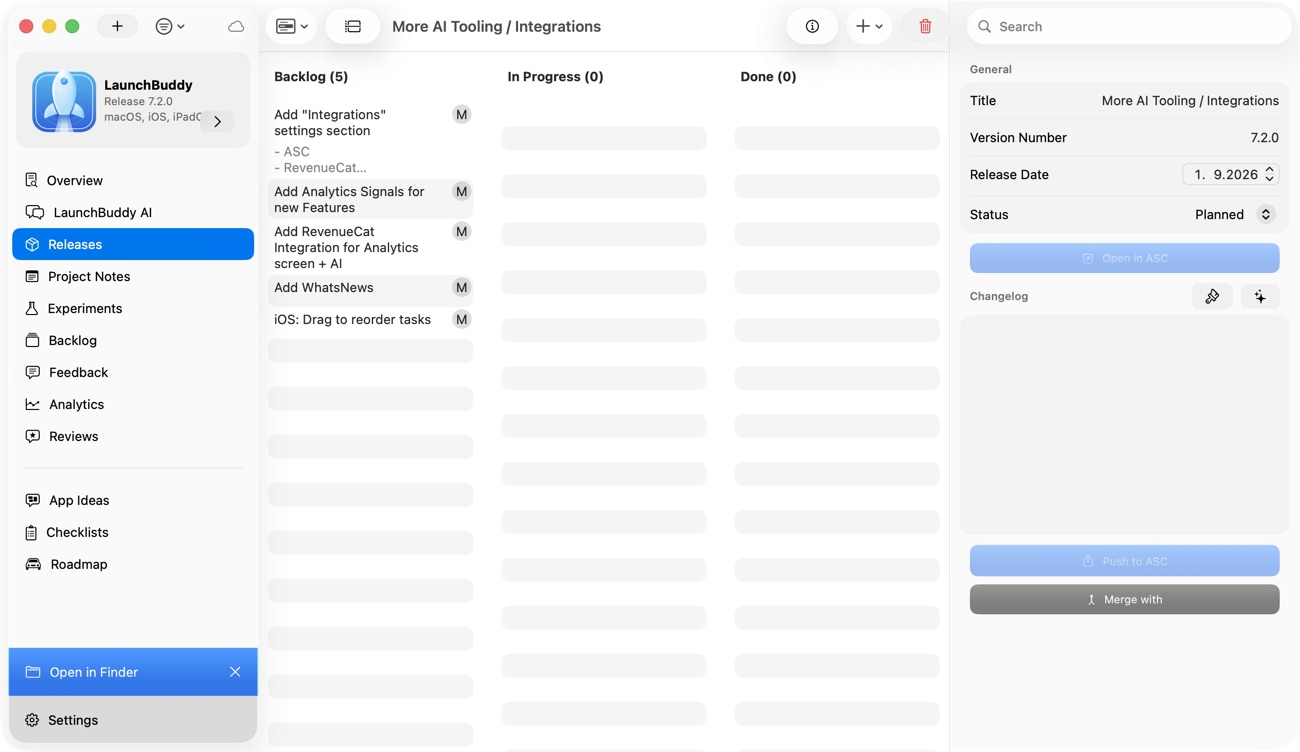
LaunchBuddy treats an app as the long-lived project and a release as the unit of commitment. Backlog work can wait without pretending it will ship. Accepted tasks move into a version, and a default or custom checklist carries recurring App Store work into that release.
That model is useful when the hard question is not “Can an agent perform this action?” but “Should this work be in version 2.4, and what evidence makes it complete?”
The Mac-only LaunchBuddy MCP server exposes that context over localhost. A client can inspect next-release status, task and checklist progress, backlog tasks, cached reviews when the required integration is available, and pending approval status. Read tools are included in Free.
Supported MCP writes require Pro. They can propose task updates or completion, release creation, release-status changes, and changelog updates. A successful tool call only creates a proposal; the user must approve or reject it in LaunchBuddy before the change applies. LaunchBuddy doesn’t document MCP tools for simulator control, code signing, builds, binary upload, TestFlight administration, or App Store submission.
LaunchBuddy is therefore the stronger fit when you need:
- one release record that says what is in scope;
- recurring checks that remain visible until completed;
- an app backlog separate from the current version;
- planning access from iPhone or iPad as well as Mac; or
- an in-product approval queue that cannot be bypassed by an MCP write tool.
Its boundary is intentional. App Store Connect stays authoritative for official Apple records, while Xcode, Transporter, Fastlane, another CLI, or CI handles binaries and signing.
Blitz owns a broader execution path
Blitz is a native Mac app and open-source MCP server for agent-driven Apple development. Its official repository documents tools for App Store Connect versions and listings, screenshots, in-app purchases and subscriptions, TestFlight, simulator interaction, signing, building, uploading, and review submission. It bundles an App Store Connect CLI helper for additional operations.
Blitz doesn’t replace Xcode. Its website says Xcode is still required for compilation, simulator runtimes, and Apple’s signing tools. Blitz provides the workflow layer that lets a compatible MCP client coordinate those components.
That makes Blitz the stronger fit when the repeated job is operational:
- inspect or change App Store Connect metadata;
- create or attach a purchase or subscription;
- capture and upload screenshots across supported device sizes;
- boot and interact with a simulator;
- set up signing, build, or upload;
- manage supported TestFlight work; or
- send a prepared version into Apple’s review flow.
Apple’s App Store Connect API overview confirms that the underlying API covers app management, metadata, provisioning, purchases, subscriptions, TestFlight, and review submission. Blitz provides a native agent surface around supported parts of that system. Apple’s records remain the source of truth after any operation.
Blitz is not documented as a substitute for a release backlog. Its project record can connect development and submission work, but its public materials don’t claim LaunchBuddy’s model of candidate backlog tasks, version commitments, due dates, and reusable release checklists.
The approval models are materially different
Both products keep their MCP endpoint local to the Mac. LaunchBuddy documents a localhost-only server with optional bearer-token authentication. Blitz’s current source uses a permission-restricted local Unix socket and a stdio helper. “Local” does not mean “equally constrained.”
LaunchBuddy’s write path is fixed:
MCP write request
  → LaunchBuddy proposal
  → approve or reject in LaunchBuddy
  → apply only after approval
  → verify the LaunchBuddy record
Blitz assigns tools to categories. Read and navigation categories run without the native prompt. Gateable mutation categories show an Approve or Deny dialog unless the category has already been allowed in settings. The dialog also offers an “Approve all in the future” choice. If that is selected, the current implementation enables all gateable categories, not merely the one operation being reviewed.
The current dialog names the requested tool but doesn’t render its arguments. Inspect the MCP client’s tool input to review the exact target and value; don’t rely on the native dialog alone to detect a wrong app, field, or version.
That difference changes the risk calculation:
| Question | LaunchBuddy | Blitz |
|---|---|---|
| Can a read run without an in-product write prompt? | Yes | Yes |
| Does a supported write directly execute from the MCP call? | No; it creates a proposal | It can execute after approval or when its category is already allowed |
| Can the product approval be broadly relaxed? | Not for documented MCP writes | Yes, through category permissions or the dialog’s approve-all choice |
| What can the write affect? | LaunchBuddy project and release records | Local project, simulator, build, and supported Apple-facing operations |
| What proves success? | Re-read LaunchBuddy or inspect its UI after approval | Inspect the local result and the relevant authoritative Apple or Xcode state |
The MCP tools specification recommends giving people the ability to deny tool invocations and showing confirmation prompts for operations. It doesn’t mandate one approval design. The right question is how much authority the workflow needs.
For Blitz, keep category bypasses off during evaluation. Use the MCP client’s own confirmation controls as an additional layer, especially for signing, upload, submission, purchases, or public metadata. For either product, an approval is permission to attempt an action, not evidence that it succeeded. The human-in-the-loop workflow guide explains why proposed, approved, applied, and verified must stay separate.
Compare one read and one bounded write
A feature table cannot show whether you will trust the handoff. Run the same low-risk release through both products and keep an authority receipt.
Use a draft update with:
App: Trail Notes
Release: 2.4
Committed work:
- Fix duplicate sync alerts
- Improve empty-state copy

Still incomplete:
- Verify upgrade from 2.3
- Review screenshots against the final build
- Approve What's New copy
Test the LaunchBuddy path
- Create release 2.4 and assign only the two committed changes.
- Apply the default checklist or a custom Pro checklist.
- Ask the MCP client to read the release, task progress, and checklist progress without proposing changes.
- Compare the result with the LaunchBuddy UI. Missing data is not the same as an empty list.
- After completing the upgrade test outside LaunchBuddy, ask the client to propose completing only that task.
- Inspect the proposal’s app, release, task, current state, and requested change.
- Approve or reject it in LaunchBuddy, then read the release again.
This test answers whether the agent understands your release record and whether the proposal contains enough context to review.
Test the Blitz path
- Use a disposable or low-risk draft app version, not the next production submission.
- Connect only the credentials and project access required for the test. Keep mutation-category bypasses disabled.
- Ask the client for a read-only report of the active project and relevant draft App Store state.
- Choose one reversible, bounded action, such as changing a draft text field that isn’t yet submitted.
- Confirm the exact target and value in the MCP client’s tool input. Check that Blitz names the expected tool, but remember that its current native dialog doesn’t display the arguments.
- Approve once. Do not select the broad future-approval option during the pilot.
- Re-read the field through Blitz, then verify it in App Store Connect.
This test answers whether the direct execution path is clear, whether the client and native prompt together provide enough context, and whether failure recovery is understandable. Protect the .p8 private key and use the least-privileged role that supports your chosen operation; the App Store Connect API key guide covers that setup.
Keep an authority receipt
Record the same five facts for both tests:
| Receipt field | What to capture |
|---|---|
| Observed | The app, release or Apple record, current value, and source |
| Requested | The exact read or write and its target |
| Authorized | What the reviewer could see, what they approved, and whether a category bypass was active |
| Reported | The tool result without rewriting “accepted” as “completed” |
| Verified | The final value in LaunchBuddy, App Store Connect, Xcode, or the simulator |
This receipt exposes the practical difference between the products. In LaunchBuddy, the final target is usually the plan. In Blitz, the target may be a build artifact, simulator state, or Apple record with a larger operational consequence.
Privacy and data boundaries
LaunchBuddy stores tasks, releases, notes, and other project data in the user’s private iCloud account rather than on LaunchBuddy-hosted project servers. Its MCP result still passes into the connected client and model service. Cached review access requires Pro and App Store Connect API credentials, and users choose whether certain private notes and local metadata may be included in LaunchBuddy AI requests.
Blitz’s current path definitions register projects under ~/.blitz/projects; imported projects can be represented there by a symbolic link. Its app-owned MCP executor listens on a local Unix socket with 0600 permissions, while a stdio helper forwards client requests. The current README also says official release builds may send limited anonymous product telemetry, while source and debug builds leave that telemetry off unless analytics configuration is embedded. Optional App Wall sync sends selected public listing and submission data to a remote service, with reviewer feedback shared only when its separate option is enabled.
For both products, review three paths independently:
- Storage: Where do project records and credentials live?
- Model disclosure: What context does the MCP client send to its model provider?
- External writes: Which local, Apple, or vendor service changes after approval?
Localhost answers only the network-listening question. It doesn’t limit what an authorized local client can read, what the client sends onward, or which external API a tool can call.
Price, platform, and maintenance
LaunchBuddy runs on iPhone, iPad, and Mac. Free supports two apps, two releases, limited project notes, default submission checklists, iCloud sync, and MCP reads on Mac. Pro costs $2.99 per month or $19.99 per year and adds unlimited capacity, custom checklists, selected App Store Connect features, AI, and MCP write proposals. One subscription covers all three platforms, but MCP hosting remains Mac-only.
Blitz is Mac-only, free, and open source under Apache 2.0. That removes a subscription decision but adds a toolchain and authority decision. Its source-build requirements currently include macOS, Xcode, Node.js, Go, and a pinned App Store Connect helper. Release users still need to keep Blitz, Xcode, credentials, and agent configuration current.
Do not compare only purchase price. Include:
- time spent maintaining build and agent tooling;
- the cost of an over-broad permission or mistaken Apple-facing write;
- repeated manual work left outside each product; and
- whether planning from iPhone or iPad matters.
For a wider comparison with command-line release automation, see LaunchBuddy vs Fastlane vs asc CLI.
Choose by the missing layer
Choose LaunchBuddy if release scope, backlog discipline, recurring checks, cross-device planning, and mandatory proposal-based MCP writes are the missing layer.
Choose Blitz if the plan is already clear and you need an agent to operate more of the simulator-to-App-Store path from a Mac.
Use both only with an explicit handoff: LaunchBuddy owns committed scope and checklist evidence; Blitz owns selected execution; Apple’s systems own official submission state. Avoid mirroring every status. A useful boundary is: a LaunchBuddy task authorizes a specific Blitz operation, and that task closes only after the resulting Apple or Xcode state has been verified.
If you need the release plan and approval queue before adding broader execution authority, download LaunchBuddy and test the next version on the free plan.