LaunchBuddy vs Asomium: Which App Store Workflow Fits?
Choose LaunchBuddy when the hard part is deciding what belongs in each release and tracking whether the work is finished. Choose Asomium when the release is already defined and you want one Mac app for metadata, screenshots, ASO research, building, uploading, and supported App Store Connect actions.
The products solve adjacent layers. LaunchBuddy is an app and release planner with selected App Store Connect features. Asomium is a Mac-native App Store Connect workspace with a direct shipping pipeline. Apple remains the source of truth for the app record, submitted build, review state, and distribution either way.
This comparison was checked against both products’ first-party information on October 24, 2026. Asomium is changing quickly: its older introduction page still says 36 MCP tools, while its current product and MCP pages document 42. This article uses the current 42-tool catalog and links to it so you can recheck a deciding capability.
LaunchBuddy vs Asomium at a glance
| Decision area | LaunchBuddy | Asomium |
|---|---|---|
| Best fit | Product backlog, version scope, recurring release checks, and post-launch follow-up | Direct App Store listing, asset, ASO, build, submission, and release operations |
| Starting point | An idea, app project, backlog, or planned version | An App Store Connect app and API key; an Xcode-installed Mac is additionally required for build and ship |
| Release planning | Version-scoped taskboards, release status, project notes, and default or custom checklists; Pro supports changelog proposals | A six-stage App Store pipeline driven by current Apple records and supported readiness checks |
| Metadata and screenshots | Tracks the work; Pro can upload approved release notes and record ASO experiments | Edits and translates localized metadata, creates localized screenshot sets, and uploads supported assets |
| Build and submission | Does not build, sign, upload, or submit binaries | Runs an xcodebuild archive and export, uploads, attaches the build, and supports submission |
| ASO | Records icon, screenshot, and copy hypotheses with baseline and result metrics | Discovers and tracks keywords, compares competitors, and overlays store changes on analytics |
| Analytics and reviews | Pro provides selected downloads, revenue, subscription metrics, reviews, replies, and review-to-task | Pulls Sales and Trends plus an Apple Analytics funnel; reads reviews and supports responses |
| Agent access | Mac-only localhost MCP; reads are free, while Pro writes become proposals requiring approval in LaunchBuddy | Local stdio MCP with 42 documented tools spanning metadata, ASO, builds, TestFlight, reviews, and analytics |
| Apps run on | iPhone, iPad, and Mac, with private iCloud sync | Mac only; macOS 15 or later is required |
| Current price | Free for two apps and two releases; Pro is $2.99/month or $19.99/year | €14.99/month or €119.99/year; the homepage advertises a 14-day no-card trial, although the MCP page currently says 3 days |
The deciding question is not which product has more features. It is whether your recurring failure happens before the App Store operation is clear or while carrying out that operation.
The core difference is planning context versus App Store execution
LaunchBuddy records product intent through version-scoped tasks, release status, project notes, and reusable submission checklists. Pro adds custom checklists, ASO experiments, and supported changelog actions.
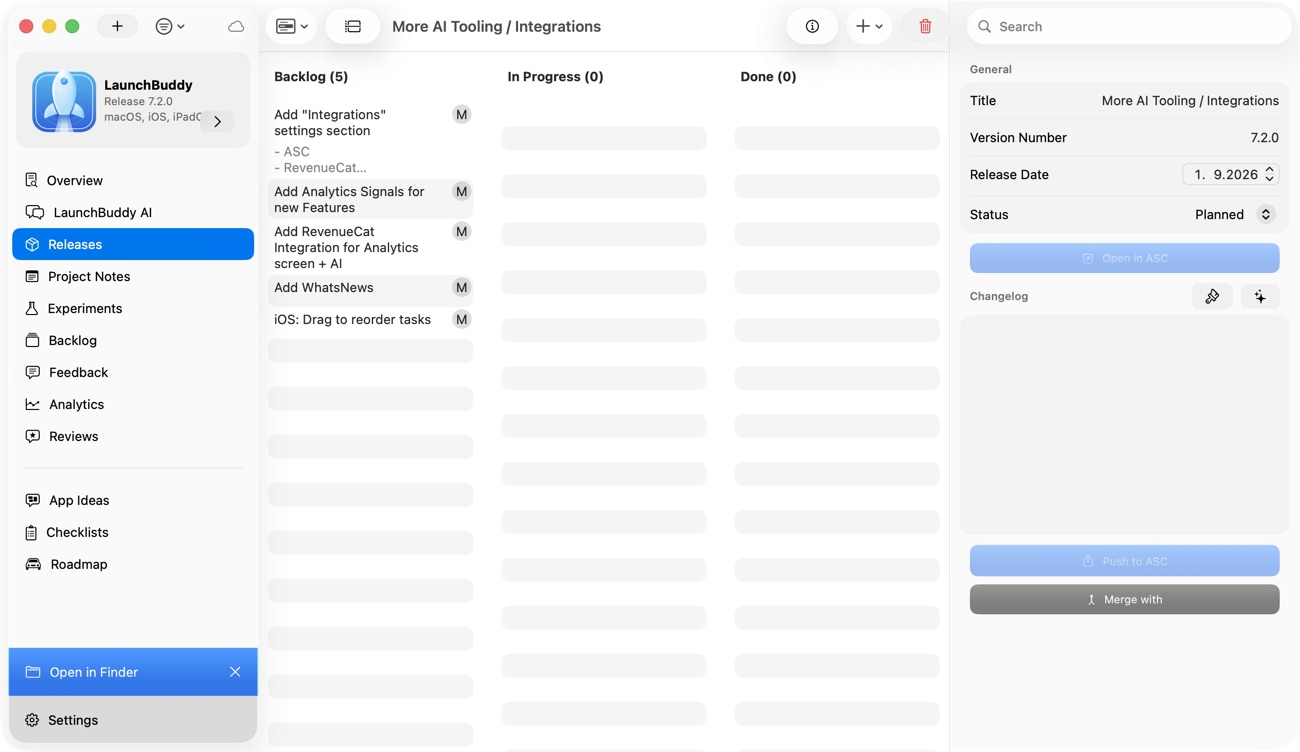
Asomium begins closer to Apple’s records. Its workspace moves through Metadata, Screenshots, Build, Submit, Review, and Live. It can read supported readiness details from App Store Connect, edit the store listing, prepare assets, run the build pipeline, and operate supported release controls.
Those workflows answer different questions:
- LaunchBuddy: What did we commit to this version, why is it in scope, and which human checks remain?
- Asomium: Are the supported store fields, assets, build, and release actions ready to move forward?
- App Store Connect: What does Apple officially hold right now?
Neither answer makes the others redundant. A complete App Store form does not prove the feature works. A checked planning task does not prove the correct build is attached.
Asomium is stronger for metadata, screenshots, and localization
Asomium’s current product page documents a multi-locale metadata grid for title, subtitle, description, keywords, and What’s New. It provides character counts, diff previews, translation with a per-app brand voice and glossary, and pushes supported changes back to App Store Connect.
Its screenshot tool adds iPhone, iPad, and Mac frames, caption layers, themes, localized text variants, and routing to supported device rows. That is a direct creative and upload workflow, not merely a task reminding someone to prepare screenshots.
LaunchBuddy does not claim general metadata editing, translation, screenshot generation, or screenshot upload. It can place that work in a release, keep the decision attached to a version, upload approved release notes with Pro and App Store Connect API credentials, and record icon, screenshot, or copy experiments. The ASO experiment tracker explains the evidence record LaunchBuddy is designed to preserve.
Choose Asomium for repeated field and asset operations across locales. Choose LaunchBuddy when the bigger risk is losing the hypothesis, version context, or follow-up decision around those changes.
Asomium provides a build-to-review pipeline
The sharpest capability difference is binary handling. Asomium’s first-party introduction says its pipeline can run xcodebuild archive, upload the result, wait for indexing, attach the build to a version, and submit it for review. An Xcode-installed Mac is required for that pipeline.
Its current MCP catalog also documents build-number changes, version creation, build listing, screenshot upload, submission, manual release, release-strategy changes, phased-release controls, and TestFlight group actions. Those are consequential operations. Verify the selected scheme, signing setup, version, build, metadata, and Apple state before invoking them on a production release.
LaunchBuddy intentionally stops before this layer. It does not build, sign, notarize, upload, or submit an app binary. Use Xcode, Asomium, Fastlane, or another supported pipeline, then keep the human release checks in LaunchBuddy. The App Store Connect release checklist is a useful final gate regardless of which uploader you use.
This difference can settle the choice immediately. If archive-to-submission automation is the missing capability, Asomium fits the requirement and LaunchBuddy does not.
Their ASO and analytics tools lead to different next actions
Asomium combines keyword discovery, daily rank tracking, competitor metadata, Sales and Trends data, and an Apple Analytics funnel. Its product page says metadata pushes, keyword changes, and versions can be overlaid on the analytics timeline. That gives an operator a direct view from store change to later observation.
LaunchBuddy’s ASO feature is narrower: Pro records an experiment involving an icon, screenshot, or copy with baseline and experiment metrics. Its connected analytics dashboard shows selected downloads, revenue, and subscription metrics. It does not claim keyword discovery, rank tracking, competitor intelligence, or Asomium’s analytics depth.
The distinction is useful:
Asomium
  -> discover a keyword
  -> edit and push metadata
  -> observe ranks and store metrics

LaunchBuddy
  -> state the hypothesis
  -> assign the creative and release work
  -> preserve the baseline and caveats
  -> record keep, revise, or revert
A chart moving after a metadata change does not prove causation. Releases, featuring, campaigns, seasonality, and other simultaneous edits can move the same numbers. Whichever tool you use, record what else changed and avoid turning correlation into a product claim.
MCP tool count matters less than write authority
Both products provide local Mac agent access, but their authority models are materially different.
LaunchBuddy’s MCP server is localhost-only. Read tools are available on Free. Supported Pro write tools create a proposal for task, release, or changelog changes; nothing applies until a person approves it in LaunchBuddy. The verified write surface does not include building or submitting an app. See the LaunchBuddy MCP server guide for the exact boundary.
Asomium’s current MCP page lists 42 local stdio tools across nine categories. They include direct metadata pushes, build and ship actions, App Review submission, release controls, review responses, and app-privacy updates. Asomium documents a dry-run metadata validator and says high-stakes actions are explicit named calls; it also notes that most clients show arguments for some production actions.
That is not the same as LaunchBuddy’s mandatory in-product approval queue. A client confirmation may provide a useful guard, but its behavior belongs to the client and configuration.
Use this safety sequence before connecting either tool:
- Start with a read that cannot change either product or Apple.
- Confirm the app, team, platform, and version returned.
- Test the narrowest reversible write in a noncritical workflow.
- Inspect the result in the app and in App Store Connect.
- Keep build upload, public metadata, review responses, submission, and release behind an explicit human decision.
Asomium provides the broader set of agent-accessible actions for direct App Store operations. LaunchBuddy is the stronger choice when every supported project write must wait in one visible approval queue.
Credentials and data have different boundaries
LaunchBuddy stores tasks, releases, notes, and other project data in the user’s private iCloud account rather than on LaunchBuddy-hosted project servers. Its App Store Connect reviews, analytics, and release-note upload require Pro plus App Store Connect API credentials. Core planning does not require an Apple connection.
Asomium requires an App Store Connect API key with the App Manager role, according to its current setup documentation. Its product page says the key is stored in macOS Keychain and App Store Connect requests go directly from the Mac to Apple. It identifies AsoAI translation, audit, and analysis as an exception that uses its Cloudflare Worker.
Neither description evaluates what a connected AI client may receive. MCP results enter the client’s own security and data-handling boundary. Use a dedicated Apple key where practical, keep the .p8 file out of source control, and confirm the effective app access before connecting production data.
Device and price differences may decide the choice early
LaunchBuddy runs on iPhone, iPad, and Mac. Free supports two apps and two releases, limited project notes, default checklists, iCloud sync, widgets, and supported read actions. Pro is $2.99 per month or $19.99 per year and adds unlimited capacity, custom checklists, selected App Store Connect features, AI, ASO experiments, and approval-gated writes. AI usage limits apply. The LaunchBuddy Free vs Pro guide lists the prerequisites.
Asomium is a Mac app requiring macOS 15 or later. Its current site lists €14.99 per month or €119.99 per year for the same Pro feature surface. The homepage advertises 14 days of no-card access, while the MCP page says 3 days; verify the offer shown in the app before relying on either duration. Asomium says pulled data stays visible after the trial, but pushing, translating, building, and submitting require a license. One active Mac is currently allowed per license.
Do not compare the prices as if the products cover the same job. Asomium includes direct listing, asset, ASO, build, and submission operations that LaunchBuddy does not provide. LaunchBuddy includes cross-device product planning and reusable release context that Asomium’s public pages do not describe as a general backlog or version-scoped development taskboard.
Test both tools with one controlled release
Use a small update instead of comparing demo screens. Suppose version 2.8 has one crash fix, one onboarding change, revised metadata in three locales, one new screenshot set, and a customer review that may describe the crash.
First choose one system of record for each data type:
| Record | System of record |
|---|---|
| Accepted scope, development tasks, and custom submission checks | LaunchBuddy or your existing planner |
| Localized metadata, screenshots, build pipeline, and supported submission actions | Asomium or another App Store Connect client |
| Official build, review, release, and distribution state | App Store Connect |
| Follow-up work accepted after release | One chosen backlog |
Then run two passes.
LaunchBuddy-first pass
- Assign only the crash fix and onboarding change to version 2.8.
- Add locale, screenshot, physical-device, and support tasks.
- Apply the default checklist or a custom Pro checklist.
- Draft What’s New from completed work and verify every line against the build.
- Convert the review into a task only if it adds actionable evidence.
- Use MCP to report incomplete work; test one low-risk proposal only if Pro writes matter to you.
Asomium-first pass
- Pull the app and editable version with the intended Apple key.
- Edit the three locales and inspect the metadata diff.
- Create and route the localized screenshots, then verify each device row.
- Run the build pipeline on the intended scheme and inspect its log.
- Verify the indexed build, version, export-compliance answer, support URL, and release strategy.
- Submit only after reviewing the exact MCP or UI action, then confirm the official status in App Store Connect.
Score the result against your actual failure mode:
Planning
Release scope stayed explicit:                  /5
Custom submission checks were hard to skip:     /5
Post-release evidence reached one backlog:       /5
Planning subtotal:                              /15

Execution
Locale and screenshot work avoided repetition:  /5
Build and submission state stayed clear:        /5
Apple's authoritative state stayed unambiguous: /5
Execution subtotal:                             /15

Agent authority matched the action's risk: Pass | Fail
Compare the two subtotals. The lower one identifies the larger workflow gap; treat agent authority as a separate constraint rather than averaging it away.
Can LaunchBuddy and Asomium work together?
Yes, with clear ownership:
LaunchBuddy
  -> backlog, version scope, tasks, custom submission checks, changelog draft

Asomium
  -> metadata, screenshots, ASO research, build, upload, supported submission actions

App Store Connect
  -> authoritative Apple record
Do not mirror every Apple status into LaunchBuddy or every development task into Asomium. A LaunchBuddy checklist item can record that someone verified the selected build, while App Store Connect remains authoritative for which build is selected. An Asomium keyword observation should become a backlog item only after you decide it warrants product work.
Choose the missing layer
Choose LaunchBuddy for a durable app backlog, version-scoped work, reusable release checks, iPhone-to-Mac planning, selected review and analytics follow-up, or approval-gated project writes.
Choose Asomium for direct multi-locale metadata and screenshot work, keyword tracking, a Mac build-to-submission pipeline, broader App Store analytics, or agent tools that operate Apple’s records.
If release scope and repeatable planning are the missing layer, download LaunchBuddy and test the next update on the free plan.