App Store Connect AI Agent Workflow for Indie iOS Developers
An App Store Connect AI agent sounds like the next obvious step for iOS release automation: ask an assistant what is ready, have it inspect App Store Connect, draft the release notes, update metadata, and maybe even submit the version for review.
That can be powerful. It can also be risky if the agent has more authority than the release workflow has structure.
LaunchBuddy is built for the layer between planning and App Store Connect. With App Store Connect integration and AI features, it can help indie iOS developers use AI agents and automation more safely by keeping builds, release tasks, TestFlight feedback, metadata decisions, and launch checklists connected to the version being shipped.
What an App Store Connect AI agent can help with
An AI agent is most useful when it can inspect structured state and turn it into a clear next action.
For App Store Connect, that can include:
- Checking build processing status
- Finding the selected build for a version
- Reviewing TestFlight state
- Summarizing TestFlight feedback
- Drafting “What’s New” release notes
- Drafting App Review notes from saved context
- Suggesting App Store metadata alternatives
- Reviewing keyword field ideas
- Checking whether screenshots or app previews need attention
- Preparing a launch checklist from the current release
- Summarizing what changed after the version ships
Those are high-value tasks because they reduce context switching. Instead of jumping between Xcode, App Store Connect, TestFlight, a notes app, a spreadsheet, and a generic chat window, the developer can ask for help from the release context that already exists.
But the key phrase is “from the release context.” Without that context, an agent can be fast and still be wrong.
Start with visibility before write access
If you are experimenting with an App Store Connect AI agent, start with read-only or low-risk workflows.
A good first phase looks like this:
1. Read App Store Connect status.
2. Match the status to the current release version.
3. Summarize what changed.
4. Suggest next checklist items.
5. Draft text without publishing it.
6. Ask the developer to review and approve every outward-facing change.
That gives the agent useful work without allowing it to silently change the release.
Good early prompts include:
Which build is ready for TestFlight, and what release tasks are still open?Summarize the TestFlight feedback for this build and suggest which items should block release.Draft App Store release notes from the completed tasks for version 2.4, but do not publish them.Compare the current App Store metadata against this release plan and list fields that may need review.These prompts work because they produce context, drafts, or review lists. They do not skip the developer’s judgment.
For a broader API-connected setup, read the App Store Connect API workflow. For automation boundaries, read App Store Connect automation.
Give the agent a release source of truth
An App Store Connect AI agent can query App Store Connect state, but App Store Connect does not know everything about your release.
It may know:
- App versions
- Build status
- TestFlight availability
- Metadata fields
- App Review status
- Pricing and availability settings
- Customer reviews and reports
It may not know:
- Which user-facing tasks are actually complete
- Which internal refactors should not be mentioned
- Which TestFlight comments are blockers
- Which feature slipped to the next version
- Why a keyword changed
- Whether a generated sentence matches the selected build
- What you want reviewers to understand
- What you plan to monitor after launch
That missing context is where release management matters.
In LaunchBuddy, the release can be the source of truth. Tasks, checklists, App Store Connect status, AI drafts, TestFlight decisions, App Review notes, metadata ideas, and follow-up work can all live around the version. The agent can help with the workflow because the important context is already organized.
Use AI agents for drafts, audits, and summaries
The safest App Store Connect AI agent workflow gives AI three main jobs: draft, audit, and summarize.
Draft
AI can turn structured release work into first drafts:
- App Store release notes
- TestFlight “What to Test” notes
- App Review notes
- Promotional text ideas
- Description updates
- Keyword candidates
- Launch copy
- Support article summaries
The developer still edits the result. The agent should make the blank page smaller, not decide what users see.
Audit
AI can also review a release checklist and point out missing work:
- Release notes mention a feature that is not marked complete
- A screenshot task is still open
- TestFlight feedback has not been triaged
- App Privacy was not checked after adding an SDK
- Metadata was updated but App Review notes were not
- A build was changed after the release notes were drafted
This is a strong use case because the agent is comparing known facts rather than inventing new ones.
Summarize
AI can summarize messy release inputs:
- What changed since the last build
- Which TestFlight feedback themes repeated
- Which tasks are user-facing
- Which bugs belong in release notes
- Which post-launch follow-ups matter
- What changed between App Store metadata drafts
Summaries help the developer make a decision faster. They should not replace the decision.
Keep high-risk App Store Connect actions manual
Some App Store Connect actions should require explicit human confirmation, especially for indie developers who are still building a repeatable release process.
Be careful with agent-driven changes to:
- App Store submission
- Pricing and availability
- In-app purchases and subscriptions
- App Privacy answers
- Age rating details
- Final App Store metadata
- Keyword fields
- Screenshot sets and app previews
- Phased release settings
- Customer review responses
The risk is not only that the agent fails. The larger risk is that it succeeds at making a plausible change that does not match the app, the selected build, or Apple’s review expectations.
Use this rule: if the action affects users, reviewers, money, privacy, compliance, or public positioning, the agent can prepare the work but the developer should approve it.
A practical App Store Connect AI agent checklist
Use this checklist when designing an AI-assisted release workflow:
Release context:
- Version created
- Release goal written
- User-facing tasks attached
- Internal-only work marked clearly
- Known exclusions listed

App Store Connect state:
- App matched to the correct App Store Connect record
- Build status visible
- Selected build confirmed
- TestFlight status reviewed
- App Store version status reviewed

Feedback:
- TestFlight feedback matched to the correct build
- Screenshot feedback reviewed
- Crash feedback reviewed
- Blocking issues separated from future ideas
- Follow-up tasks created

AI drafts:
- Release notes drafted from completed work
- App Review notes drafted from saved context
- Metadata ideas generated only when useful
- Keyword ideas reviewed for relevance
- Every claim checked against the selected build

Approval:
- Screenshots verified manually
- Metadata reviewed manually
- App Privacy, pricing, and availability checked manually
- Submission checklist complete
- Release timing decided by the developer

Follow-up:
- App Review status tracked
- Live App Store page verified
- Reviews and support issues monitored
- Next-release tasks created
This gives the AI agent a clear job: make the release easier to understand and prepare, without turning submission into a black box.
For a field-by-field process, use the App Store Connect release checklist. For feedback-specific work, read TestFlight feedback management.
What this looks like in LaunchBuddy
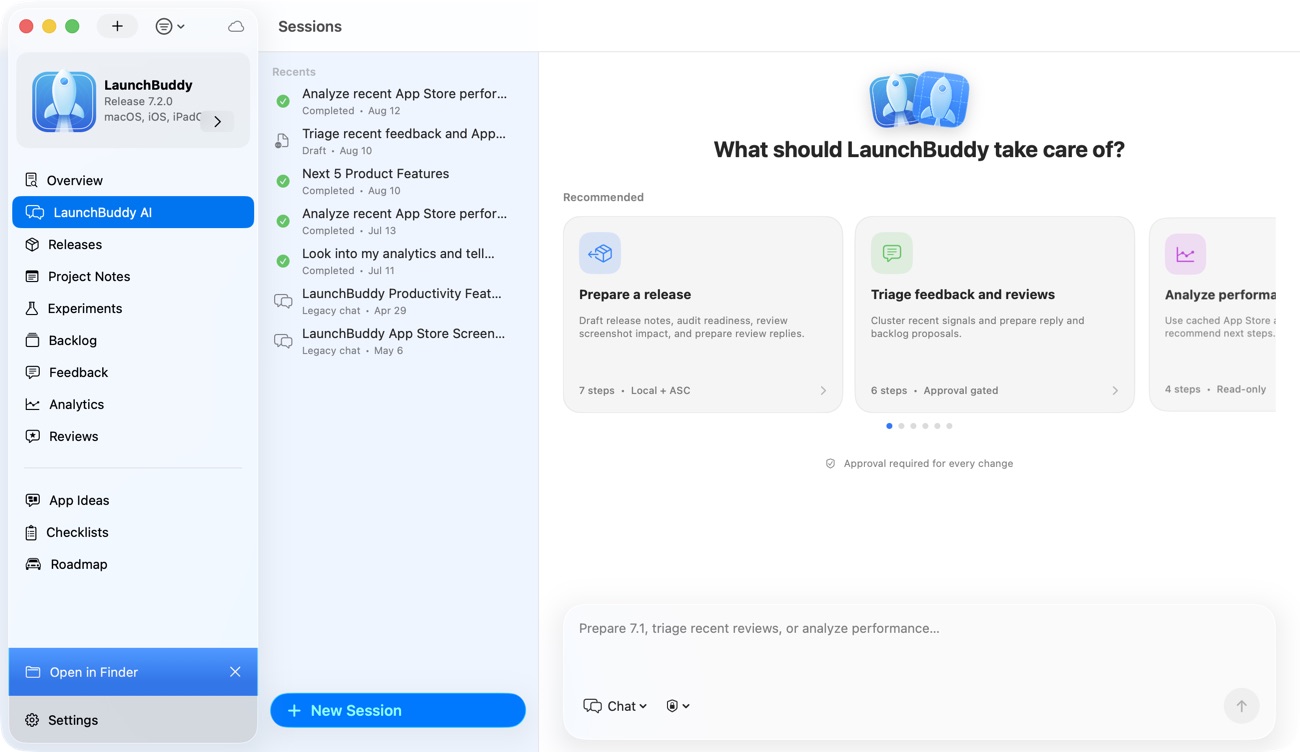
Imagine you are preparing version 3.1 of an indie iOS app.
Without a connected workflow, your AI agent might see App Store Connect state but miss the release story:
- Build 218 is available
- The version is prepared for submission
- The release notes field is empty
- TestFlight feedback exists
- Metadata has not changed
That is useful, but incomplete.
With LaunchBuddy as the release-management layer, the agent can work from better context:
- Version 3.1 is focused on onboarding improvements
- Three onboarding tasks are complete
- One internal refactor should not be mentioned
- Build 218 is the selected release candidate
- Two TestFlight comments confirm the new onboarding flow is clearer
- One crash report belongs to an older build
- Screenshots still need review
- App Review notes should mention a demo account
- AI release notes need developer approval before being pasted into App Store Connect
Now the agent can give better help:
Version 3.1 is close, but screenshots are still unchecked and the App Review note is missing the demo account. The selected build is 218. I drafted release notes focused on onboarding clarity and excluded the internal refactor.That is more useful than a generic “ready to submit” answer because it reflects the release, not just the API state.
Why LaunchBuddy fits the App Store Connect AI agent workflow
LaunchBuddy is not trying to replace App Store Connect, Xcode, CI, Fastlane, CLI tools, or MCP servers. Those tools can all be part of a strong release system.
LaunchBuddy fits the human release-management layer:
- Organize iOS projects and tasks
- Group work by app version
- Keep App Store Connect status close to release work
- Reuse App Store submission checklists
- Connect TestFlight feedback to release decisions
- Use AI to draft release notes and metadata ideas
- Save final copy and launch decisions
- Keep follow-up tasks visible after the update ships
Let the agent help, but keep the release accountable
An App Store Connect AI agent can make iOS releases faster, especially when it can read status, summarize feedback, draft release notes, and audit checklists. But the agent needs a stable workflow around it.
Start with the version. Attach the tasks, build, feedback, metadata decisions, App Review notes, AI drafts, and follow-up work to that version. Let the agent reduce the repetitive work and surface what needs attention. Keep final decisions visible and intentional.
That is the practical path for indie iOS developers: AI assistance without losing the release story.
That is the workflow LaunchBuddy is designed to support.

