App Store Connect Project Management for Indie iOS Developers
App Store Connect project management is becoming a real need for indie iOS developers. App Store Connect is where your app versions, TestFlight builds, metadata, pricing, App Review status, and release settings live. But the work required to ship a good update usually starts somewhere else.
It starts in Xcode tasks, bug notes, TestFlight feedback, screenshot reminders, App Store Optimization ideas, support conversations, and the vague feeling that you still forgot something before submitting.
LaunchBuddy is built for that gap. It helps iOS developers manage projects, releases, tasks, and checklists, and now with App Store Connect integration and AI features, it can keep the release plan closer to the App Store workflow.
Why App Store Connect needs project management around it
App Store Connect is a submission system, not a project management system. It stores important release fields, but it does not always show the surrounding work:
- Which user-facing tasks belong to this version
- Which bugs were fixed after TestFlight feedback
- Whether screenshots need to be refreshed
- Why a metadata change was made
- Which ASO keywords are being tested
- Whether release notes match the selected build
- What follow-up tasks should happen after review
For a single app update, you can sometimes keep that in memory. For multiple apps, frequent releases, subscription changes, localizations, or a launch with marketing tasks, memory becomes risky.
App Store Connect project management gives the release a home before, during, and after submission.
What belongs in an App Store Connect project management workflow
A practical workflow should connect the work you plan with the App Store state you need to act on.
That usually means tracking:
- Release scope
- Development tasks
- TestFlight build status
- App Store version status
- Metadata review
- ASO keyword ideas
- Screenshots and app previews
- Privacy, pricing, and in-app purchase checks
- App Review notes
- Release timing
- Post-launch follow-up
The key is not to duplicate every App Store Connect field in a task manager. The key is to make every release decision visible next to the work that caused it.
Start with the release version
Every App Store Connect workflow should start with a version boundary. Before editing metadata or drafting release notes, decide what this release is meant to include.
Create a release and attach:
- Features that will ship in this version
- User-visible bug fixes
- Deferred tasks that should not block submission
- TestFlight feedback that affected the final build
- App Store metadata changes
- Screenshot or localization updates
- Review notes and demo account details
- Marketing or launch tasks
This turns the version into the organizing unit. Instead of asking “What still needs to happen?” you can open the release and see the answer.
In LaunchBuddy, this is where project management and App Store Connect work meet. The release plan keeps the why, while App Store Connect provides the submission state.
Keep TestFlight status close to release tasks
TestFlight is often where release confidence becomes either stronger or weaker. A build might be uploaded, but not processed. It might be processed, but not tested. It might be tested, but the feedback created three new tasks.
For each release, track:
- Build uploaded
- Build processed
- Internal testing complete
- External testing complete, if used
- Blocking feedback resolved
- Selected build confirmed for the App Store version
- Release notes checked against that exact build
This matters because release notes, screenshots, and metadata should describe the build users will actually receive. If the selected build changes, the release plan should make that visible.
Treat ASO tasks as part of the release
App Store Optimization is easy to postpone because it does not feel as urgent as fixing a crash or uploading a build. But if your release changes the app’s positioning, your App Store metadata may need to change too.
Add ASO review tasks for:
- App name and subtitle
- Keyword field
- Description
- Promotional text
- Screenshots
- App preview video
- Localized metadata
- Category and audience fit
You do not need to rewrite everything for every update. A small bug fix release may only need a quick metadata check. A major feature launch may need new keywords, screenshots, and a stronger first paragraph in the description.
The point is to make ASO an intentional release task instead of a separate chore you remember too late.
Use AI for drafts, not final decisions
AI is especially useful in App Store Connect project management when it has structured release context. A generic prompt can write generic copy. A release plan gives AI better source material.
AI can help draft:
- App Store release notes
- User-facing summaries of completed tasks
- Review note wording
- Metadata alternatives
- Launch copy for a new feature
- ASO keyword ideas to evaluate manually
The safe workflow is simple:
- Collect the completed release tasks.
- Ask AI for a first draft.
- Compare every claim against the selected build.
- Remove internal details and unsupported promises.
- Save the final copy with the release.
For a deeper writing workflow, read the guide to AI release notes for iOS apps. The same principle applies across metadata and review notes: AI should reduce blank-page friction, not decide what is true.
Build a reusable App Store Connect release system
A strong release workflow should be reusable. Instead of rebuilding your process every time, create a checklist that can be applied to each version.
Here is a practical template:
Release:
Version:
Goal:
Target build:

Scope:
- Features:
- Fixes:
- Deferred:

TestFlight:
- Build uploaded:
- Build processed:
- Feedback reviewed:
- Selected build confirmed:

App Store Connect:
- Metadata reviewed:
- Keywords reviewed:
- Screenshots verified:
- App Privacy checked:
- Pricing and availability checked:
- IAPs or subscriptions checked:
- Review notes ready:

AI-assisted work:
- Release notes drafted:
- Release notes verified:
- Metadata copy reviewed:
- Launch copy drafted:

Submission:
- Release method chosen:
- Submitted for review:
- Approved:
- Released:

Follow-up:
- Live App Store page verified:
- Reviews monitored:
- Support issues tracked:
- Next release tasks created:
If you want the field-by-field version, use this App Store Connect release checklist before submitting. The project management workflow is what makes that checklist easier to reuse.
What App Store Connect project management looks like in practice
Imagine you are shipping version 2.4 of an indie iOS app. The update adds a new onboarding flow, fixes a subscription edge case, and improves sync reliability.
Without a release workflow, your work might be scattered:
- Subscription fix in Xcode
- Onboarding notes in a task list
- TestFlight feedback in email
- Screenshot reminder in Notes
- Release notes drafted directly in App Store Connect
- ASO keyword ideas in a spreadsheet
- Review notes copied from the last release
With App Store Connect project management, the release becomes the center:
- The onboarding tasks belong to version 2.4
- The subscription fix is marked as App Review-relevant
- TestFlight feedback creates follow-up tasks
- Screenshots are checked against the selected build
- AI drafts release notes from completed work
- Metadata review is tracked before submission
- App Review notes are saved with the version
- Post-launch monitoring becomes part of the release history
That does not make the release bigger. It makes it clearer.
Why LaunchBuddy fits this workflow
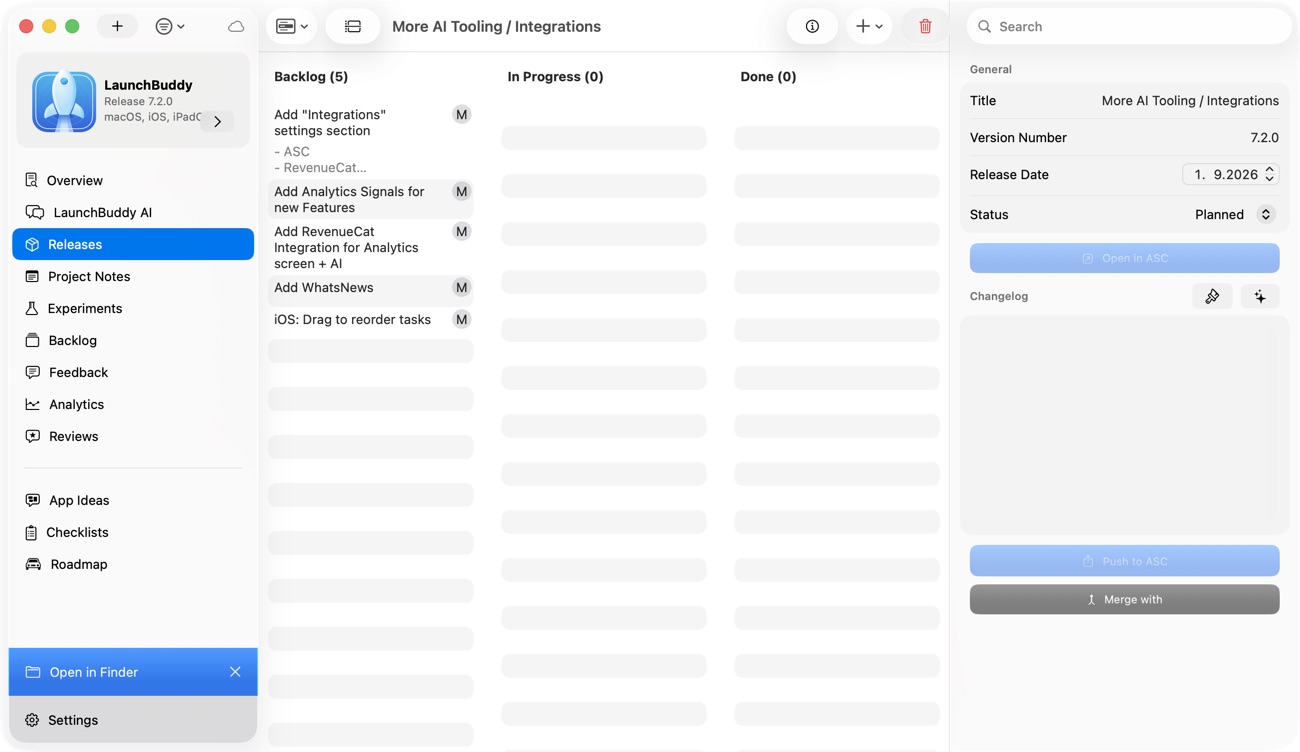
LaunchBuddy is not trying to replace App Store Connect. App Store Connect remains the source of truth for Apple’s submission process. LaunchBuddy helps with the project management around that process.
For indie iOS developers, that means:
- Organizing Xcode tasks by project
- Grouping work into releases
- Reusing App Store submission checklists
- Keeping App Store Connect work visible next to development tasks
- Drafting clearer release notes and app store copy with AI
- Tracking what still needs attention before and after submission
- Keeping release context available across iPhone and Mac
That combination is useful because the hardest part of shipping is often not one specific App Store Connect field. It is remembering how every task, build, note, and decision connects to the version you are trying to release.
Ship through App Store Connect with less context switching
App Store Connect project management is about reducing context switching. You still need Xcode to build the app. You still need App Store Connect to submit it. But the release itself needs a place where tasks, checklists, metadata work, AI drafts, and follow-up decisions stay connected.
That is the job LaunchBuddy is designed to handle.
If your next update is almost ready, do not wait until App Store Connect asks for the final details. Start with the release, connect the work around it, and let AI help with the parts that are easier to draft when the context is already organized.