
iOS Developer Task Manager: Organize Xcode Projects, App Store Releases, and AI Release Notes
June 30, 2026
An iOS developer task manager has a different job than a generic project management tool. It is not only tracking what you want to build. It also needs to help you ship through Xcode, TestFlight, App Store Connect, App Review, and the follow-up work that appears after a release goes live.
That is where many indie workflows become messy. A feature starts as an idea, becomes a few Xcode tasks, moves into a release, collects TestFlight feedback, needs App Store release notes, and finally waits for App Review. If those steps live in separate apps, the release depends too much on memory.
LaunchBuddy is built for that exact workflow. It gives indie iOS developers a focused place to manage projects, tasks, releases, checklists, App Store Connect context, and AI-assisted launch writing without turning a side project into an enterprise backlog.
The SEO opportunity: iOS developer task manager
“iOS developer task manager” is a valuable long-tail keyword because it captures developers who already know generic to-do apps are not enough for shipping apps. They are usually looking for a lightweight alternative to Jira, Linear, Trello, or a spreadsheet, but they still need workflows that understand Xcode projects, TestFlight builds, and App Store submission steps.
Related keywords worth targeting across LaunchBuddy content include:
- iOS developer task manager
- Xcode project manager
- project management app for iOS developers
- indie developer task tracker
- side project tracker for developers
- iOS app release manager
- App Store Connect project management
- App Store release task tracker
- AI project management for app developers
- App Store release notes workflow
The shared intent is practical: developers want one calm system for the work between “I should build this” and “the update is live on the App Store.”
Why generic task managers break down for iOS releases
Generic task managers are good at simple lists. They struggle when the task is part of an App Store release.
For example, “fix onboarding bug” might sound like one task, but for an iOS app it can affect:
- The Xcode branch or local project where the fix is implemented
- The release version that should include the fix
- TestFlight instructions for testers
- Screenshots if onboarding UI changes
- App Store release notes
- App Review notes if the bug affects a gated or login-only flow
- Follow-up tasks if tester feedback reveals a larger issue
If those details are scattered across Notes, GitHub issues, App Store Connect, Slack, and memory, the task can be technically done while the release is still incomplete.
An iOS developer task manager should keep that relationship visible. The task belongs to a project, the project has releases, and each release has App Store work attached to it.
Start with Xcode projects, not generic workspaces
Most indie developers do not manage work in abstract departments. They manage apps.
A useful Xcode project manager should let you answer questions like:
- Which app am I working on?
- What is the next release for this app?
- Which tasks are blocking that release?
- Which tasks are just ideas for later?
- Which bugs came from TestFlight feedback?
- Which App Store Connect steps still need review?
- What did I ship in the last version?
That app-first structure matters because indie developers often juggle multiple projects: a main app, a small utility, a client build, a weekend experiment, or an old app that still needs maintenance. A single generic board can blur those contexts together.
LaunchBuddy keeps the work organized around the way iOS developers actually think: projects, releases, tasks, checklists, and App Store launch steps.
Connect tasks to releases early
The best time to attach a task to a release is before the release is finished.
If you wait until submission day, you have to reconstruct the scope from memory, commits, screenshots, and half-finished notes. That makes release notes weaker and increases the chance that a small App Store Connect task is missed.
A release-aware task workflow looks like this:
Project: Habit Garden

Release: 2.4
Goal: Improve onboarding and prepare subscription copy

Tasks:
- Simplify first-run checklist
- Fix reminder permission explanation
- Update subscription paywall wording
- Add TestFlight notes for onboarding testers
- Review screenshots after onboarding changes
- Draft App Store release notes with AI
- Verify App Review notes before submission
Each task is small, but together they describe the version. When the build is ready, you are not starting from a blank checklist. The release already contains the work that explains what changed.
For a full release workflow, read the guide to iOS app release management.
Bring App Store Connect status into the task workflow
App Store Connect is the source of truth for Apple submission state, but it is not always the best place to plan your work.
Before a release goes live, you may need to know:
- Has the uploaded build finished processing?
- Is the build ready for TestFlight?
- Which build is selected for the App Store version?
- Is external beta testing waiting for review?
- Has tester feedback introduced new tasks?
- Is the version ready for App Review?
- Is the release waiting for developer approval?
Those questions affect tasks. If a build is still processing, you may be blocked on testing. If the selected build changes, your release notes may need another pass. If TestFlight feedback includes a crash or screenshot report, it may become blocking work for the current version.
That is why App Store Connect integration belongs inside an iOS developer task manager. It reduces the need to keep opening Apple tools just to understand what work is safe to do next.
For a status-focused workflow, see the App Store submission tracker.
Use reusable checklists for App Store submissions
Every App Store release has repeated steps. The exact details vary by app, but the shape is familiar:
Release checklist:
- Confirm version and build number
- Upload the build
- Wait for processing
- Run TestFlight checks
- Review TestFlight feedback
- Select the final build
- Verify screenshots and app previews
- Review metadata and keywords
- Draft release notes
- Check App Privacy and age rating
- Prepare App Review notes
- Submit for review
- Track approval and release timing
- Verify the live App Store page
The value of a checklist is not that it makes release work complicated. The value is that it makes the boring, easy-to-forget steps repeatable.
For indie developers, this matters even more because there may not be another person checking the submission. A checklist gives your future self the benefit of the process you already learned the hard way.
LaunchBuddy lets those checklists live alongside the tasks and releases they support. That turns a task manager into a lightweight App Store release system.
Where AI helps in an iOS developer task manager
AI is useful when it works from real project and release context. It is less useful when it starts from a vague prompt like “write release notes for my app.”
In an iOS developer task manager, AI can help with:
- Turning completed tasks into user-facing release notes
- Summarizing TestFlight feedback themes
- Drafting App Review notes for non-obvious flows
- Rewriting internal task names into clearer customer language
- Suggesting ASO metadata ideas from the release goal
- Creating launch copy for a feature announcement
- Identifying follow-up tasks from a release summary
The important part is grounding. AI should know which tasks are complete, which build is selected, which feedback is resolved, and which ideas are not shipping yet.
For example, this prompt is much safer than starting from scratch:
Write App Store release notes for this iOS app update.

Use only the completed tasks in Release 2.4:
- Simplified first-run checklist
- Fixed reminder permission explanation
- Improved subscription paywall wording
- Resolved TestFlight feedback about onboarding copy

Do not mention:
- The new analytics dashboard, which moved to Release 2.5
- Internal refactors
- Experimental AI features

Tone: clear, specific, friendly.
Create one short version and one standard version.
LaunchBuddy’s AI features fit naturally here because the release plan already contains the source material. Instead of asking AI to invent context, you can use it to draft from the work you actually organized.
If release writing is the main bottleneck, read the guide to an App Store release notes generator.
Avoid mixing idea management with release commitments
Indie apps are full of ideas: feature requests, personal experiments, refactors, ASO tests, subscription improvements, design polish, and “maybe someday” projects.
A good developer task tracker should separate ideas from commitments.
Use three layers:
- Ideas: possible work that should not distract from the current release.
- Project tasks: real work that belongs to an app but is not necessarily scheduled.
- Release tasks: work committed to a specific version.
That distinction keeps the current release honest. If every idea looks like a current task, the project feels permanently behind. If every release task is mixed with someday ideas, it is harder to see what actually blocks submission.
LaunchBuddy is useful because it can support the full shape of indie development without forcing every note into the same priority level.
A practical iOS developer task management workflow
Here is a repeatable workflow for solo developers and small indie teams:
1. Capture ideas by app
   - Feature requests
   - Bugs
   - ASO ideas
   - Refactors
   - Launch improvements

2. Promote important ideas into project tasks
   - Define the user outcome
   - Add notes or acceptance criteria
   - Keep non-release work visible but separate

3. Create the next release
   - Set the version
   - Define the release goal
   - Move committed tasks into the release

4. Build and test
   - Track Xcode work
   - Upload builds
   - Review TestFlight feedback
   - Add blocking feedback as release tasks

5. Prepare App Store Connect
   - Check build status
   - Review metadata
   - Verify screenshots
   - Draft release notes with AI
   - Prepare App Review notes

6. Submit and follow up
   - Track App Review status
   - Decide release timing
   - Verify the live page
   - Save final notes
   - Create follow-up tasks
This workflow is intentionally lightweight. It adds enough structure to make releases reliable without turning indie development into process theater.
What to look for in an iOS developer task manager
When choosing a task manager for iOS development, look for features that match the full shipping cycle:
- Project organization built around apps
- Release grouping by version
- Task lists that can include bugs, features, polish, metadata, and launch work
- Reusable App Store submission checklists
- TestFlight and App Store Connect awareness
- AI-assisted release notes or metadata drafts
- Cross-device access on iPhone and Mac
- A lightweight workflow that works for solo developers
- A clear separation between ideas, tasks, and release commitments
You may still use GitHub for code, Xcode for builds, App Store Connect for submission, and Fastlane or CI for automation. The task manager does not need to replace those tools. It needs to keep the release context visible around them.
Why LaunchBuddy is built for this keyword
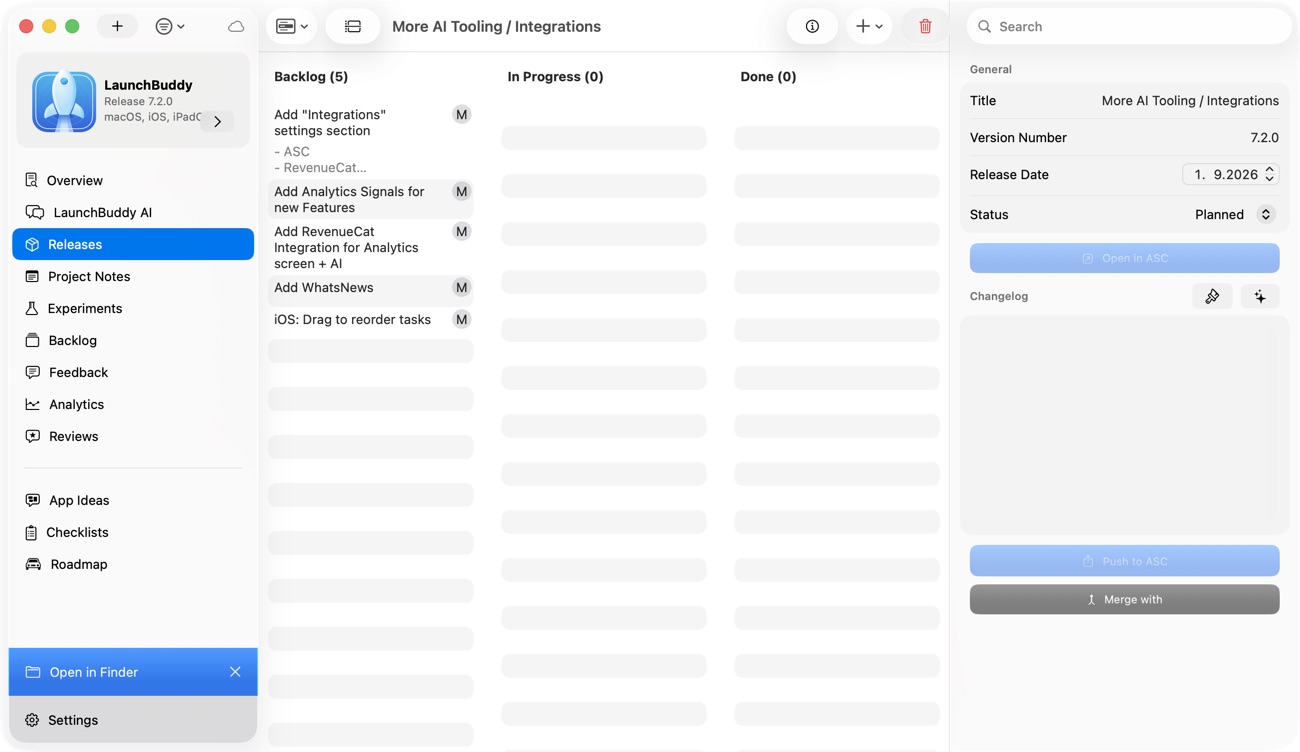
LaunchBuddy sits at the intersection of several high-intent searches: iOS developer task manager, Xcode project manager, side project tracker, iOS app release manager, App Store submission tracker, and AI release notes workflow.
That is valuable because the problem is connected. Developers do not only need a place to type tasks. They need a place where tasks can become releases, releases can connect to App Store Connect, and AI can help turn completed work into launch-ready writing.
With LaunchBuddy, indie iOS developers can:
- Organize multiple Xcode projects
- Track features, bugs, ideas, and polish work
- Group tasks into App Store releases
- Reuse submission checklists
- Keep App Store Connect context close to release planning
- Use AI to draft release notes and app store copy
- Sync work across iPhone and Mac
- Ship with less context switching
That makes “iOS developer task manager” more than a label. It describes a focused workflow for developers who want to keep building, testing, submitting, and learning without losing the thread.
Manage the work behind every release
Shipping iOS apps is not just writing code. It is choosing the right scope, testing the right build, preparing App Store Connect, writing clear release notes, responding to feedback, and remembering what comes next.
An iOS developer task manager should support that whole path. Start with projects. Organize tasks by release. Use checklists for submission work. Bring App Store Connect status closer to your plan. Let AI help with drafts, but keep the release facts in control.
That is the workflow LaunchBuddy is designed for: simple enough for indie developers, specific enough for App Store releases, and focused on the real work of shipping.
