App Store Submission Tracker for Indie iOS Developers
An App Store submission tracker is the place where an iOS release becomes visible from the moment you choose a version to the moment the update is live.
For indie developers, that visibility matters. App Store Connect tells you the official state of the version, but the real work around a submission often lives somewhere else: Xcode tasks, TestFlight feedback, screenshots, metadata notes, review instructions, release notes, and the list of things you need to check after approval.
LaunchBuddy is built for that gap. It helps iOS developers organize projects, tasks, releases, and checklists, and with App Store Connect integration and AI features, it can keep submission status connected to the release work that caused it.
Why App Store submissions need tracking
Submitting an iOS app update sounds like one action, but it is usually a sequence of smaller decisions:
- Which version are you submitting?
- Which build is selected for App Review?
- Did TestFlight feedback change the release scope?
- Are screenshots current?
- Are metadata fields accurate?
- Are release notes written for the selected build?
- Are privacy, pricing, in-app purchases, and review notes ready?
- Is the release manual, automatic, scheduled, or phased?
- What needs to happen after approval?
App Store Connect holds the final submission state. A submission tracker holds the working context around that state.
Without that context, small mistakes become easy. You can submit the wrong build, leave a stale screenshot, forget a review note for a subscription flow, or publish release notes that describe a feature you moved to the next version.
An App Store submission tracker helps each release answer a better question: “What is still blocking this version from going live?”
Start with the release version
The version is the best container for submission work. Before opening App Store Connect, create a release and define:
- Version number
- Release goal
- Target build
- User-facing features
- Bug fixes
- Known risks
- Metadata changes
- TestFlight testing scope
- Review notes needed
- Launch or post-launch tasks
This gives the submission a boundary. If a task belongs to version 2.4, it should be completed, moved to a future release, or intentionally cut before submission. If it does not belong to 2.4, it should not quietly slip into release notes or screenshots.
In LaunchBuddy, the release can act as the home for this context. App Store Connect remains the source of truth for Apple’s review workflow, while LaunchBuddy keeps the project management layer easier to see.
Track App Store Connect status beside the work
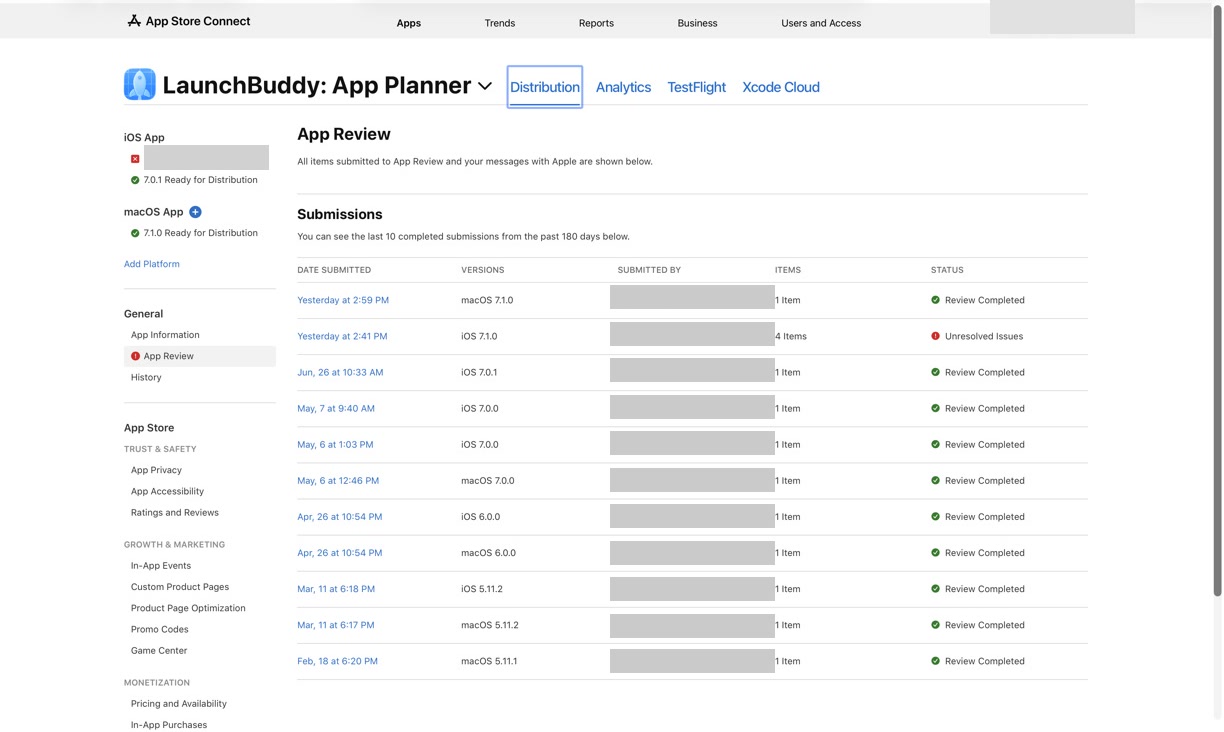
The most useful App Store submission tracker does not need to copy every App Store Connect field. It needs to surface the statuses that affect the release plan.
For each version, track the key submission states:
- Draft release created
- Build uploaded
- Build processed
- TestFlight testing complete
- Build selected for App Store version
- Metadata reviewed
- Screenshots verified
- Compliance and privacy checked
- Review notes ready
- Submitted for review
- Waiting for review
- In review
- Rejected or metadata rejected
- Approved
- Pending developer release, if manual release is selected
- Released to the App Store
- Post-launch follow-up complete
This is especially helpful when you ship more than one app, manage both iPhone and Mac versions, or pause a release while waiting for beta feedback. The status itself matters, but the next action matters more.
For example, “Waiting for Review” usually means the work is done for now. “Rejected” means the rejection reason should become one or more tasks. “Pending Developer Release” means you need to decide when to make the version available. A tracker turns status into action.
Keep the selected build visible
The selected build is the anchor of the submission. Everything else should match it.
Before submitting, check:
- The version and build numbers are correct
- The build has finished processing
- The build was tested in TestFlight
- Known release blockers are resolved
- Screenshots reflect that build
- Release notes describe that build
- Review notes mention any non-obvious flows in that build
- In-app purchases or subscriptions are configured for that build
This is where many indie workflows get messy. You might upload build 184, draft release notes, find a bug, upload build 185, update screenshots, then upload build 186 for one final fix. If the submission tracker does not show which build is final, it is easy for copy, screenshots, and review notes to drift.
For a deeper beta workflow, read TestFlight release management for indie iOS developers. TestFlight is often the stage where the final App Store submission becomes trustworthy.
Treat metadata as submission work, not marketing work
App Store metadata is easy to separate from development work, but during a release it should be part of the submission tracker.
Add checklist items for:
- App name and subtitle
- Keyword field
- Description
- Promotional text
- Screenshots and app previews
- Support URL
- Marketing URL
- Privacy policy URL
- App Privacy answers
- Age rating
- Pricing and availability
- In-app purchases or subscriptions
- Review notes and demo account details
You do not need to rewrite every field for every release. A small bug fix may only need a quick review. A feature launch may need new screenshots, a better first paragraph, and updated keywords.
The important habit is making metadata visible before submission. If your release changes the app’s value proposition, your App Store page may need to change with it.
For a field-by-field pass, use the App Store Connect release checklist before submitting.
Use AI to reduce submission friction
AI is useful in an App Store submission tracker when it works from structured release context. The release already contains tasks, completed work, TestFlight notes, and checklist status. That gives AI better input than a blank prompt.
AI can help draft:
- App Store release notes
- A summary of what changed since the last version
- Review note wording
- Metadata alternatives
- Follow-up tasks from TestFlight feedback
- A short launch announcement
- A post-release checklist summary
The safe workflow is:
- Collect the release context.
- Ask AI for a draft or summary.
- Compare every claim against the selected build.
- Remove internal details and unsupported promises.
- Save the final copy with the release.
This keeps AI in the right role. It reduces blank-page friction and helps organize information, but the developer still decides what is true, safe, and ready for App Review.
If release notes are the hardest part of your submission, read AI release notes for iOS apps.
A reusable App Store submission tracker template
Use this template for each iOS release:
Release:
Version:
Goal:
Target build:

Scope:
- Features:
- Fixes:
- Deferred:

Build and TestFlight:
- Archive uploaded:
- Build processed:
- Internal testing complete:
- External testing complete:
- Blocking feedback resolved:
- Final build selected:

App Store Connect:
- Version draft created:
- Build attached:
- Metadata reviewed:
- Keywords reviewed:
- Screenshots verified:
- App Privacy checked:
- Age rating checked:
- Pricing and availability checked:
- IAPs or subscriptions checked:
- Review notes ready:

AI-assisted work:
- Release notes drafted:
- Release notes verified against final build:
- Review notes drafted:
- Metadata copy reviewed:

Submission status:
- Submitted for review:
- Waiting for review:
- In review:
- Rejected or metadata rejected:
- Approved:
- Pending developer release:
- Released:

Follow-up:
- Live App Store page checked:
- Reviews monitored:
- Support issues tracked:
- Next release tasks created:
The template should change to fit your app. A solo utility app with no accounts may not need demo credentials. A subscription app should track purchase testing carefully. A localized app may need a metadata and screenshot pass for every important locale.
The point is not to make the checklist longer. The point is to make the release easier to trust.
What an App Store submission tracker looks like in practice
Imagine you are shipping version 3.2 of an indie productivity app. The update includes:
- A redesigned dashboard
- A sync reliability fix
- New onboarding copy
- Updated screenshots
- AI-drafted release notes
Without a submission tracker, the work might look like this:
- Build 210 is uploaded to TestFlight
- One tester reports onboarding confusion
- Build 211 fixes the onboarding copy
- Screenshots still show build 210
- Release notes mention the dashboard, but not the sync fix
- Review notes are copied from the previous release
- The app is approved, but nobody checks the live page until later
Nothing there is unusual. It is exactly the kind of scattered release work indie developers deal with.
With an App Store submission tracker, version 3.2 has a clearer path:
- Build 211 is marked as the final build
- TestFlight feedback is attached to the release
- Updated screenshots are checked against build 211
- AI drafts release notes from completed tasks
- Release notes are verified before submission
- Review notes are updated for the new onboarding flow
- App Review status becomes visible next to follow-up tasks
- The live App Store page is checked after release
The submission did not become more complicated. It became easier to see.
How LaunchBuddy helps track App Store submissions
LaunchBuddy is not trying to replace App Store Connect. App Store Connect remains the official place for App Review, TestFlight, metadata, and release state.
LaunchBuddy helps manage the work around that official process:
- Organize Xcode projects and app tasks
- Group work into release versions
- Reuse submission checklists
- Keep App Store Connect work visible beside release tasks
- Track TestFlight feedback and release blockers
- Use AI to draft release notes and summarize release context
- Keep project context available across iPhone and Mac
That combination matters because the hardest part of submission is often not one App Store Connect field. It is knowing whether every task, build, screenshot, note, and decision still matches the version you are about to send to Apple.
For the broader workflow, read iOS app release management and App Store Connect project management. An App Store submission tracker is one focused layer inside that system.
Ship with a clearer submission workflow
An App Store submission tracker gives each release a home. Instead of treating App Store status, TestFlight feedback, metadata, release notes, and post-launch tasks as separate chores, connect them to the version you are preparing.
Start with the release. Keep the selected build visible. Track App Store Connect status beside the work. Use AI for drafts and summaries, then verify everything before submitting.
That is the workflow LaunchBuddy is designed to support: fewer forgotten steps, less context switching, and a calmer path from Xcode to the App Store.