LaunchBuddy vs Appfigures: Which Tool Should Indie App Developers Choose?
LaunchBuddy vs Appfigures is less a contest between equivalent products than a choice between two different centers of gravity. LaunchBuddy helps indie Apple developers decide what to build, organize the work, and ship each release. Appfigures is a mature cross-store analytics and intelligence platform for measuring apps, researching markets, improving ASO, and managing reviews at scale.
The short verdict: choose LaunchBuddy when your main problem is turning app ideas, feedback, and unfinished work into a controlled App Store release. Choose Appfigures when your main problem is understanding performance across stores, researching keywords and competitors, or operating a data-heavy growth workflow. Use both when you need Appfigures to identify an opportunity and LaunchBuddy to turn it into the next shipped version.
Neither product replaces App Store Connect, Xcode, or your deployment pipeline. The useful question is whether you need a product-and-release workspace or a deeper growth-data platform.
LaunchBuddy vs Appfigures at a glance
| Area | LaunchBuddy | Appfigures |
|---|---|---|
| Primary job | App ideas, project planning, release-scoped tasks, submission checklists, and selected App Store Connect actions | Cross-store analytics, ASO, app and market intelligence, and review operations |
| Best fit | Solo developers and small studios shipping Apple-platform apps | Developers, publishers, marketers, and analysts measuring apps across stores |
| Release planning | App-centric backlogs, tasks assigned to versions, release status, and reusable checklists | Not the product’s main focus; its public product catalog centers on reports, growth, and intelligence |
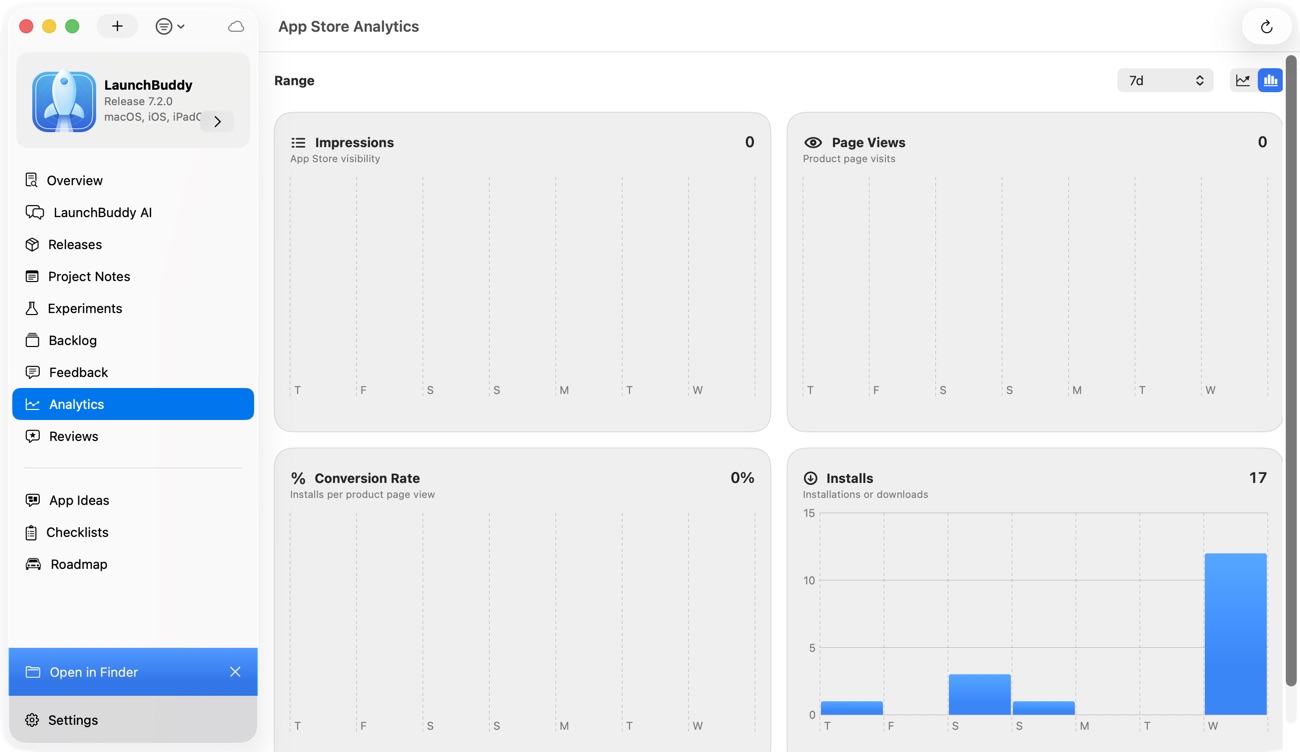
| Analytics | Focused App Store Connect view of downloads, revenue, and subscription metrics beside release work | Broad reporting for downloads, revenue, subscriptions, churn, payouts, ad revenue, ad spend, usage, retention, and more |
| ASO | Records icon, screenshot, and copy experiments with baseline and result metrics | Keyword research, popularity and competition data, rank monitoring, competitor keywords, translation, and alerts |
| Market intelligence | No dedicated competitor-estimate or market-research suite | Download and revenue estimates, app profiles, competitor comparison, SDK intelligence, trends, and market exploration |
| Reviews | Apple reviews, replies, AI-assisted drafts, and review-to-task conversion | Cross-store alerts, filters, search, translation, replies, exports, sharing, and API access |
| Working environment | Native iPhone, iPad, and Mac apps with private iCloud sync | Centralized reporting across major stores, data sources, services, and dashboards |
This difference matters more than the number of checked boxes. Both products can display analytics and reviews, but they help you do different things after you see them.
What LaunchBuddy is designed to do
LaunchBuddy is an app project and release manager built around the way an indie developer ships. Each app is a project with its own ideas, notes, backlog, releases, reviews, and experiments. Tasks can remain at app level or be assigned to the version in which they should ship, so “important someday” does not quietly become “required for this submission.”
The workflow can begin before an app exists. Idea Chat helps you explore an audience, positioning, validation, features, launch strategy, and monetization. When an idea becomes a real app project, LaunchBuddy can propose concrete backlog tasks. Those AI actions are reviewable: the developer still decides which hypotheses are supported and which tasks belong in scope.
Once development starts, LaunchBuddy connects the operational pieces that generic task managers often separate:
- App-centric projects rather than one mixed company backlog
- Backlog tasks that can be committed to a specific release
- Reusable App Store submission checklists that add the same required work to every version
- Release notes grounded in completed work
- Product and marketing notes kept with the app
- ASO experiments for icon, screenshot, and copy changes
- Post-release reviews and metrics beside the release that may have affected them
LaunchBuddy Pro can connect to App Store Connect to read and reply to reviews, show key downloads, revenue, and subscription metrics, and upload approved release notes. A one-star review can become a structured product task through review-to-task instead of disappearing after a reply.
Its AI is most useful because it can work from app context such as tasks, releases, and cached reviews. That grounding does not make every draft correct; public responses and release notes still need human verification. It does make the starting point more relevant than prompting a general chatbot with no knowledge of what actually changed.
The native workflow is another practical distinction. iCloud keeps project data current across iPhone, iPad, and Mac. You can capture an idea or review a release away from your desk, then continue on the Mac without maintaining another copied project state.
For agent-assisted workflows, LaunchBuddy also has a macOS-only local MCP server. It can expose project and release context to compatible clients, while supported writes become proposals that require approval in LaunchBuddy. It is a release-workflow bridge, not a remote App Store Connect automation service.
What Appfigures is designed to do
Appfigures starts from data. It connects store and analytics accounts, normalizes their reports, and provides one place to inspect an app portfolio and the surrounding market. Its official report catalog covers sales and downloads, subscriptions, revenue, ad revenue, payments, unified ad spend, ratings, reviews, usage, category ranks, keywords, featuring, competitors, and market trends.
That breadth is especially valuable when an indie business has outgrown a single-store dashboard. Appfigures lists integrations for the iOS App Store, Google Play, Amazon, Steam, Windows, Stripe, App Store Connect Analytics, Firebase, ad-monetization networks, Slack, and other sources on its analytics integrations page. Exact availability can depend on the connected source and account, but the product is clearly built for aggregation.
Appfigures also separates your first-party connected performance from intelligence about the wider market. Its App Intelligence product includes daily download and revenue estimates, competitor comparisons, app profiles, rankings, monetization details, SDK intelligence, audience data, and alerts. That can help answer questions LaunchBuddy is not intended to answer:
- How large might a category or competitor be?
- Which markets appear to be growing?
- How does one app’s performance compare with several rivals?
- Which SDKs are apps adopting or removing?
- Where is a competitor gaining visibility?
Competitor numbers are estimates, not the competitor’s private first-party reports. Appfigures explains that its download and revenue estimates come from models trained on shared real-world data and observable store information. Treat them as directional intelligence with model uncertainty, not accounting records.
Appfigures is also substantially deeper for keyword-led ASO. Its official ASO tools provide keyword discovery, AI-assisted suggestions, popularity and performance data, competitor keyword research, translation, hourly rank monitoring, and rank-change alerts across countries and stores. That is a research and monitoring system, not merely a place to record an experiment.
Finally, Appfigures provides a REST API for reports and account data. Its documentation says the Appfigures API can expose sales, ads, ranks, reviews, featured data, and supported public app data. Appfigures also documents API-backed CLI and MCP access, with availability tied to the data your plan can access and requests consuming credits. Check the current API access documentation before designing automation around it.
Where Appfigures is stronger
Analytics depth and consolidation
LaunchBuddy intentionally shows a focused App Store Connect snapshot. Appfigures is the stronger choice for serious reporting: cross-store downloads and revenue, subscription and churn analysis, ad income, ad spend, payouts, usage, retention, ranks, and portfolio-level comparisons. If you need to reconcile several monetization sources or give a growth report to a team, this difference is decisive.
ASO research and rank monitoring
LaunchBuddy can track what you changed and whether an experiment improved its chosen metric. Appfigures can help discover which keywords to target, monitor rank movement, find competitor gaps, and compare stores and countries. For ongoing keyword intelligence, Appfigures has the deeper toolset.
Competitor and market intelligence
LaunchBuddy manages your own product context. Appfigures researches the market around it. Estimates, competitor alerts, SDK signals, leaderboards, trending apps, and market exploration are useful when deciding whether a category, country, or acquisition opportunity deserves investment.
Cross-store review operations
Appfigures’ reviews and ratings tools support alerts, filtering by rating, version, country, or keyword, automatic translation, replies, exports, sharing, and API workflows across supported platforms. That is better suited to a portfolio receiving reviews in many countries and stores.
Where LaunchBuddy is stronger
From idea to shipped scope
Appfigures can reveal demand signals and competitive movement, but LaunchBuddy is designed to hold the product decision that follows. An app idea can become a project, proposed backlog tasks can be reviewed, and only accepted work needs to enter the next release.
Release-specific execution
LaunchBuddy makes the version a first-class planning object. Features, fixes, metadata work, screenshots, review notes, testing, and launch follow-up can be scoped to the release that owns them. Reusable submission checklists reduce the chance that a routine requirement is forgotten during a small update.
Closing the review-to-release loop
Both tools can surface and reply to reviews. LaunchBuddy’s distinctive step is converting a review into product work and connecting that work to a future version. The review is evidence, the backlog task is the decision, and the release records when the response became available to customers.
Native indie workflow
For an Apple-focused solo developer, a native iPhone and Mac workflow can be more useful than a broader analytics portal. Private iCloud sync keeps planning close at hand, while grounded AI and approval-gated automation help with drafting and task proposals without hiding the final decision.
The overlap: reviews, analytics, and ASO
The overlap is real, but it should not be mistaken for equal depth.
For reviews, Appfigures is stronger at monitoring and operating a large cross-store inbox. LaunchBuddy is stronger at moving one useful review into the app backlog and then a release. A studio may triage trends in Appfigures and create only the validated product work in LaunchBuddy.
For analytics, Appfigures is the analytical system. LaunchBuddy is the operational context around selected App Store Connect metrics. Use Appfigures to segment, compare, and diagnose; use LaunchBuddy to record what the signal means for the next release. LaunchBuddy should not be presented as a replacement for Appfigures’ analytics depth.
For ASO, Appfigures helps find and monitor opportunities. LaunchBuddy helps manage an experiment as product work: define the hypothesis, preserve a baseline, schedule the creative or copy tasks, and record the outcome. Research and execution can form one loop without being the same feature.
Who should choose LaunchBuddy?
Choose LaunchBuddy if most of these statements are true:
- You primarily ship iPhone, iPad, or Mac apps.
- Your tasks, app ideas, submission checks, reviews, and release notes are scattered.
- You want work assigned to a specific version rather than a generic board.
- You need reusable App Store submission checklists.
- You want a focused App Store Connect companion, not a full growth-intelligence platform.
- Turning review evidence into a backlog task matters more than operating a large support queue.
- A native iCloud workflow and contextual AI fit how you work.
Who should choose Appfigures?
Choose Appfigures if most of these statements are true:
- You need analytics across Apple, Google Play, or several other stores and data sources.
- Subscription, ad revenue, ad spend, payout, usage, or portfolio reporting needs more depth.
- Keyword research and rank monitoring are recurring growth work.
- Competitor estimates and market intelligence affect product or investment decisions.
- You manage reviews across stores, countries, and languages.
- You need exports, API access, alerts, or data shared across a growth team.
Before subscribing, verify current plan limits for the exact reports, intelligence data, API routes, review replies, and tracked apps you need. Those entitlements can change, which is why this comparison avoids quoting a price snapshot.
Using LaunchBuddy and Appfigures together
A combined workflow gives each product a clear responsibility:
- Observe in Appfigures. Review performance, keyword movement, competitor changes, and cross-store feedback.
- Form a hypothesis. Decide whether the signal supports an ASO test, bug investigation, feature candidate, or no action.
- Plan in LaunchBuddy. Create or update the app task, preserve the evidence, and assign accepted work to a release.
- Ship deliberately. Run the reusable submission checklist, verify the build, prepare release notes from completed work, and submit through Apple’s systems.
- Measure again. Use Appfigures for deeper post-release analysis and LaunchBuddy to connect the result to the release and next decision.
Avoid copying every chart movement into the backlog. Appfigures can produce many signals; LaunchBuddy should contain only the decisions and work that survive product judgment.
Frequently asked questions
Is LaunchBuddy an Appfigures alternative?
Only for a narrow set of Apple-focused review and analytics needs. LaunchBuddy is mainly a product and release workspace. Appfigures is mainly an analytics, ASO, and intelligence platform. They are complements when you need both jobs.
Does LaunchBuddy replace Appfigures analytics?
No. LaunchBuddy Pro shows key App Store Connect downloads, revenue, and subscription metrics near app projects and releases. Appfigures provides much deeper cross-store reporting, segmentation, monetization, usage, and intelligence capabilities.
Which is better for App Store reviews?
Appfigures is stronger for high-volume, cross-store monitoring, alerts, filters, translation, export, and reporting. LaunchBuddy is stronger when an Apple review should become a product task, enter the backlog, and be traced to a shipped fix.
Does Appfigures manage release tasks and submission checklists?
Appfigures’ public product catalog is centered on analytics, reviews, ASO, and market intelligence rather than release-scoped project management. Use a dedicated release workspace such as LaunchBuddy if versions, tasks, and reusable submission checklists are the missing layer.
Can either tool submit the complete app release?
Neither should be treated as a replacement for App Store Connect, Xcode, or CI. LaunchBuddy can upload release notes through its App Store Connect integration, but Apple remains the source of truth for builds, submission, review, and release state.
Do LaunchBuddy and Appfigures support MCP?
Yes, for different purposes. LaunchBuddy’s local Mac server exposes its app and release context and puts supported writes behind approval. Appfigures documents MCP as an API-backed way to pull data already available to your account, subject to its current access and credit rules. Confirm both products’ current setup details before connecting a client.
Choose the workflow you actually need
Choose Appfigures when better market and performance data is the constraint. Choose LaunchBuddy when turning decisions into a finished App Store release is the constraint. If both are true, let Appfigures explain what is happening and let LaunchBuddy organize what you will ship about it.
If your release work is currently split across notes, generic task boards, review tabs, and memory, download LaunchBuddy on the App Store and plan the next version as one app-centered workflow.