LaunchBuddy vs Forge: Which App Store Connect Tool Fits Your Workflow?
LaunchBuddy vs Forge is not a choice between two versions of the same app. Both help indie iOS developers spend less time in App Store Connect, but they start from different problems.
The short verdict: choose LaunchBuddy when you need an operating system for the whole app journey—ideas, app projects, backlog tasks, release scope, reusable checklists, customer feedback, and post-launch learning. Choose Forge when your main goal is to perform more App Store Connect management from a fast native Mac app, especially metadata, screenshots, versions, TestFlight, in-app purchases, subscriptions, and other Apple-facing operations.
They can also work well together. LaunchBuddy can hold the plan and explain what should ship; Forge can carry out supported App Store Connect work. Apple remains the source of truth either way.
LaunchBuddy vs Forge at a glance
| Area | LaunchBuddy | Forge |
|---|---|---|
| Primary job | App, task, and release operating system with selected App Store Connect features | Native macOS client for broad App Store Connect management |
| Best starting point | An idea, backlog, app project, or planned release | An existing App Store Connect app or operation |
| Release planning | Release-scoped tasks, backlog, notes, and reusable submission checklists | App versions, release status, review submission, release history, and phased rollouts |
| Metadata | Plan metadata work, draft copy with app context, track ASO experiments, and upload release notes | Edit localized metadata; manage screenshots, previews, custom product pages, and Product Page Optimization |
| TestFlight | Organize testing tasks, feedback follow-up, and readiness inside a release | Manage builds, testers, groups, distribution, beta review, feedback, and crash reports |
| Customer reviews | Read and reply; AI-assisted replies; convert one-star feedback into backlog tasks | Unified multi-app inbox, filters, response history, sentiment/rating views, and AI suggestions |
| AI center of gravity | Ideas, tasks, releases, cached reviews, release notes, and review-to-task workflow | Live App Store Connect questions and operations such as metadata, screenshots, and reviews |
| Analytics and experiments | Downloads, revenue, and subscription dashboard; track icon, screenshot, and copy experiments | Subscription metrics plus Apple product-page experiment and custom-product-page management |
| Platforms | iPhone, iPad, and Mac with iCloud sync | Native macOS app |
| App Store Connect scope | Selected reads and writes; not a full ASC replacement | Broad Apple-facing management across 17 advertised modules |
| Price on July 20, 2026 | Free for two apps and two releases; Pro is $2.99/month or $19.99/year | Free during its launch phase; Forge says future pricing changes will be announced |
Feature coverage changes. Verify any operation critical to your release against each product’s current documentation.
The key difference: release context versus App Store Connect operations
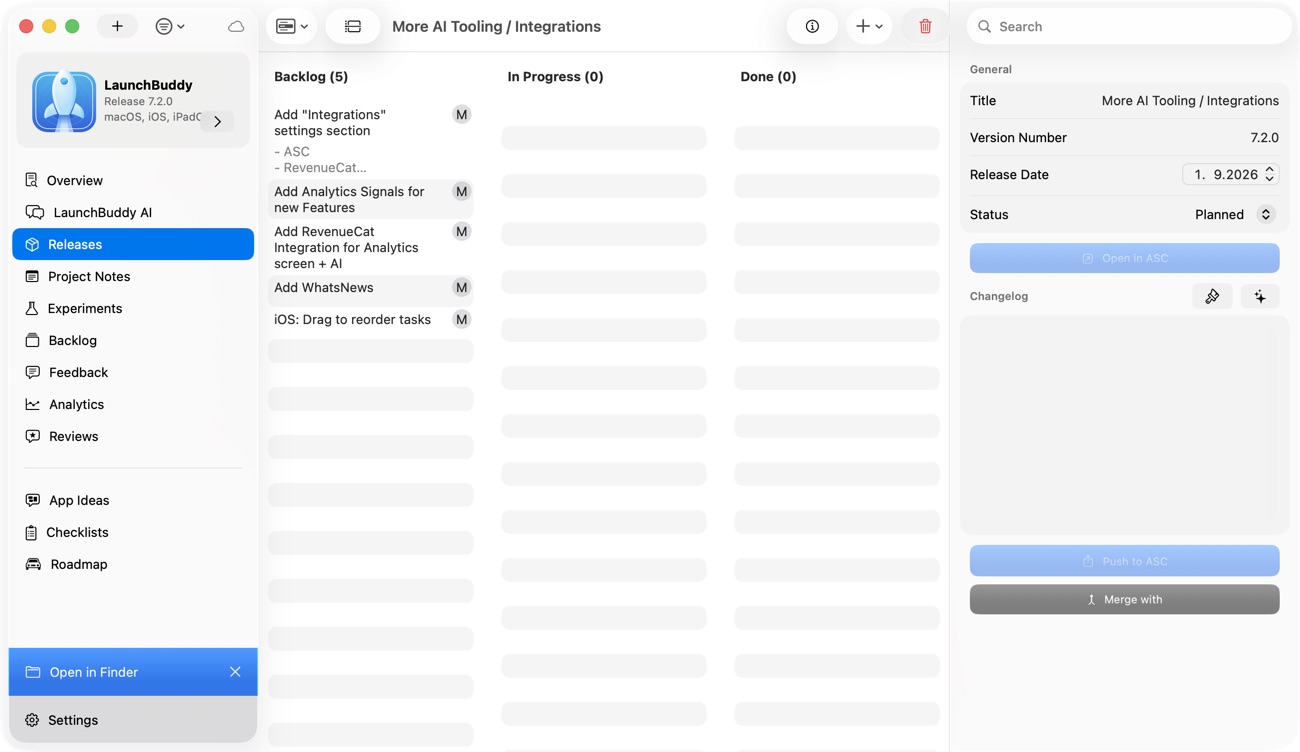
LaunchBuddy begins before an App Store Connect version may exist. An idea can become an app-centric project, candidate backlog tasks, and then a release with an explicit scope. Development tasks, launch work, notes, and checklist items stay attached to that app and version. After launch, App Store reviews and analytics can feed the next backlog and ASO experiment.
Forge begins closer to Apple’s records. Its feature catalog covers app information, screenshots and previews, custom product pages, Product Page Optimization, versions, TestFlight, purchases, subscriptions, reviews, in-app events, nominations, users, and localizations. Its strength is replacing browser navigation with native Mac workflows for supported App Store Connect resources.
LaunchBuddy moves from idea to app, backlog, release tasks, checklist, release, reviews, and the next task. Forge moves through App Store Connect data, assets, TestFlight, commerce, reviews, and release state. Neither model is universally better: the question is whether your recurring problem is organizing the work or operating Apple’s system.
Where Forge is stronger
Metadata, localization, and product-page assets
Forge can edit app names, subtitles, descriptions, keywords, and promotional text across localizations. Its dedicated screenshot manager supports drag-and-drop uploads, device-size organization, localization, reordering, previews, and app preview videos. It also advertises custom product pages and Apple’s Product Page Optimization workflow.
LaunchBuddy does not claim that breadth. It can make metadata review part of a release, keep copy and screenshot tasks in scope, use grounded AI to help draft text, track ASO experiments, and upload approved release notes. It is not the tool for bulk-editing every localized field or directly arranging screenshot sets in App Store Connect.
LaunchBuddy’s ASO experiments record a hypothesis and baseline-versus-experiment results for icons, screenshots, or copy. Forge manages Apple’s actual Product Page Optimization treatments and metrics. One is a learning log connected to the roadmap; the other is an App Store Connect operation.
TestFlight administration
Forge’s TestFlight module manages builds, testers, groups, invitations, distribution controls, beta review submission, tester feedback, and crash reports. If your frustration is adding builds to groups, monitoring processing, or managing external testing without the browser, Forge is the closer match.
LaunchBuddy does not distribute builds or administer testers and groups. Its role is to track the human workflow around beta testing: which release is being tested, which tasks block it, whether checklist steps are complete, and what follow-up work came from feedback. Xcode, CI, TestFlight, Forge, or App Store Connect still handles the actual build and tester operations.
Commerce and account administration
Forge advertises modules for in-app purchases, renewing and non-renewing subscriptions, pricing, users and access, in-app events, and editorial nominations. LaunchBuddy does not claim to configure those App Store Connect resources. It can hold a task such as “verify annual subscription localization,” but the operation itself belongs in Forge or App Store Connect.
For developers with localized apps, subscriptions, frequent TestFlight cohorts, or many screenshots, that breadth is a substantial advantage.
Where LaunchBuddy is stronger
From idea to app to release
LaunchBuddy treats each app as a durable project. Ideas can be explored with Idea Chat, converted into reviewable backlog tasks, assigned to a specific release when accepted, and deliberately left for later when they are out of scope. Release notes can then start from the work that actually shipped.
Forge’s official pages focus on apps already represented in App Store Connect and the resources attached to them. They do not position Forge as an idea manager, product backlog, or release-scoped development task system.
Reusable release discipline
LaunchBuddy’s submission checklists can automatically add repeatable tasks to every release. A checklist might cover TestFlight verification, screenshots, metadata, privacy, review notes, support links, release notes, and post-launch checks. Custom reusable checklists are part of LaunchBuddy Pro; the free tier includes a default checklist.
Forge can make an App Store Connect action faster. LaunchBuddy makes sure the right action appears in the plan and remains incomplete until handled.
Feedback that becomes product work
Both products can read and respond to public App Store reviews, but the downstream workflow differs.
Forge emphasizes a unified review dashboard across apps, rating and date filters, response history, sentiment and rating trends, and AI-suggested responses. That is useful for processing a busy reviews inbox.
LaunchBuddy keeps reviews next to app and backlog context. It can draft a response using app context and turn a one-star review into a task, preserving the issue for a future release. Its App Store Connect analytics dashboard shows downloads, revenue, and subscription metrics.
A cross-device workspace
LaunchBuddy runs on iPhone, iPad, and Mac, with projects synchronized through the developer’s private iCloud account. Forge is intentionally a native macOS App Store Connect client.
LaunchBuddy also has a confirmed local, macOS-only MCP server for compatible agents. It can expose project and release reads, including task/checklist progress and cached reviews. Supported writes become proposals that must be approved in LaunchBuddy, and write tools require Pro. It is an automation bridge for LaunchBuddy context—not a general App Store Connect MCP server and not a way to upload builds.
Reviews and AI: similar labels, different jobs
Forge Agent is designed to understand and act on live App Store Connect data. Its official page describes natural-language metadata updates across localizations, screenshot and preview management, review analysis and response generation, and app status questions. Forge says writes are confirmation-gated. Its pricing FAQ also says Forge Agent uses the developer’s own OpenAI API key.
LaunchBuddy AI is grounded in tasks, releases, and cached review data. App Chat can draft release notes or reason about planned work; Idea Chat can brainstorm and propose backlog items; review assistance can draft responses and connect feedback to tasks. AI and automation changes use an approval flow.
In practical terms:
- Choose Forge AI when the desired outcome is an App Store Connect action, such as updating localized metadata.
- Choose LaunchBuddy AI when the desired outcome is a better plan, backlog item, release draft, or feedback loop grounded in your project.
- In both cases, verify public copy and consequential writes before approving them.
Can you use LaunchBuddy and Forge together?
Yes. Their different boundaries make a combined workflow practical:
- Capture and refine the idea in LaunchBuddy.
- Convert accepted work into backlog tasks and assign the in-scope tasks to a release.
- Apply a reusable TestFlight and submission checklist.
- Build and upload with Xcode, Fastlane, or CI.
- Use Forge for TestFlight administration and beta review; track blocking fixes in LaunchBuddy.
- Draft release notes from completed work, then review them.
- Use Forge for localized metadata, screenshots, version, and submission operations—or LaunchBuddy for the narrower release-note upload.
- After launch, process reviews and turn actionable feedback into LaunchBuddy tasks.
- Record the next ASO hypothesis and compare results later.
LaunchBuddy owns product and release context; Forge or App Store Connect owns Apple-facing configuration; Apple remains authoritative.
Who should choose LaunchBuddy?
LaunchBuddy is the better first choice if most of these sound familiar:
- Ideas, bugs, launch tasks, and release notes are scattered across Notes, reminders, and memory.
- You want tasks grouped by app and by the release that will ship them.
- You repeat the same submission checks but still miss steps.
- Customer reviews should influence the backlog, not just receive replies.
- You want AI grounded in tasks, releases, and review context.
- You track ASO hypotheses beyond one Apple Product Page Optimization test.
- You work from iPhone as well as Mac.
- You need selected App Store Connect visibility without managing every ASC resource.
It is not the best fit if your only requirement is bulk metadata, screenshot uploads, TestFlight group administration, IAP configuration, or direct submission management.
Who should choose Forge?
Forge is the better first choice if:
- The App Store Connect website itself is the main bottleneck.
- You manage metadata and screenshots across many localizations.
- You actively administer TestFlight builds, testers, and groups.
- You need native workflows for purchases, subscriptions, product pages, or in-app events.
- You want an AI assistant oriented toward live App Store Connect operations.
- Your work happens primarily on a Mac.
It is not positioned as a backlog, release taskboard, idea system, or reusable project checklist. Pair it with a planning tool if that context is missing.
Frequently asked questions
Is Forge an App Store Connect replacement?
Forge is a native client for broad App Store Connect workflows, but Apple remains the source of truth. Agreements, review decisions, and unsupported operations still belong to Apple’s systems.
Does LaunchBuddy manage TestFlight?
LaunchBuddy manages release tasks and checklists around TestFlight. It does not claim to upload builds, invite testers, manage groups, distribute builds, or submit a beta for review. Forge supports those operational TestFlight workflows.
Which tool is better for App Store metadata?
Forge is stronger for directly editing localized metadata, screenshots, previews, custom product pages, and Product Page Optimization. LaunchBuddy is stronger for deciding what metadata needs attention, connecting that work to a release, drafting from release context, tracking broader ASO experiments, and uploading release notes.
Which tool is better for App Store reviews?
Choose Forge for a multi-app operations inbox with filters, response history, trend views, and AI suggestions. Choose LaunchBuddy when the important step is connecting a review to app context and turning severe feedback into planned product work. Both support reading and responding to reviews.
Is Forge free?
As of July 20, 2026, Forge’s pricing page says it is free with all features during launch. That is not a guarantee of permanent pricing. LaunchBuddy is free for two apps and two releases; App Store Connect, AI, custom checklists, and unlimited portfolio features require Pro.
Which one should an indie developer try first?
Start with the bottleneck. If you lose track of what to build and ship, try LaunchBuddy. If you know exactly what to do but App Store Connect makes doing it slow, try Forge. If both are true, use a small real release to test the combined workflow.
Choose the layer you are missing
The useful question is not whether LaunchBuddy or Forge has the longer feature list. It is whether you are missing a release operating system or a native App Store Connect operations client.
Forge is stronger deep inside App Store Connect. LaunchBuddy is stronger across the wider loop from idea to tasks, release, customer response, and the next decision. Keep those boundaries clear and either product can remove real friction without pretending Apple, Xcode, TestFlight, or your judgment no longer matters.
If the missing layer is a calm, app-centered release workflow, download LaunchBuddy on the App Store and start with your next release.