App Store Connect Alternatives: Which Tool Fits Your iOS Workflow?
Searching for an App Store Connect alternative usually starts with a specific frustration. Maybe you are tired of moving between browser tabs on release day. Maybe you want metadata in Git, automated uploads in CI, a better reviews inbox, or one place to organize everything that must happen before submission.
There is an important limitation, though: no third-party tool truly replaces App Store Connect. Apple still owns the app record, TestFlight service, agreements, submission process, and final release state. The useful alternatives are clients, automation tools, and release workspaces that connect to Apple’s system while improving one part of the workflow.
This guide explains the main types of App Store Connect alternatives, what each one is good at, and how to choose without buying a tool that solves the wrong problem.
What developers mean by an App Store Connect alternative
“Alternative” can describe several different needs:
- A faster native Mac interface for App Store Connect
- A command-line tool for repeatable uploads and metadata changes
- CI/CD that builds, signs, tests, and deploys automatically
- A project manager for release tasks and submission checklists
- A better inbox for App Store reviews
- A clearer analytics dashboard
- AI assistance for release notes, metadata, or review replies
- A way to manage several apps without losing release context
Those are different jobs. A native client may make metadata editing pleasant but not manage your Xcode backlog. A CI pipeline can upload every build reliably but will not decide whether screenshots are current. A project management app can keep the release organized but may intentionally leave signing and binary upload to Xcode or CI.
Before comparing products, name the part of App Store Connect that is slowing you down.
Can you actually replace App Store Connect?
No. For public App Store distribution, App Store Connect remains Apple’s source of truth.
Apple’s service is still where you:
- Create and manage the official app record
- Accept agreements and maintain tax and banking information
- Manage users and roles
- Upload or select builds
- Configure TestFlight
- Maintain App Store product information
- Submit versions to App Review
- Choose release timing and availability
- Manage in-app purchases and subscriptions
Third-party tools normally work through the App Store Connect API, supported upload tools, or data exported by Apple. They can provide a better interface or automate supported actions, but the underlying resources still live in App Store Connect.
That distinction matters when evaluating marketing claims. Ask whether a tool is:
- A client for Apple’s data
- An automation layer that performs App Store Connect actions
- A workflow layer that organizes work around a release
Many good tools combine two categories. Very few cover all three deeply.
The main types of App Store Connect alternatives
1. Apple’s own companion tools
Start by checking whether Apple’s tools already solve the problem.
The App Store Connect app for iPhone and iPad is useful for checking status, viewing performance, and handling some review activity away from a desk. Transporter provides a Mac interface for uploading app packages and other content. Xcode can upload archives directly.
These tools are a good fit when:
- You only need occasional access away from the browser
- Your release process is simple
- You prefer first-party tools
- Build upload is the main pain point
They do not provide a complete project plan around each version. You may still need another place for tasks, checklists, release notes, screenshot work, and post-launch follow-up.
2. Native App Store Connect clients for Mac
A native client connects to App Store Connect and presents its data in a Mac-focused interface. Depending on the product, it may support metadata, localizations, screenshots, TestFlight, reviews, analytics, in-app purchases, or submissions.
Examples in this category include AppConsul, Asomium, Forge, Helm, and other Mac clients. Feature coverage changes quickly, so compare their current documentation against your exact workflow rather than assuming every native client supports every App Store Connect resource.
A native client is a strong choice when your main problem is:
- Slow or fragmented browser navigation
- Editing metadata across many locales
- Managing screenshots and product-page assets
- Working across several App Store Connect apps
- Wanting a keyboard-friendly desktop workflow
Check these details before connecting one:
- Does it support the App Store Connect features you use today?
- Are write operations previewed before they are applied?
- Where is the
.p8private key stored? - Does it connect directly to Apple or pass data through a vendor server?
- Can it work with the minimum App Store Connect role required?
- Is there a clear way to remove credentials and revoke access?
- Does it show which changes are local, pending, or already live?
A polished native interface can save time, but it is not automatically a release manager. If the missing context lives in tasks, TestFlight feedback, and launch decisions, a faster metadata editor only solves part of the problem.
3. Fastlane and command-line automation
Fastlane is a widely used open-source automation toolkit for mobile releases. Its actions can build and sign apps, upload binaries and metadata, manage screenshots, interact with TestFlight, and support repeatable deployment lanes.
Command-line automation is useful when:
- The same release steps happen every time
- Metadata and screenshots should be version-controlled
- Several developers need a repeatable process
- Uploads should run in CI
- Manual mistakes are more costly than maintaining scripts
A simple automated release flow might look like this:
Pull request merged
  -> Run tests
  -> Archive and sign
  -> Upload build
  -> Upload reviewed metadata
  -> Distribute to an internal TestFlight group
  -> Notify the developer
  -> Wait for human approval before App Store submission
The tradeoff is maintenance. Signing changes, API changes, Ruby dependencies, CI images, and new App Store fields can break a pipeline. Automation is most valuable for stable, repeated actions—not for decisions that still need product judgment.
Keep submission approval explicit unless your release process is mature enough to support a different policy.
4. Direct App Store Connect API tools
The App Store Connect API is a good foundation when you need a custom workflow that an existing product does not provide. Apple exposes resources for areas such as apps, versions, builds, beta testing, reviews, review responses, and reporting.
Direct API work is a good fit when:
- You need an internal dashboard
- App Store state must connect to another engineering system
- A script needs only a small number of actions
- You want precise control over reads and writes
- Your team can maintain authentication and API changes
It is usually a poor fit when the real goal is simply “make release day less stressful.” Building a client requires more than calling one endpoint. You need short-lived JWT authentication, pagination, retries, error handling, role management, secure key storage, auditability, and protection against accidental writes.
If you build your own integration, begin with read-only operations. Add one narrowly scoped write action at a time, and show a preview before changing App Store data.
5. Mobile CI/CD platforms
CI/CD services focus on the path from source code to a tested, signed, distributed build. They can run tests, manage signing credentials, build on hosted Mac infrastructure, and deploy to TestFlight or App Store Connect.
Choose this category when your biggest bottleneck is:
- Building without a local Mac
- Keeping signing repeatable
- Running tests before every upload
- Distributing beta builds automatically
- Creating a consistent team deployment process
CI/CD does not eliminate the product work around submission. Someone still needs to verify the release scope, screenshots, App Privacy answers, review notes, support URLs, pricing, and launch timing.
Think of CI/CD as build and deployment infrastructure. Pair it with a release checklist or project workflow when the human side of shipping is where mistakes occur.
6. Release and project management for iOS developers
App Store Connect records submission data, but it does not manage all the work that creates a release. A release-management tool fills that gap.
This category is useful when you need to connect:
- Features and bug fixes assigned to a version
- Reusable App Store submission checklists
- TestFlight feedback that changes the release
- Metadata and screenshot tasks
- Release notes based on completed work
- App Review follow-up
- Customer reviews that should become backlog tasks
- Post-launch analytics and experiments
LaunchBuddy belongs primarily in this category. It combines app projects, release planning, taskboards, and checklists with selected App Store Connect features. LaunchBuddy Pro adds a reviews inbox, analytics, release-note uploads, review-to-task actions, and AI features that use app context.
It does not pretend that Xcode, TestFlight, or App Store Connect no longer exist. Its job is to keep the work around those systems connected to the version you are shipping.
App Store Connect alternatives compared by job
| Your main need | Best category to evaluate | Important tradeoff |
|---|---|---|
| Upload a build from a Mac | Xcode or Transporter | Limited surrounding workflow |
| Edit metadata and localizations faster | Native App Store Connect client | Coverage varies by client |
| Automate repeatable release actions | Fastlane or another CLI | Requires script maintenance |
| Build, test, sign, and deploy in the cloud | Mobile CI/CD | Does not make product decisions |
| Create a custom internal integration | App Store Connect API | Highest engineering cost |
| Organize tasks, checklists, and releases | iOS release-management tool | May not upload binaries |
| Read and respond to reviews efficiently | Review inbox or ASC client | Check publishing controls |
| Turn feedback into roadmap work | Project manager with review integration | Needs disciplined triage |
| Draft copy with app context | AI-assisted release workspace | Every claim still needs review |
The best setup may use more than one category. For example:
Xcode or CI
  -> build, test, and upload

App Store Connect
  -> official version, TestFlight, review, and release state

LaunchBuddy
  -> release scope, tasks, checklists, reviews, analytics, and follow-up
That is not unnecessary duplication if each tool has a clear responsibility. Duplication begins when the same release state is manually copied into several systems with no owner.
How to choose the right alternative
Step 1: Write down the repeated failure
Do not begin with a feature list. Begin with what goes wrong.
Examples:
- “I forget a submission check after every small update.”
- “Localizing metadata takes too long.”
- “Build uploads are inconsistent between team members.”
- “One-star reviews never reach the backlog.”
- “I cannot tell which completed tasks belong in the release notes.”
- “I manage four apps and lose track of the next version of each.”
A precise failure makes the right tool category much easier to identify.
Step 2: Separate automation from judgment
Good automation handles deterministic work:
- Running tests
- Building an archive
- Uploading a known artifact
- Fetching reviews
- Checking field lengths
- Generating a draft from approved context
Human judgment should remain visible for:
- Deciding release scope
- Confirming whether a bug is really fixed
- Approving public metadata
- Checking privacy declarations
- Responding to sensitive reviews
- Making App Review representations
- Releasing a version to customers
AI can speed up drafting and summarization, but it does not change that boundary.
Step 3: Check API key security
Many App Store Connect alternatives require an API key. Before connecting one, understand:
- Whether it uses a team or individual key
- Which App Store Connect role it requires
- Whether access can be limited to assigned apps
- Where the private
.p8key is stored - Whether credentials or app data pass through another server
- How to revoke the integration
Apple only allows the private key file to be downloaded once. Store it securely, never commit it to Git, and use a dedicated key when practical. The App Store Connect API key guide covers setup, roles, and common errors in detail.
Do not grant Admin access merely to avoid investigating a permission error. Use the least-privileged role that supports the required actions.
Step 4: Test one real release
A demo with sample data rarely exposes the actual friction. Test the tool during a low-risk update and answer:
- Did it reduce context switching?
- Could you see what it was about to change?
- Did it preserve a useful history?
- Was failure recovery clear?
- Did it add another status you had to maintain manually?
- Would you trust the same process with several apps?
Keep App Store Connect open as the source of truth during the trial. Verify that reads, writes, and displayed states match Apple’s system.
Step 5: Prefer a small, composable workflow
An indie developer usually does not need an enterprise release platform. A practical stack may be:
- Xcode for building and uploading
- App Store Connect for submission
- LaunchBuddy for releases, tasks, and checklists
Add Fastlane or CI when repeated build and upload work justifies it. Add a specialized metadata client when localization or screenshot operations become the bottleneck. Every tool should remove a repeated problem, not merely move it to a new dashboard.
Where LaunchBuddy fits
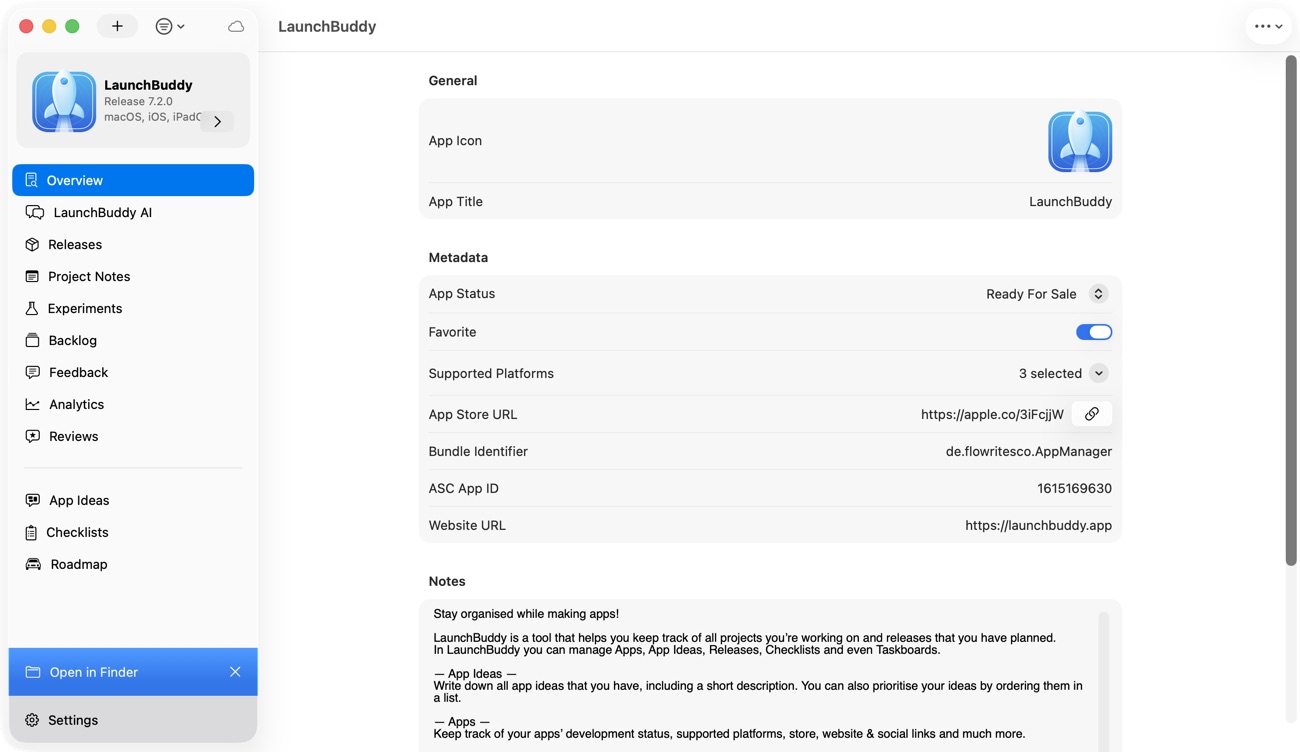
LaunchBuddy is an App Store Connect companion for indie iOS developers who need project and release management around Apple’s submission system.
The free tier supports up to two apps and two releases, with taskboards, default submission checklists, and iCloud sync across iPhone, iPad, and Mac. That is enough to build a repeatable workflow for a side project without connecting App Store Connect.
LaunchBuddy Pro adds:
- Unlimited apps and releases
- Custom submission checklists
- An App Store Connect reviews inbox
- App Store analytics for downloads, revenue, and subscriptions
- Release-note uploads to App Store Connect
- One-tap conversion of one-star feedback into backlog tasks
- App Chat using task, release, and review context
- Idea Chat that can turn ideas into backlog items
- AI-assisted App Store review replies
- ASO experiments for icons, screenshots, and copy
- Shortcuts and MCP support
The App Store Connect integration requires an API key from Apple. Core tasks, checklists, and AI chat do not require that connection. Project data is stored in your private iCloud account rather than on LaunchBuddy’s own servers.
LaunchBuddy is the strongest fit when your pain sounds like this:
“I can use App Store Connect, but the tasks, customer feedback, release notes, and decisions around each version are scattered.”
It is not the right replacement if your only goal is fully automated code signing and binary upload. Use Xcode, Fastlane, or CI for that job, and use LaunchBuddy if you also need the release context organized around it.
A practical workflow with LaunchBuddy and App Store Connect
For an indie app update, a clear division of responsibilities looks like this:
Before the build
- Create the version in LaunchBuddy.
- Assign features and fixes to the release.
- Apply a reusable submission checklist.
- Add metadata, screenshot, privacy, and review-note tasks.
During TestFlight
- Upload the build with Xcode or your automation.
- Test the exact release scope.
- Turn actionable feedback into tasks.
- Move non-blocking work to a later release intentionally.
Before submission
- Confirm the selected build in App Store Connect.
- Generate a release-note draft from completed work.
- Verify every claim against the build.
- Upload the approved release notes.
- Complete the App Store Connect release checklist.
- Submit through Apple’s workflow.
After release
- Review early analytics.
- Read new customer reviews.
- Draft and approve useful responses.
- Turn recurring or severe feedback into backlog tasks.
- Connect fixes to the next release.
This creates a feedback loop instead of treating submission as the end of the project.
Frequently asked questions
What is the best App Store Connect alternative for Mac?
It depends on the missing workflow. Choose a native App Store Connect client if you mainly want faster metadata, screenshot, TestFlight, or localization management. Choose LaunchBuddy if you mainly need release planning, taskboards, checklists, reviews, analytics, and AI assistance connected to your app projects. Use Xcode or Transporter when build upload is the only requirement.
Is there a free App Store Connect alternative?
Apple’s App Store Connect app, Xcode, and Transporter cover several first-party workflows. Fastlane is open source. Some third-party clients offer free tiers. LaunchBuddy is free for two apps and two releases; App Store Connect integration and AI features are part of Pro.
Can I submit an iOS app without App Store Connect?
Not to the public Apple App Store. A third-party tool may perform supported actions through Apple’s APIs, but the app and submission still live in App Store Connect. Separate distribution methods exist for specific testing, enterprise, or regional cases, but they are not general replacements for public App Store submission.
Is Fastlane an App Store Connect replacement?
No. Fastlane automates work that interacts with App Store Connect and other Apple tools. It is especially useful for repeatable build, upload, screenshot, metadata, and TestFlight workflows, while App Store Connect remains the system receiving and storing those resources.
Do App Store Connect alternatives need my Apple Account password?
A modern integration should normally use supported authentication such as an App Store Connect API key rather than asking for your Apple Account password. Confirm the product’s current authentication method, required role, key storage, and data path before connecting it.
Can AI manage App Store Connect for me?
AI can draft release notes, summarize feedback, suggest metadata, or propose review responses. An agent connected through APIs may also perform supported actions. Keep human approval around public copy, privacy information, customer responses, submission, and release. Verify every AI-generated claim against the actual build and App Store state.
Choose the problem before the product
The best App Store Connect alternative is not the tool with the longest feature list. It is the tool that removes the specific friction between finished code and a well-managed release.
Use a native client when the browser is the bottleneck. Use Fastlane or CI when repeated build and upload steps need automation. Use the API when your workflow is genuinely unique. Use LaunchBuddy when the missing layer is the project: releases, tasks, checklists, reviews, analytics, and AI-assisted follow-up kept together for each app.
App Store Connect will remain the official destination. Your alternative should make the path to it clearer, safer, and easier to repeat.

