App Store Introductory Offers: Setup and Testing Guide
To set up an App Store introductory offer, open an auto-renewable subscription in App Store Connect, choose Set Up Introductory Offer under Subscription Prices, select the storefronts and dates, then choose Free, Pay As You Go, or Pay Up Front and confirm the duration and price. Test both eligible and ineligible accounts before launch. Under Apple’s standard rules, each customer can redeem one introductory offer per subscription group.
An introductory offer applies to the initial period of an auto-renewable subscription. It isn’t a discount code, a retention offer for an active subscriber, or a general win-back campaign. Start with the customer state and subscription group, then choose terms that test one acquisition hypothesis.
The workflow below carries that decision through configuration, StoreKit testing, launch verification, and a paid-conversion review. If customers must receive and redeem a code, use the separate subscription offer codes workflow.
Start with one new-subscriber hypothesis
“Increase trials” isn’t a complete objective. A large free-trial cohort can still produce weak paid conversion, early churn, or support load. Write down why the intended customer needs an introductory period and what result would justify keeping it.
Subscription product and group:
Target storefronts:
Customer problem:
Why the standard purchase is a barrier:

Offer type: Free trial | Pay as you go | Pay up front
Duration and price:
Standard renewal price and period:
Value the customer should experience before renewal:

Primary result:
Guardrails:
First review date:
Mature-cohort review date:
Decision: Keep | revise | remove | insufficient evidence
A useful hypothesis might be: “New monthly subscribers need several planning cycles to experience the full workflow; a discounted three-month period may produce more standard-price renewals without increasing first-cycle support failures.”
That statement can be tested. “People like discounts” can’t.
Choose the introductory offer type
Apple supports three payment modes. Each is scheduled to auto-renew at the subscription’s standard price after the introductory period unless the customer cancels.
| Type | How the introductory period is billed | A reasonable use case | Main caveat |
|---|---|---|---|
| Free trial | No charge during the trial | Customers can reach meaningful value before paying | Trial starts may overstate purchase intent |
| Pay as you go | A discounted price each billing period for a set duration | Value repeats across several billing cycles | Review every discounted renewal, not just the first |
| Pay up front | One discounted payment covers the full introductory duration | The experience needs a longer evaluation period and an upfront commitment is acceptable | The first payment can add friction, and the next charge changes to the standard terms |
Don’t pick the longest duration merely because App Store Connect permits it. Apple’s duration table varies by the subscription’s standard duration. Choose the shortest period that gives a customer a fair chance to reach the promised value.
Use these questions to make the choice:
- How soon can a new customer experience the core outcome? A three-day trial is a poor test when setup alone takes a week.
- Does value repeat over several cycles? Pay as you go can expose renewal behavior during the discount instead of postponing every payment until the end.
- Would an upfront charge contradict the acquisition message? “Try before paying” and pay up front are different promises.
- What happens at standard renewal? Show the regular price, billing period, and timing clearly in the purchase experience.
The offer type changes the customer journey, so compare cohorts by type instead of combining every introductory start into one result.
Check subscription-group eligibility before setup
Introductory eligibility follows the subscription group, not just the individual product. Apple’s standard rules produce four important branches:
- a new subscriber is eligible;
- a lapsed returning subscriber can be eligible if they haven’t used an introductory offer in the group;
- an active subscriber in the group isn’t eligible for another product’s introductory offer;
- a customer who already redeemed an introductory offer on any product in the group isn’t eligible for a second one.
Group design therefore matters. Monthly and annual versions of the same service usually belong together, and using a trial on one can consume eligibility for the other. Don’t create a second group just to manufacture another introductory offer; Apple recommends one group for most apps because customers can hold only one subscription per group while subscriptions in separate groups can be billed at the same time.
Before configuring the offer, record:
Subscription group:
Products in the group:
Upgrade, downgrade, and crossgrade paths checked:
Existing introductory offers:
Current and future storefront schedules:
Eligibility language reviewed in the app:
If the first subscription or group still needs App Review, complete that dependency separately. The In-App Purchase review guide explains when a new app version and subscription group must travel with the product.
Configure the offer in App Store Connect
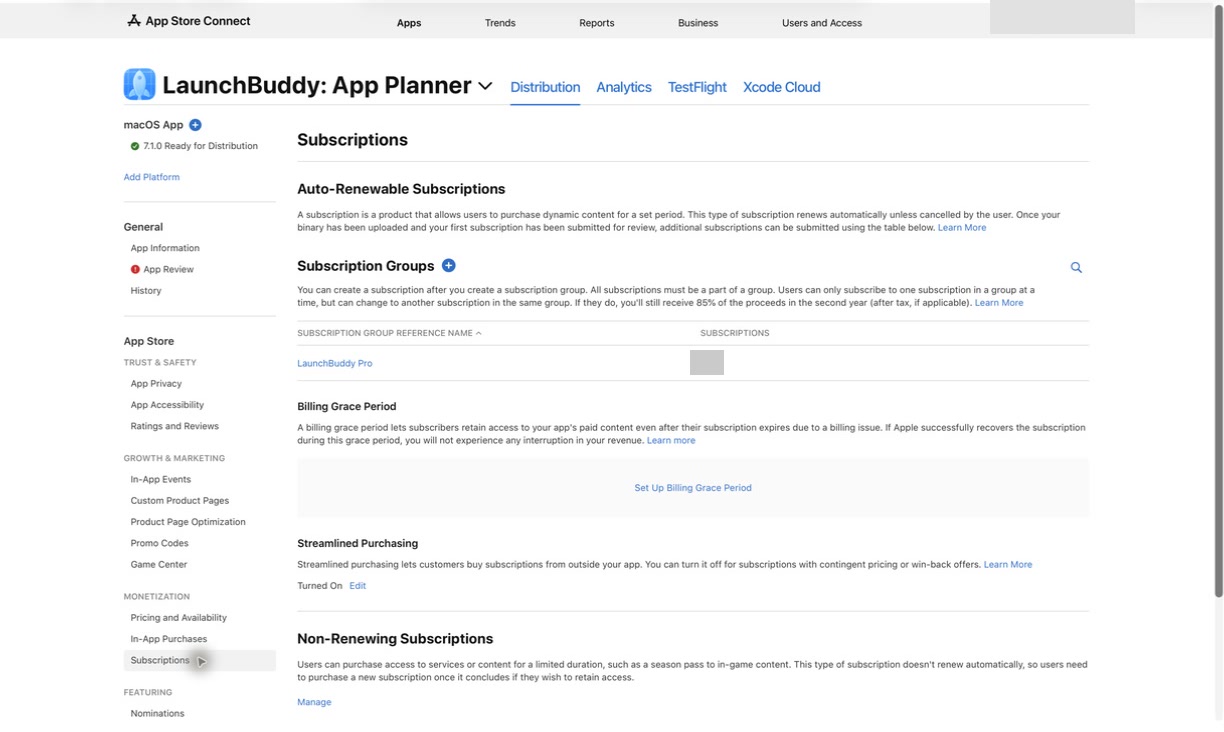
The Account Holder, Admin, App Manager, or Marketing role can create an introductory offer. Follow Apple’s current setup path:
- In Apps, select the app.
- Select Subscriptions in the sidebar.
- Open the subscription group, then the subscription product.
- Under Subscription Prices, select View all Subscription Pricing.
- Select Set Up Introductory Offer.
- Choose the countries or regions.
- Set the start and end dates. The exact end time varies by region.
- Choose Pay As You Go, Pay Up Front, or Free.
- Select the duration and price.
- Review Apple’s comparable storefront prices and adjust any deliberate local prices.
- Verify the complete schedule and confirm.
Apple allows one current and one future introductory offer per storefront. If newly created offers overlap, the latest action overwrites the existing offer for those dates. Before confirming, build an offer-configuration record:
| Storefront | Start | End | Type | Introductory price | Duration | Standard renewal |
|---|---|---|---|---|---|---|
| Priority market A | Date | Date | Type | Local price | Period | Local price / period |
| Priority market B | Date | Date | Type | Local price | Period | Local price / period |
Reopen the offer and compare it with the record. Apple says an introductory offer can’t be edited after creation; changing it requires deletion and a new offer. Treat confirmation as a controlled pricing action, not an ordinary draft save.
Implement eligibility and terms in the app
App Store Connect creates the commercial offer. Your app still needs to present the subscription accurately and grant the correct entitlement after a verified transaction.
StoreKit returns the product’s introductory-offer details. Check the group with Product.SubscriptionInfo.isEligibleForIntroOffer(for:), and require both an eligible result and a non-nil introductoryOffer before presenting introductory terms. Group eligibility alone doesn’t prove that an offer is active for this product, storefront, and date. Don’t hard-code “free trial available” because an account may have consumed its group-level eligibility on another product or may be in a storefront where the offer isn’t active.
The purchase presentation should make these details clear:
- subscription name;
- introductory price and duration;
- whether billing occurs once or each introductory period;
- standard renewal price and billing period;
- when standard renewal begins;
- how to cancel.
Treat the verified transaction and current entitlement as authoritative. A visible offer card or tapped button isn’t proof of purchase.
Test eligible and ineligible paths
Use StoreKit Testing in Xcode for fast local checks, then use Sandbox for the App Store-backed configuration. Apple’s Sandbox overview distinguishes those environments: Xcode testing is local, while Sandbox uses App Store infrastructure without a real charge.
Run at least this matrix:
| Scenario | Expected result |
|---|---|
| New test account, no purchase in the group | Eligible; terms appear when the product returns the active offer |
| Lapsed returning account that never used a group offer | Eligible under standard rules; active offer still required |
| Active subscriber in the group | No introductory offer is presented |
| Account used an offer on another product in the group | No second introductory offer is presented |
| Eligible account in a selected storefront | Correct local type, price, and duration appear |
| Account in an excluded storefront | The scheduled offer doesn’t appear |
| Purchase succeeds | Verified transaction grants the correct entitlement |
| App relaunches or another device restores | Entitlement remains correct |
| Introductory period ends | Subscription follows the displayed standard renewal terms unless canceled |
Also test cancellation, a failed or interrupted purchase, network loss, and any server-notification path your app relies on. Support should be able to distinguish ineligibility from a configuration delay or purchase failure.
Apple’s Xcode workflow lets you retry by deleting the introductory-offer transaction in Debug → StoreKit → Manage Transactions. For an expired test subscription that used an offer, Apple’s Sandbox testing instructions provide a Reset Eligibility action in Sandbox Subscription Management. Keep the environment and reset action in the test evidence so a manufactured eligible state isn’t mistaken for production behavior.
Changes to product metadata can take up to one hour to appear in Sandbox. If a new offer is missing immediately, confirm the account, group, storefront, dates, and propagation window before rewriting purchase code.
Launch with a reversible verification plan
Before the start date:
- compare the saved offer with the offer-configuration record;
- verify paywall and App Store terms for priority storefronts;
- test one eligible and one ineligible account;
- confirm analytics and support ownership;
- preserve the prior subscription baseline;
- record any other pricing, product, or acquisition changes.
After the offer starts, check the intended product page and in-app purchase flow with an eligible account. Apple’s setup documentation says an active introductory offer appears on the App Store product page for eligible users; in-app merchandising still depends on your StoreKit implementation.
If the type, price, dates, or storefront scope is wrong, stop promotion and remove the offer rather than waiting for analytics to expose the mistake. Preserve the configuration, detection time, and support response before making the change.
Measure paid conversion, not just starts
In App Store Connect, open Analytics → Monetization → Offers, then select Introductory Offers and filter by the relevant offer, territory, or device. Apple’s Offers dashboard documentation recommends reading offer volume with conversion to paid subscriptions, churn, lifecycle events, billing status, territory, and acquisition source.
Track the result as stages:
Eligible offer exposure, where measurable
→ introductory starts
→ active introductory subscriptions
→ conversion to paid
→ standard-price renewal
→ later churn
Those stages don’t share one denominator. A start isn’t a paid conversion, and a paid conversion isn’t durable retention. Wait until each cohort has had enough time to finish the introductory period and reach the renewal event you’re judging.
Record the interpretation with the result:
Offer and cohort:
Review window:
Introductory starts:
Conversions to paid:
Standard-price renewals:
Later churn:
Billing or entitlement failures:
Support themes:

Other changes during the period:
What the evidence supports:
What it does not prove:
Decision: Keep | revise | remove | insufficient evidence
For consistent metric definitions and comparison windows, use the broader App Store Connect analytics guide. It helps prevent a simultaneous release, campaign, or storefront change from being credited entirely to the offer.
Where LaunchBuddy fits
App Store Connect owns introductory-offer configuration, dates, storefront pricing, subscription groups, and offer reporting. StoreKit and your app own eligibility presentation, purchase handling, and entitlement behavior. Those are the authoritative systems.
LaunchBuddy doesn’t configure introductory offers, test StoreKit, or determine customer eligibility. Use its release taskboards to track the StoreKit test, storefront check, launch verification, and decision date; default submission checklists and limited project notes are also available on the Free plan within its two-app and two-release limits.
With App Store Connect API credentials, LaunchBuddy Pro adds selected downloads, revenue, and subscription metrics. Use Apple’s Offers dashboard for offer-level conversion and churn analysis.
Download LaunchBuddy and keep your introductory-offer test and launch checks with the release plan.