Indie App Portfolio Management: A Practical Solo Workflow

Indie app portfolio management means deciding which apps deserve active work, which only need maintenance, and which should be parked or considered for exit. For a solo developer, the simplest useful system is one record per app, one current lifecycle state, and one next decision.
Use this six-step workflow:
- Inventory every app and unfinished product.
- Assign each one a lifecycle state.
- Set a limit on simultaneous active work.
- Review product, customer, and maintenance evidence.
- Give every app one next decision.
- Move accepted work into an app backlog or named release.
The portfolio is not another combined task list. It sits above individual backlogs and answers a different question: where should your limited attention go now?
Step 1: Build a portfolio inventory you can scan
Start with products, not tasks. Include live apps, apps in development, validated ideas you have committed to investigate, and parked apps that still create obligations.
Give each app a compact control record:
App:
Lifecycle state:
Current promise:
Latest public version:
Next release:
Open customer risk:
Last evidence review:
Next decision:
Revisit trigger or date:
“Current promise” is the outcome the app is expected to provide, not its feature list. “Open customer risk” captures an obligation such as a broken core flow, an unresolved purchase issue, an expiring service dependency, or a platform change that needs investigation.
Keep task counts out of this first view. An app with 40 low-value ideas is not automatically more important than an app with one confirmed data-loss bug. The inventory should expose decisions and obligations before volume.
Possible apps that have not earned a build decision belong in a separate iOS app idea backlog. That keeps an exciting concept from appearing as equally committed work beside a live app with customers.
Step 2: Give each app one lifecycle state
Use states that change how you allocate attention. This set is intentionally small:
| State | Meaning | What belongs here |
|---|---|---|
| Investigating | You are deciding whether a product should exist | A bounded research question or prototype, not a release backlog |
| Building | The first credible version is in development | One defined user journey and the work required to test it |
| Shipping | A release is the current active commitment | Version-scoped development, testing, submission, and launch work |
| Maintaining | The app is live without an active growth release | Support, compatibility, reliability, policy, and necessary upkeep |
| Parked | No active work is authorized | Preserved context plus a specific condition for reconsideration |
| Exit review | Continued ownership is in question | An explicit review of users, data, subscriptions, services, transfer, or removal obligations |
These are recommended portfolio labels, not App Store Connect statuses or documented LaunchBuddy fields.
Do not use “parked” to hide an app that still has active customers or unresolved obligations. Parking stops discretionary development; it does not make support, privacy, billing, or service dependencies disappear.
Apple’s overview of maintaining an app separates several ongoing jobs: releasing new versions, monitoring customer reviews and analytics, changing pricing or availability, and removing an app. That is a useful reminder that “live” is not one operating state. A live app can be growing, quietly maintained, under incident response, or approaching an exit decision.
Step 3: Set a portfolio attention budget
A solo developer can own many apps but cannot give every app active product attention at once. Define capacity before comparing opportunities.
Use three buckets:
Active bets:
- Apps allowed to consume feature-development time now

Service obligations:
- Live apps receiving fixes, support, or required maintenance

Waiting:
- Investigations or parked apps with no authorized implementation work
Choose limits that match your available time and risk. A developer working full-time on an app business may support a different mix from someone maintaining side projects on weekends. There is no defensible universal number.
Here is one example, not a benchmark:
Active bets: 1
Service obligations: 2
Waiting: unlimited, but reviewed only by trigger
When the active-bet limit is full, starting another app requires a visible trade: finish a release, move an app to maintenance, park an investigation, or deliberately replace the current bet. That rule prevents “just a quick prototype” from silently competing with an unfinished release.
Track maintenance separately from feature investment. Fixing a crash in a stable utility does not necessarily promote that utility into an active growth project. Conversely, leaving an app in “maintenance” while repeatedly building features disguises where the attention is going.
Step 4: Review evidence without forcing every app onto one score
Portfolio decisions need comparable questions, not necessarily a single formula. Revenue, customer impact, strategic interest, maintenance risk, and personal motivation use different units. A weighted score can look precise while hiding weak evidence.
Review each app in three lanes.
Product evidence
- What outcome was the latest release meant to change?
- Did the planned scope ship?
- Which behavior changed after release?
- Is the next opportunity a specific hypothesis or only a broad wish?
- What would you stop doing to fund it?
For App Store evidence, use complete and comparable periods. Apple’s Analytics dashboard supports date ranges, metrics, filters, segments, and cohorts across acquisition, engagement, monetization, retention, and quality. Filter by app version, territory, device, source, or another relevant dimension where the metric supports it.
Do not turn a small percentage movement into a portfolio verdict. Usage data depends on customer opt-in and appears only after Apple’s privacy thresholds are met. A blank chart is unavailable evidence, not proof that nobody uses the app.
Customer evidence
- Is a core flow blocked?
- Are several independent reports describing the same symptom?
- Does the feedback identify a problem, or only request a solution?
- Is the issue tied to the current version?
- Is there a verified response or next diagnostic action?
Apple confirms in its ratings and reviews overview that ratings, reviews, and responses are public, while individual reviews can be viewed and responded to in App Store Connect. Treat them as specific qualitative evidence, not a representative survey. The App Store review management workflow shows how to separate reply work, investigation, and product follow-up.
Maintenance evidence
- Which supported OS, device, service, or account dependency needs attention?
- Are purchases, subscriptions, sync, login, or data export involved?
- Is there a security, privacy, legal, or policy question that needs qualified review?
- Does the app require a compatibility release?
- If you stopped feature work, what work would still remain?
This lane keeps quiet but consequential work from losing every comparison to a new feature. It also exposes apps whose ongoing obligations exceed the value or interest you are willing to support.
Record uncertainty directly:
Known:
Version 2.3 introduced the new onboarding flow.

Observed:
The selected complete comparison periods show higher first-time downloads.

Unknown:
Traffic source also changed, so the release effect is not isolated.

Next evidence:
Compare source segments and a mature retention cohort on September 1.
“Keep monitoring” is not a decision until it names the signal, segment, and next review point.
Step 5: End with one next decision per app
A portfolio review should change what you will work on, not merely create a longer summary. Give each app one of these next decisions:
| Decision | Required output |
|---|---|
| Invest | One outcome, a bounded release or experiment, and the work you will defer elsewhere |
| Maintain | The current service obligation and the next maintenance trigger |
| Investigate | One uncertainty, one evidence-gathering action, and a stop condition |
| Park | The reason no work is authorized and the event that reopens the decision |
| Run an exit review | A separate checklist for customers, data, subscriptions, services, communication, transfer, and App Store availability |
Avoid “work on this when I have time.” It authorizes an unlimited stream of interruptions without defining what success or completion means.
An exit review also should not jump straight to deleting an App Store record. Apple distinguishes changing availability from removing the app record. Its availability documentation says customers who previously downloaded an app may continue receiving updates and may be able to redownload it from purchase history after removal from sale, subject to the necessary contract. Apple’s separate app-record removal process has eligibility conditions and warns that you lose ownership of the app name, cannot reuse the SKU in the same organization, and cannot reuse the bundle ID after uploading a build.
Those Apple controls are only part of the decision. Your app may also have customer communication, data access, subscription, backend, vendor, tax, contractual, or support obligations. Identify them before changing availability, and get appropriate legal or financial advice where needed.
Step 6: Translate the portfolio decision into the right work layer
Once an app receives investment, move the accepted outcome down one level:
Portfolio decision
  → App backlog
    → Named release
      → Version-scoped tasks and submission checks
Keep candidate work in the app backlog. Only work you intend to ship in a specific version belongs in the release. The iOS app release management guide covers that version-level workflow.
This separation makes reprioritization legible. If an app loses active-bet status, its current release must be finished, cut to a safe boundary, or explicitly paused. The portfolio decision should not leave half-committed tasks pretending to be active.
A worked indie app portfolio review
Suppose a developer owns four products:
| App | Current evidence | Obligation | Decision |
|---|---|---|---|
| Habit Garden | Onboarding update is live; retention cohort is not mature | Monitor crashes and onboarding support | Maintain until the named cohort review |
| Receipt Box | Two independent reports describe failed PDF export in the current version | Investigate a core customer flow | Shipping: scope the smallest verified fix |
| Trail Notes | Prototype exists, but audience access is still unproven | None; not public | Investigate one distribution question |
| Old Timer | Low personal interest; live app uses a service with an upcoming migration | Existing users and service dependency | Run an exit review before the migration date |
The decision is not “Receipt Box has the highest score.” It is:
- Receipt Box receives the active shipping slot because a current core flow has credible risk.
- Habit Garden remains in maintenance until its evidence is mature enough for a product decision.
- Trail Notes gets research time but no implementation backlog.
- Old Timer needs an exit decision before its dependency creates unplanned work.
The portfolio review produced one active release, one dated observation, one bounded investigation, and one ownership decision. It did not merge every task into a master board.
Use a trigger-based review rhythm
Run a short portfolio scan on a schedule you can sustain, then open a deeper review when something material changes.
Useful triggers include:
- A release has enough post-launch evidence to evaluate.
- A severe customer or service issue appears.
- An OS, policy, vendor, or infrastructure change affects maintenance.
- An app reaches its recorded park or investigate trigger.
- You are about to start a new build while the active-bet limit is full.
- Continued operation, transfer, or removal is now a real decision.
For the scan, ask only:
Has an app's risk changed?
Has new evidence changed a decision?
Is active work above the agreed limit?
Does every non-active app have a trigger or date?
This keeps a portfolio current without turning its review into a weekly performance ritual for dormant ideas.
Frequently asked questions
How many apps should a solo developer work on at once?
There’s no universal number, but most solo developers do best with one app getting feature work at a time. Other live apps can stay in maintenance for fixes and support, and everything else waits with a written trigger for when to look at it again.
When should I remove an app from the App Store?
Consider it when the app needs upkeep you no longer plan to do, such as a new iOS version breaking it or a service it depends on shutting down, and nothing suggests it will earn that time back. Before removing it, deal with active subscriptions, user data, and support, or look at an app transfer instead. The app sunset checklist covers the steps.
Where LaunchBuddy fits
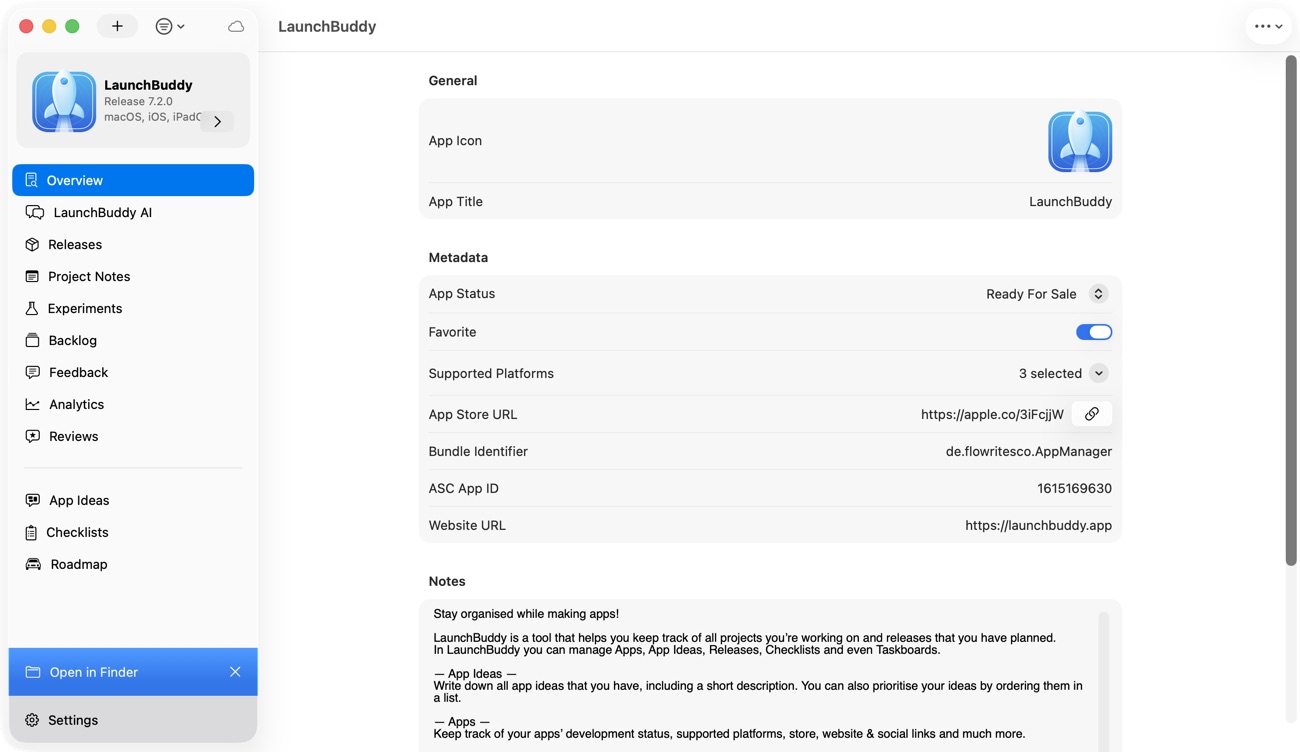
LaunchBuddy can hold apps, releases, taskboards, default submission checklists, and project notes across iPhone, iPad, and Mac. Project data is stored in the user’s private iCloud account and syncs across those devices. Private iCloud sync is a personal data and cross-device model; it should not be treated as a shared team workspace.
The Free plan supports up to two apps and two releases, with limited project notes. LaunchBuddy Pro supports unlimited apps and releases, unlimited project notes, and custom checklists. Current website pricing is $2.99 per month or $19.99 per year, and one subscription covers iPhone, iPad, and Mac; feature availability varies by platform.
Core portfolio and release planning do not require App Store Connect credentials. Pro’s reviews inbox and analytics dashboard for downloads, revenue, and subscription metrics require an App Store Connect API key. App Store Connect remains the authoritative place for full analytics, availability, app transfer, and app-record changes.
Use LaunchBuddy to keep each app’s backlog, next release, maintenance tasks, and notes distinct. On Mac, the menu bar app launcher can shorten the handoff to a managed app. The lifecycle labels, attention budget, evidence record, and portfolio decisions in this article are an operating method you apply; they are not claimed automatic portfolio scoring or prioritization features.
Start with the inventory, choose one next decision for every app, and download LaunchBuddy to keep your app and release plans together.