iOS App Sunset Checklist: Retire an App Without Missing Obligations
To sunset an iOS app safely, don’t start by deleting its App Store Connect record. First decide whether retirement is better than maintenance or transfer, map every promise that survives the last download, communicate the change, and complete any final support work. Only then should you stop new purchases, remove the app from sale, and decide whether the app record should remain.
The short iOS app sunset checklist is:
- Record the reason, evidence, decision owner, and stop conditions.
- Compare sunset with maintenance, transfer, or a reduced service.
- Inventory accounts, user data, subscriptions, purchases, servers, vendors, and support promises.
- Define the last date for new sales, service, support, and data access.
- Notify affected customers through channels they can still reach.
- Ship and verify any final update before dismantling its dependencies.
- Stop subscriptions and in-app purchases in the right order.
- Remove the app from sale in App Store Connect.
- Verify the storefront result and keep the remaining obligations owned.
- Remove the app record only if you understand Apple’s eligibility rules and identifier consequences.
This is a dependency checklist, not a universal 30-day plan. A free offline utility may have a short path. An app with annual subscriptions, cloud data, regulated records, or a promised export period needs a longer one.
Separate the sunset decision from Apple’s removal controls
Three actions are easy to conflate:
- Sunsetting an app is the full product and customer process.
- Removing an app from sale changes App Store availability for new downloads.
- Removing the app record removes it from your main Apps view when Apple’s conditions are met.
Apple says that Remove App From Sale removes the app from all countries or regions within 24 hours. People who previously downloaded it can continue receiving updates and can redownload it from purchase history while the necessary contract remains active. That means removal from sale doesn’t switch off installed copies, subscriptions, accounts, or servers.
Apple’s separate app-record removal process is more consequential. The app must already be unavailable in every country or region, associated in-app purchases must be removed from sale, and alternative marketplace distribution must be removed where applicable. Some review, transfer, and bundle states also block removal. Apple warns that you lose ownership of the app name, the SKU can’t be reused in the same organization, and a bundle ID can’t be reused after a build has been uploaded.
For most sunset planning, remove from sale is the operational milestone. Treat app-record removal as a later housekeeping decision, not as proof that customer obligations are complete.
Gate 1: Write a decision record before creating shutdown tasks
Start with a compact record that another person—or you six months later—can audit:
App and current public version:
Proposed decision: Maintain | reduce | transfer | sunset
Reason:
Evidence period:
Known customer groups:
Active purchases or subscriptions:
User data and export path:
External services and vendors:
Last support commitment:
Decision owner:
Reversal deadline:
Conditions that block removal:
Use comparable evidence, not a single quiet week or one difficult support thread. Review a complete period for downloads, active use, proceeds, subscription state, support volume, repeated review themes, infrastructure cost, and required maintenance. Apple’s Sales and Trends reports include download, sales, and subscription reports; financial reports remain the place for finalized proceeds.
Write uncertainty beside the evidence. Low usage may be real, but App Store usage data depends on customer opt-in and privacy thresholds. A blank chart isn’t evidence of zero users. The App Store Connect analytics guide explains how to compare periods and avoid mixing estimates with financial records.
Before choosing sunset, test two alternatives:
- Maintenance: Can you keep the core promise with fewer features, services, or release commitments?
- Transfer: Is another developer willing and able to own the app and its obligations?
Apple says an eligible app transfer can preserve availability, ratings, reviews, updates, and the Bundle ID. Transfer has its own technical and account handoff requirements, so it is an alternative project rather than a shortcut. Use a broader indie app portfolio review when the app has not yet reached a clear exit decision.
Gate: Don’t proceed until the decision record names the evidence, unresolved obligations, and the condition that would reverse or pause the sunset.
Gate 2: Build an obligation map
An App Store control can’t discover what your app promises outside the storefront. Map every dependency by asking what a current customer would lose if it disappeared today.
| Area | Questions to answer | Completion evidence |
|---|---|---|
| Accounts and data | Can people export and delete their data? What must be retained, and why? | Tested export/deletion path, retention owner, policy review |
| Subscriptions | Which durations and entitlements are active? When can service stop? | Subscription removed from sale, entitlement dates checked |
| In-app purchases | Are consumables unused or durable purchases still expected to work? | Purchase inventory, notice, restore/access test |
| Backend and storage | Which features fail when a server, database, domain, or certificate ends? | Dependency map with shutdown dates and rollback owner |
| Authentication | Do Sign in with Apple, email links, or account recovery require a live service? | Login, recovery, and deletion tests |
| Support and web | Which support, privacy, status, or export pages must remain reachable? | URL list, content owner, retirement date |
| Vendors and contracts | Which hosting, analytics, email, tax, or licensing obligations survive? | Contract review and cancellation record |
If the app supports account creation, removing it from sale doesn’t remove accounts or personal data. Apple’s account-deletion guidance says users must be able to initiate deletion of the full account and associated data that isn’t legally required to be kept. The flow should also explain billing and cancellation for in-app purchases. Legal retention requirements vary, so record the question and obtain qualified advice instead of inventing a deletion rule.
Create a shutdown matrix for technical dependencies:
Dependency:
Customer function:
Last safe operating date:
Data to export or delete:
Replacement or fallback:
Shutdown action:
Verification:
Rollback window:
Owner:
This exposes hidden sequencing. For example, deleting an authentication service before the final data-export window ends makes the export promise impossible to fulfill.
Gate: Every account, payment, data, and service dependency has an owner, a last safe date, and observable completion evidence.
Gate 3: Communicate a precise customer timeline
A useful notice answers five questions:
- What is changing?
- When will new downloads or purchases stop?
- Which installed features will continue to work, and for how long?
- How can someone export data, manage a subscription, restore a purchase, or get support?
- What should a customer do before the final date?
Use the channels the affected audience already has: an in-app notice, email where consent and account data permit it, and maintained support or website pages. Avoid a vague “soon” banner. State dates, time zones where relevant, affected features, and what isn’t changing.
Do not promise that an installed app will work forever merely because Apple allows redownloads. Your app may still depend on a server, certificate, API, domain, or supported OS behavior. Describe only the access you have tested and are prepared to maintain.
For auto-renewable subscriptions, Apple recommends advance notice through email, a website, or in-app messaging at least 31 days before service discontinuation. The customer notice should match the actual subscription and service timeline, including longer-duration plans.
Gate: The notice has been reviewed against the real dependency dates, and customers still have a working path to complete the requested action.
Gate 4: Ship the last support release before taking dependencies apart
A final update is not always necessary. Use one when the current public build lacks something customers need for the exit, such as:
- A clear in-app sunset notice
- A working account-deletion or data-export path
- A replacement for a retiring API
- Removal of promotions for purchases that will stop
- Updated support, privacy, or migration links
- A stable offline mode or honest unsupported-state message
Keep the release narrow. A sunset build is a poor time for speculative features or a broad refactor. Define acceptance tests around preserved access, purchase restoration, account actions, critical data, and the behavior when a service is unavailable.
Upload, test, submit, and release the build through Apple’s tools. Then install or update from the public App Store version and repeat the critical tests. The iOS app release management workflow can keep this final version separate from later shutdown tasks.
Gate: The public build customers can actually download contains the required exit behavior, and its critical paths have been verified against production services.
Gate 5: Close subscriptions and in-app purchases in sequence
Removing the app itself doesn’t settle paid entitlements.
For an auto-renewable subscription, Apple’s subscription availability guidance says to remove the subscription from sale to stop additional sign-ups and renewals. Apple requires eligible subscribers to receive the full content for their subscription duration. It specifies a minimum of 31 days between removing a subscription from sale and stopping service for monthly and shorter durations, recommends timing removal to the subscription duration, and directs developers to contact Apple when they can’t fulfill a longer subscription.
For consumables and other in-app purchases, Apple’s in-app purchase availability guidance recommends announcing the removal and ending merchandising at least 31 days beforehand so customers can use purchased consumables. Apple also says to notify Apple of the planned removal and notes that it may provide refunds for unfulfilled purchases.
Use this order:
- Inventory every paid product, duration, promotion, and affected customer path.
- Stop advertising the product.
- Publish the customer notice and support instructions.
- Remove the subscription or purchase from sale in App Store Connect.
- Continue providing promised access for the applicable period.
- Verify entitlement, restore, account, and support behavior.
- Record the first date on which service can safely end.
Don’t use 31 days as a blanket permission to shut down. Annual subscriptions, durable purchases, contracts, refunds, local law, and your own customer promises may require a different plan.
Gate: No new paid entitlement can begin, and every existing entitlement has a documented fulfillment or resolution path.
Gate 6: Remove the app from sale and verify the result
When the prior gates pass, use App Store Connect’s availability controls:
- Open the app in App Store Connect.
- Select Pricing and Availability.
- Choose Remove App From Sale.
- Confirm the change.
- Check representative storefronts after Apple’s stated window of up to 24 hours and confirm availability is removed everywhere in App Store Connect.
Record who made the change, the time, the storefronts checked, and the result. Also test the path for a previous customer separately from a new customer. They are not expected to have the same experience.
Removal is a milestone, not the end of the checklist. Keep monitoring the support channel, promised services, subscription resolution, data requests, domains, and vendor shutdown dates until each has evidence of completion.
A dependency-based sunset timeline
Avoid picking a removal date first and forcing every obligation to fit it. Work from gates:
T0  Decision approved and obligation map complete
T1  Customer notice live; promotion stops
T2  Subscriptions and purchases removed from sale
T3  Final support build verified on the public App Store
T4  App removed from sale
T5  Last promised entitlement, export, and support periods complete
T6  Backends and vendors shut down in dependency order
T7  App-record retention or removal decided separately
T2, T3, and T4 may need a different order for your app. A final build may have to ship before purchase availability changes; a severe security or legal issue may require stopping new downloads sooner. The invariant is that each move passes its gate and doesn’t destroy a path customers still need.
At closeout, preserve a small evidence pack: the decision record, notices, public version, App Store availability confirmation, purchase timeline, data-retention decision, dependency shutdown log, and owner of each remaining obligation. Do not archive live credentials inside it.
Track the sunset in LaunchBuddy without confusing planning with execution
LaunchBuddy can keep the app, final release, tasks, default submission checklist, and project notes together across iPhone, iPad, and Mac through private iCloud sync. The Free plan supports up to two apps and two releases; Pro supports unlimited apps and releases plus custom checklists.
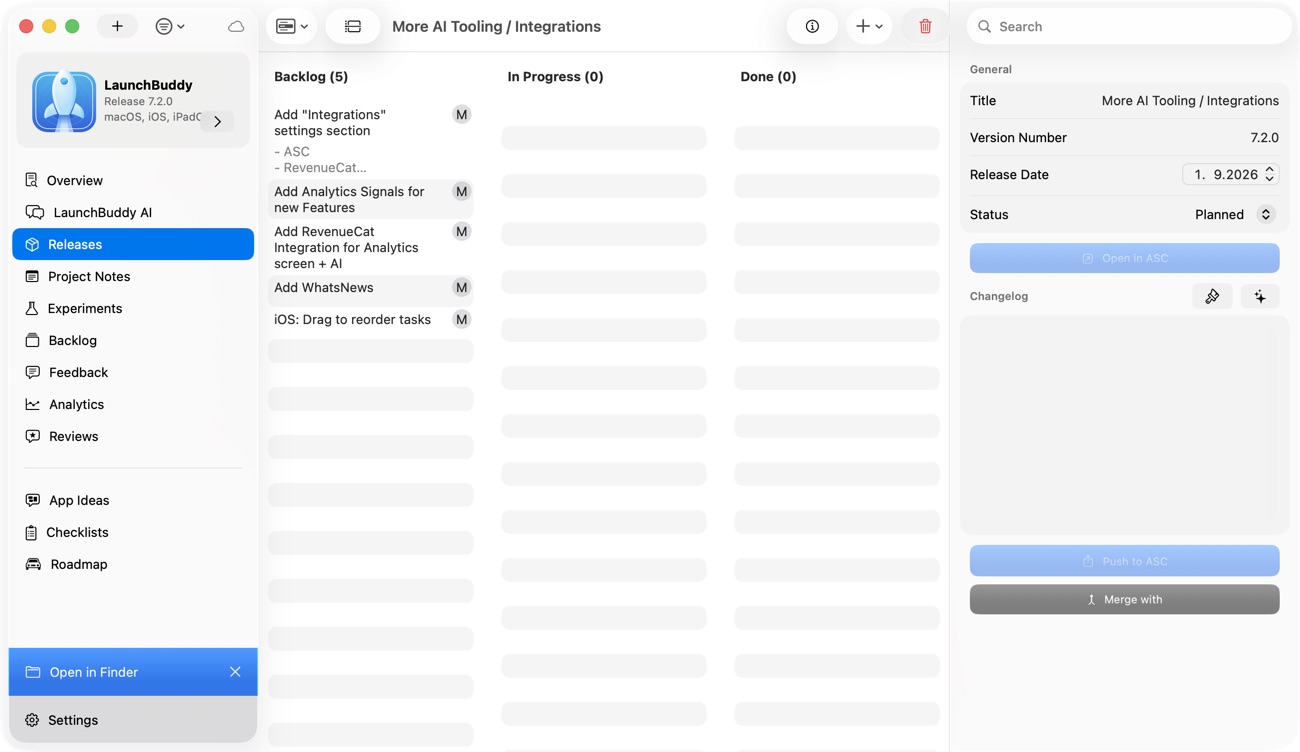
Use a named final release for build work and separate follow-up tasks for notices, subscription dates, export support, storefront verification, and service shutdown. “Sunset,” the gates above, the obligation map, and the shutdown matrix are an operating method you add to the project; LaunchBuddy does not automatically discover those obligations or certify that they are complete.
LaunchBuddy Pro can show a reviews inbox and selected download, revenue, and subscription metrics when App Store Connect API credentials are configured. Use those signals as evidence, then verify official analytics, financial records, subscriptions, availability, and app-record state in App Store Connect. LaunchBuddy does not remove an app from sale, cancel subscriptions, delete customer data, shut down a backend, or remove an App Store Connect app record.
An app is ready to close only when the storefront action and the surviving customer promises tell the same story. Download LaunchBuddy to organize your final release and sunset tasks.