App Store Subscription Groups: Levels and Plan Changes
An App Store subscription group contains auto-renewable subscription products that represent one service. A customer can have only one active product in a group at a time. Put monthly and annual versions of the same access at the same level, rank higher-access plans above lower-access plans, and create a separate group only when a customer should be able to buy both services simultaneously.
The order is functional, not cosmetic. Apple uses it to decide whether a plan change is an immediate upgrade, a next-renewal downgrade, or a crossgrade whose timing depends on duration.
This guide shows how to design the group before creating products, predict each transition, and test the result without treating App Store Connect configuration as the whole implementation.
1. Decide whether the products belong in one group
Start with the customer entitlement, not the billing period. Apple’s subscription setup guide recommends one group for most apps and says to add another only for separate services that customers can purchase at the same time.
Use one group when the products are alternatives:
- Basic monthly or Basic annual
- Pro monthly or Pro annual
- Basic or Pro access to the same service
Use separate groups only when the products are independent purchases. For example, a language-learning app might offer a lesson library and a separate live-tutoring service that a customer can hold together.
This test catches a common modeling error:
If a customer buys product B while product A is active, should B replace A or coexist with it?
If it should replace A, the products probably belong in one group. If both should remain active and be billed independently, separate groups may fit. Don’t split equivalent monthly and annual plans merely to let both exist. Customers who subscribe in different groups are billed separately, which can create an accidental double-subscription path.
Record the decision before creating product IDs:
Service:
Customer outcome:

Plans that replace one another:
-

Services a customer may hold simultaneously:
-

Group decision:
Reason:
2. Build a benefit-and-duration matrix
Next, separate service level from billing duration. Apple’s model supports up to 100 products in a group, but the limit isn’t a target. Every product adds pricing, localization, testing, review, and support work.
Use a matrix like this:
| Product | Customer access | Duration | Proposed level |
|---|---|---|---|
| Pro monthly | All Basic features plus export and automation | 1 month | 1 |
| Pro annual | All Basic features plus export and automation | 1 year | 1 |
| Basic monthly | Core tracking features | 1 month | 2 |
| Basic annual | Core tracking features | 1 year | 2 |
The two Pro products share a level because they provide equal service; only the duration differs. The Basic products follow the same rule. Level 1 is the highest service level, not the cheapest, most popular, or shortest plan.
Before assigning levels, make every access difference explicit:
Capability                 Basic       Pro
Core tracking              Included    Included
Export                     —           Included
Automation                 —           Included
Support promise            Same        Same
If two products differ only in duration, price, or a similar commercial variable, Apple says they can be stacked at the same level. If one unlocks more service, place it at a higher level.
Avoid using levels to encode an internal marketing preference. A product called “Annual Best Value” doesn’t belong above a monthly product when both grant identical access. Doing so turns a duration change into an upgrade or downgrade and changes when it takes effect.
3. Predict every upgrade, downgrade, and crossgrade
Apple’s auto-renewable subscription reference defines plan changes from the level ordering:
| Change | Example | When the new product takes effect | Billing behavior |
|---|---|---|---|
| Upgrade to a higher level | Basic monthly → Pro monthly | Immediately | Apple refunds the prorated amount from the lower plan, charges for the higher plan, and makes the change date the new renewal date |
| Downgrade to a lower level | Pro annual → Basic annual | At the next renewal | The lower plan is charged when the current period ends |
| Crossgrade at the same level and same duration | Plan A monthly → Plan B monthly | Immediately | Apple refunds the prorated payment for the old product, charges for the new product, and resets the renewal date |
| Crossgrade at the same level with a different duration | Basic monthly → Basic annual | At the next renewal | The current product remains active until renewal |
“Higher” means closer to level 1. It doesn’t mean a higher price. That distinction matters when storefront prices, introductory terms, or older preserved prices make the amount paid look different from the service hierarchy.
This table covers Apple’s standard plan-change definitions. If you use monthly billing with a 12-month commitment, review that billing model’s current availability, cancellation, and payment rules separately before applying the matrix.
Create a transition sheet for the actual products rather than relying on the generic table:
| From | To | Relationship | Expected effective time | Expected access before change | Expected access after change |
|---|---|---|---|---|---|
| Basic monthly | Pro monthly | Upgrade | Immediate | Basic | Pro |
| Basic annual | Pro monthly | Upgrade | Immediate | Basic | Pro |
| Pro annual | Basic monthly | Downgrade | Next renewal | Pro | Basic |
| Basic monthly | Basic annual | Crossgrade, different duration | Next renewal | Basic | Basic |
Review every directed path. Basic-to-Pro and Pro-to-Basic are separate tests, as are monthly-to-annual and annual-to-monthly. This exposes mistakes that a simple list of plans hides.
4. Configure the group and levels in App Store Connect
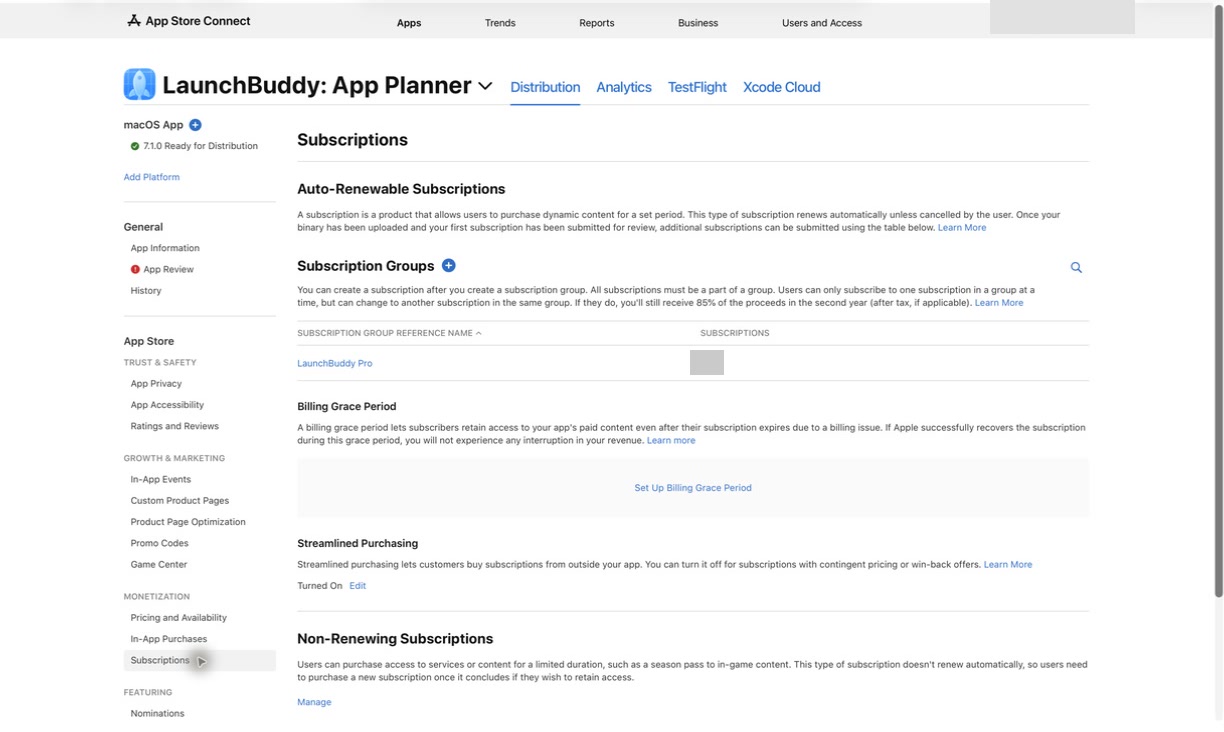
Once the matrix and transition sheet are approved:
- In App Store Connect, open the app and select Subscriptions under Monetization.
- Create the subscription group and give it an internal reference name.
- Add each subscription product with its permanent product ID.
- Set duration, price, availability, review information, and any required localization for each product.
- Open the group and use Edit Order to place the highest service at level 1.
- Stack equal-access products at the same level.
- Add the localized group display name and choose the app-name display option customers will see when managing subscriptions. Localize each subscription’s own display name and description separately.
- Reopen the group and compare its order with the approved matrix.
Don’t create placeholder products casually. Apple says a subscription’s duration can’t be changed after it is submitted for review. Product IDs also become part of the app’s StoreKit implementation and operating history. Verify names, IDs, access, duration, and level before assembling the submission.
Save a configuration receipt:
Group reference name:
Customer-facing group name:

Product ID / duration / service level:
-

App Store Connect order checked:
Localizations checked:
Storefront availability checked:
Reviewed by:
Review date:
5. Make the app follow the entitlement, not the button tap
The group order tells Apple how products relate. Your app still has to grant the service represented by the customer’s verified current entitlement.
Keep one product-to-access map in the implementation:
basic_monthly  -> Basic access
basic_annual   -> Basic access
pro_monthly    -> Pro access
pro_annual     -> Pro access
Then handle the transition timing from verified StoreKit state:
- An upgrade can invalidate the old lower-level transaction immediately.
- A scheduled downgrade shouldn’t remove higher-level access before renewal.
- A different-duration crossgrade at the same level shouldn’t change access early.
- A same-duration crossgrade can replace the current product immediately.
- Restore, relaunch, another device, billing recovery, and server refresh should resolve to the same access.
Don’t unlock a plan permanently because the customer tapped a purchase control or because your server once stored isPro = true. Apple’s isUpgraded documentation directs apps to find the newer transaction with the higher service level when an old transaction was upgraded. Use verified current state as the authority for access.
If the app has a server, make its product-to-access map and transition handling match the client. A correct paywall with stale server authorization still produces a broken upgrade.
6. Test the transition matrix locally and in sandbox
Use two test layers:
- StoreKit Testing in Xcode for fast, repeatable checks while developing the product mapping and UI.
- Sandbox for the real products configured in App Store Connect, with simulated transactions that don’t incur charges.
Apple’s sandbox overview supports subscription renewals, state changes, and other purchase events at accelerated rates. A local pass doesn’t prove that App Store Connect has the same product IDs, group, levels, availability, and localization, so complete both layers.
For each row in the transition sheet, record:
Environment: Xcode | Sandbox
Starting product:
Target product:
Expected relationship:
Expected effective time:

Displayed choice:
Purchase result:
Verified current entitlement:
Access before transition:
Access after transition:
Renewal date behavior:
Relaunch / restore result:
Server result, if applicable:
Pass / fail:
Include new purchase, renewal, cancellation, lapse, restore, and interrupted-purchase checks around the plan changes. Sandbox renewals are accelerated, so timing won’t match production clock time; the point is to prove the state sequence and access decisions.
7. Submit the group with the right review packet
Apple requires the first auto-renewable subscription for an app to be submitted with a new app version. A new subscription group must be submitted with at least one subscription in that same draft. Later products can follow a different path after Apple has approved the first product of that type and the app has an approved version.
Before submitting, verify:
- the build requests the exact product IDs in the group;
- each product has complete metadata, availability, pricing, and review information;
- the review screenshot and notes make the purchase path testable;
- the app version, new group, and required subscriptions are in the same draft;
- the draft is actually sent with Submit for Review, not left at Ready for Review.
The In-App Purchase review guide covers the complete packet and status check. Keep group design and review packaging as separate gates: correct review metadata can’t repair a wrong level order.
8. Review plan changes without confusing them with renewals
After release, compare actual upgrades, downgrades, and crossgrades with the paths you intended. Apple’s subscription-data guide says consecutive renewals reset when a customer upgrades, downgrades, or crossgrades. Define the question before opening a chart:
- Are Basic customers reaching Pro after a feature limit?
- Are Pro downgrades concentrated after a particular release?
- Are monthly-to-annual crossgrades completing at renewal?
- Did support reports reveal an access mismatch after an immediate upgrade?
Keep counts, products, storefronts, and complete date ranges visible. A price, offer, app release, or acquisition change can move the same metrics, so don’t claim the group structure caused a result from a before-and-after chart alone. The App Store Connect analytics guide explains how to segment changes and preserve competing explanations.
Where LaunchBuddy fits
App Store Connect owns subscription groups, product levels, pricing, availability, review, and official reporting. StoreKit and your app or server own purchase handling and entitlement behavior. LaunchBuddy doesn’t create groups, reorder levels, test purchases, or inspect an individual customer’s subscription state.
Use LaunchBuddy to keep the design matrix, implementation tasks, test paths, review packet, and post-launch check with the relevant app and release. Release planning, taskboards, default submission checklists, and iCloud sync are available on the Free plan within its two-app and two-release limits. Pro adds custom reusable checklists, unlimited apps and releases, and selected subscription metrics through the credential-gated App Store Connect integration. Use Apple’s reports for detailed subscription-event analysis.
For a related acquisition decision, the introductory-offers guide explains why offer eligibility also follows the subscription group rather than one product in isolation.
Design the transitions before creating the products
A sound subscription group can be explained without opening App Store Connect: which products replace one another, what access each level grants, and when every change takes effect. Write that model first, configure it second, and test each directed path before review.
Download LaunchBuddy and keep your subscription rollout checks with the release plan.

