iOS App Release Cadence: How Often Should You Ship Updates?
There is no universal best iOS app release cadence. Ship on the shortest repeatable cycle that lets you finish a meaningful change, test it, prepare the App Store version, and monitor the result without lowering your quality gate.
A practical cadence uses a regular release window, not a promise to publish a new App Store version on every date. Ready work can catch the window. Unready work moves to the next one, while urgent fixes use a separate hotfix path.
Below, you’ll compare time-based and feature-based cadences, choose a first interval, and build a reusable plan-build-TestFlight-submit-observe cycle.
What is an iOS app release cadence?
An iOS app release cadence is the policy that decides how often finished changes become App Store versions. It should answer five questions:
- When is scope selected?
- When does new work stop entering the version?
- What must be true before submission?
- What happens when work misses the cutoff?
- What can bypass the normal cycle?
“Release every two weeks” answers only the calendar question. A useful cadence also defines scope, readiness, exceptions, and the feedback that changes the next cycle.
Apple’s documentation explains how to create a version, test builds, submit to App Review, and choose when an approved version becomes available. It doesn’t prescribe one weekly, biweekly, or monthly interval for every app. Treat claims that a particular frequency automatically improves App Store ranking with caution; use a cadence because it helps you ship useful, reliable updates.
Time-based vs feature-based release cadence
The basic distinction is whether time or scope is the stronger constraint. The Fedora Project’s time-based release explanation describes the difference clearly: a time-based release includes components that are ready by the deadline, while a feature-based release treats the planned features as blockers until they are completed or removed.
| Cadence model | Release trigger | Strength | Main failure mode |
|---|---|---|---|
| Time-based | A recurring release window arrives | Predictable rhythm and smaller batches | Shipping to satisfy a date despite weak readiness |
| Feature-based | A named outcome is complete | Scope stays connected to the release goal | One delayed feature holds finished work indefinitely |
| Event-based | An external event requires a version | Aligns compatibility, campaigns, or obligations | Event pressure overrides testing and contingency planning |
| Hybrid | A recurring window opens, but only ready scope ships | Predictability with a real quality gate | The “hybrid” label hides an undefined cutoff or endless exceptions |
For an actively maintained indie app, a hybrid policy is one practical starting hypothesis:
Review candidates on a regular date.
Freeze scope before final testing.
Submit only if the release gate passes.
Move incomplete work to the next window.
Handle urgent customer harm outside the normal cadence.
Treat this as a starting model, not a universal recommendation. A stable utility with occasional compatibility work may need event-based releases. A new subscription app testing onboarding changes may benefit from shorter, time-boxed cycles. A major data migration may justify a feature-based release with a narrower scope and deeper validation.
Choose a cadence from constraints, not ambition
Start with evidence from your last few releases. If you don’t have a history yet, make conservative assumptions and label the first cadence as a trial.
1. Estimate the arrival rate of ready work
Count changes that reached a genuinely releasable state, not tasks that were started.
Ask:
- How often does one customer-meaningful improvement become ready?
- Do related changes need to ship together?
- Does work usually arrive steadily or in bursts?
- How often are you maintaining this app rather than another project?
A weekly window doesn’t help if ready work appears once a month. A quarterly window can create oversized batches if useful fixes are ready every few days.
2. Measure the fixed cost of one release
Some work repeats no matter how small the version is:
- Final regression and upgrade testing
- TestFlight distribution and feedback review
- App Store metadata and What’s New copy
- Privacy, age-rating, entitlement, or purchase checks when affected
- App Review notes and demo access
- Submission, availability, and post-launch verification
Apple’s TestFlight overview treats beta distribution as a loop: upload a build, invite testers, collect feedback, improve the app, and continue until issues are resolved before submission. If that loop takes several focused sessions for your app, a cadence that leaves only a few hours for testing isn’t credible.
Use your own observed release cost. Don’t copy the interval of an app with different account flows, purchases, backend dependencies, device support, or test coverage.
3. Classify the change risk
Release risk should affect both batch size and validation depth.
Higher-risk work includes changes to:
- Data models and migrations
- Sync and conflict handling
- Login or account recovery
- Purchases and subscriptions
- Security or privacy behavior
- A backend path that must support old and new app versions
- Core workflows where failure blocks the app’s main outcome
Frequent, small releases can reduce the amount that changes at once. They don’t make an individual change safe. If the release process can’t validate a risky migration, shortening the calendar compounds the problem.
4. Account for feedback latency
Don’t begin another consequential experiment before the previous result can answer its question.
For example:
- Crash signals may appear quickly but still require enough usage and detailed investigation.
- App Store reviews can reveal specific problems but are not a representative survey.
- Retention cohorts need time to mature.
- Subscription trials may not have reached conversion or churn outcomes.
Apple’s App Usage documentation says usage data comes only from people who agreed to share diagnostics and usage information. It also supports app-version filters for usage and crashes where data is available. Low-volume apps may need longer observation windows or qualitative evidence instead of faster releases built on empty charts.
Feedback latency doesn’t have to block unrelated maintenance. It should stop you from stacking changes that make the same outcome impossible to interpret.
5. Check your response capacity
An update isn’t finished when you click Submit for Review. Someone still needs to:
- Verify the public version and product page
- Watch crashes, support, reviews, and service health
- Decide whether a signal needs investigation
- Prepare a replacement version if customer harm is confirmed
If you can’t monitor after a planned release, move the window or choose a release option that matches your availability. Apple’s release-option documentation lists three version-release settings: manual, automatic, and automatic no earlier than a specified date and time. Those controls change what happens after approval; they don’t repair an unrealistic cadence or guarantee App Review timing.
Build the cadence as an operating policy
Once you understand the constraints, define the cycle. The example below uses a 14-day window only to make the handoffs concrete. It isn’t a recommended interval.
Days 1–6: plan and build
- State one outcome for the version.
- Pull only work that supports that outcome or necessary maintenance.
- Keep later ideas in the app backlog.
- Test each completed change before calling it a release candidate.
Day 7: scope cutoff
Review every item:
- Ready: Implemented, reviewed, and suitable for release testing.
- Needs stabilization: The intended change is complete, but testing or fixes remain.
- Not ready: Scope is incomplete or still changing.
Only ready and explicitly accepted stabilization work stays in the version. Move the rest to the backlog or next release. Don’t silently extend the scope cutoff whenever a favored feature is close.
Days 8–10: TestFlight and release testing
- Upload the candidate build.
- Test clean install and upgrade paths.
- Exercise the changed workflows on relevant devices and OS versions.
- Review TestFlight feedback, sessions, and crashes.
- Fix blockers and repeat affected checks.
The goal isn’t to fill three calendar days. It is to reach the written release gate. A narrow app may finish earlier; a risky version may fail the gate and miss the window.
For a deeper beta workflow, use the TestFlight release management guide.
Days 11–12: prepare the App Store version
Apple’s create-a-version instructions tell developers to enter an incremental App Store version number, review the transferred metadata, upload a build, select it for the version, and submit it to App Review. In the release plan:
- Confirm the selected version and build.
- Write accurate release notes from completed work.
- Review changed metadata, screenshots, privacy details, and review notes.
- Choose the availability and rollout settings.
- Name the person responsible for submission and follow-up, even if that person is you.
A reusable App Store Connect release checklist keeps these recurring checks visible without redefining the cadence around every form field.
Day 13: readiness decision and submission
Use a gate with explicit outcomes:
Submit:
All blockers are resolved, required checks pass, and dependencies are ready.

Hold:
The build, metadata, or operational plan is not ready. Move the window;
do not weaken the gate.

Cut scope:
The version can be safe and useful without the unfinished item.
Remove it, repeat affected tests, and submit the smaller release.
Submission is not the same as public availability. App Review and your chosen release setting sit between those states, so don’t use “submitted” as the cadence’s measure of customer delivery.
After release: observe and close
Verify the public version, inspect release-specific quality and customer signals, and compare the result with the version’s goal. Route urgent problems immediately. Give slower signals a named review date.
Use the iOS post-launch checklist for the operational checks. Then close the cycle with three notes:
Keep:
Change next cycle:
Unresolved evidence:
That small review is enough to adjust the cadence without turning every release into a formal retrospective.
Define exception lanes before you need them
A regular cadence needs exceptions, but each exception should have a narrower purpose than the normal cycle.
Hotfix lane
Use it for confirmed customer harm that shouldn’t wait for the next window, such as data loss, a blocked core workflow, or a severe purchase failure.
The lane should narrow scope to the smallest safe correction. It doesn’t skip reproduction, testing, App Store metadata, or submission requirements. Apple states that you can’t revert to a previous version on the App Store; you must create and submit a new version. That makes a tested fix-forward path more useful than a vague “ship immediately” rule.
Event lane
Use it for a real external deadline such as an OS compatibility requirement, a contractually required change, or a coordinated launch. Work backward from the event, add a contingency, and define which scope can be cut.
An event date doesn’t prove the build is ready. If the quality gate fails, the plan needs a fallback rather than a ceremonial exception.
Hold lane
Use it when:
- A release blocker remains unresolved.
- A required service or backend dependency isn’t ready.
- Testing found a regression that hasn’t been understood.
- You won’t be available for a high-risk release.
- App Review or availability timing would miss the release’s purpose.
A hold is a cadence outcome, not a failure of discipline. Repeated holds are evidence that the interval, scope cutoff, or readiness assumptions need to change.
Measure whether the cadence works
Before changing the interval, compare enough completed cycles to distinguish a recurring pattern from a one-off release, unless the cadence creates immediate quality or customer risk. Track a small set of operational signals:
| Signal | What it reveals |
|---|---|
| Ready work waiting for a window | The interval may be unnecessarily long |
| Scope moved after cutoff | Intake discipline or planning is weak |
| Work repeatedly carried over | The window, scope size, or estimates are unrealistic |
| Holds at the readiness gate | Testing time or dependencies are underplanned |
| Urgent replacement versions | Quality risk may be escaping the normal cycle |
| Time from ready to publicly available | The whole delivery path, not just coding speed |
| Capacity spent on release administration | Whether the interval leaves enough time for product work |
Counts need context. One carefully held release can show that the gate works. One hotfix for a severe issue matters more than several harmless carryovers.
Adjust one variable at a time:
- Shorten or lengthen the release window.
- Move the scope cutoff earlier.
- Reduce the amount admitted to each version.
- Expand release testing for a specific risk.
- Separate product experiments so their feedback windows don’t overlap.
Then run another trial. If you change interval, scope, testing, and release option together, you won’t know which change improved the process.
Three example cadence decisions
A small utility with occasional maintenance
Ready work arrives irregularly, the app has no backend, and most changes are compatibility fixes. Use a feature- or event-based cadence with a monthly candidate review. Don’t manufacture an update when no useful change is ready.
An actively developed subscription app
Improvements arrive steadily, but login, purchase, and backend paths need careful regression testing. Trial a recurring two- or three-week release window, set scope several days before submission, and keep a separate hotfix lane. Treat the interval as a hypothesis until repeated cycles show sustainable testing and response capacity.
A major onboarding experiment
Use a feature-based boundary for the complete onboarding experience, then avoid overlapping changes that affect the same retention outcome. The next maintenance release can still ship unrelated fixes, but don’t overwrite the experiment before its evidence matures.
These are examples of the decision method, not frequency benchmarks.
Copyable iOS release cadence template
App:
Cadence trial dates:
Candidate release window:
Why this interval:

Scope
Release goal:
Scope selection:
Scope cutoff:
Carryover rule:

Readiness gate
Required testing:
TestFlight group:
Release blockers:
Metadata and submission checks:
Dependencies:
Monitoring owner and availability:

Exceptions
Hotfix criteria:
Event criteria:
Hold criteria:

Delivery
Release option:
Rollout choice:
Submission owner:
Public-version verification:

Learning
Primary outcome:
Guardrails:
First review date:
Longer-term review date:

Cadence health
Ready work waiting:
Post-cutoff changes:
Carryover:
Holds:
Urgent replacement versions:
Ready-to-public time:

Next adjustment:
How LaunchBuddy supports the cadence
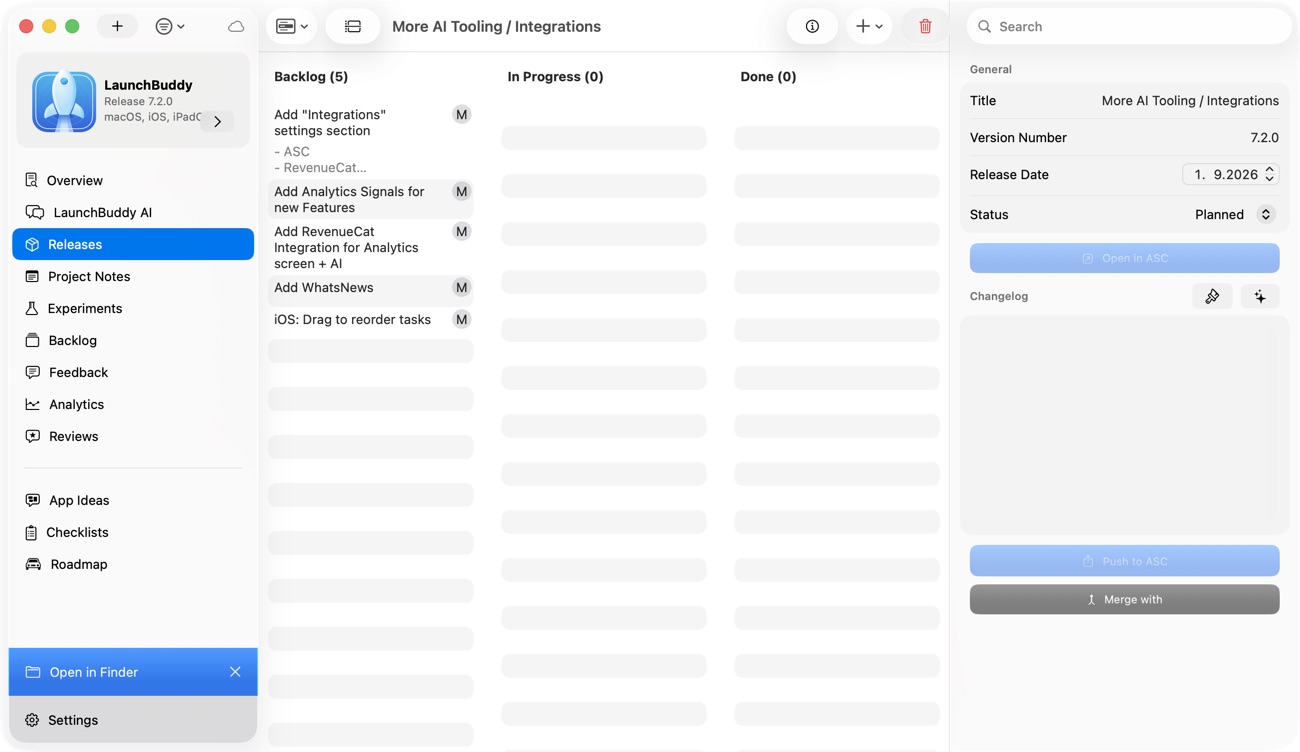
LaunchBuddy can keep each app’s backlog separate from version-scoped release tasks, then apply a submission checklist to the work that reaches the release window. Release planning, taskboards, default checklists, and iCloud sync are available in the free tier, which is limited to two apps and two releases. Custom checklists require Pro.
With LaunchBuddy Pro and App Store Connect API credentials, the reviews inbox plus downloads, revenue, and subscription metrics can sit near the release plan. Apple’s systems remain the source of truth for builds, TestFlight, App Review, release settings, full analytics, and public availability. LaunchBuddy doesn’t build or upload the binary, choose the right cadence, or prove that a release caused a metric to change.
Use it for the part a cadence needs most: a visible boundary between backlog, current version, recurring release checks, and follow-up work.