App Store Review Time: How Long to Plan For
Apple says App Review works around the clock with the goal of reviewing at least 50% of submissions in less than 24 hours and 90% in less than 48 hours. That is the best current answer to “How long does App Store review take?” It is not a promise that your app will be approved within two days.
Those figures describe Apple’s review timing, not the complete time from your upload to public availability. Build processing happens before submission. A rejection can add another response, fix, and review cycle. After approval, release controls and App Store processing can add more time.
For a date-sensitive launch, plan four separate clocks:
- submission preparation;
- Apple’s review;
- issue resolution and possible resubmission; and
- release and storefront availability.
Apple’s current App Review time figures
As of October 11, 2026, Apple’s review-status guidance states these goals:
- at least 50% of submissions reviewed in less than 24 hours;
- 90% reviewed in less than 48 hours; and
- some submissions take longer when Apple needs additional verification.
Apple specifically names documentation checks and complex or novel issues as reasons for a longer review. Its broader App Review guidance also warns that an incomplete submission can be delayed or fail review.
Do not turn “90% in under 48 hours” into “my app will be live in 48 hours.” The percentage is not an appointment, an approval guarantee, or an availability estimate. It also does not tell you how long the queue and active-review portions lasted separately.
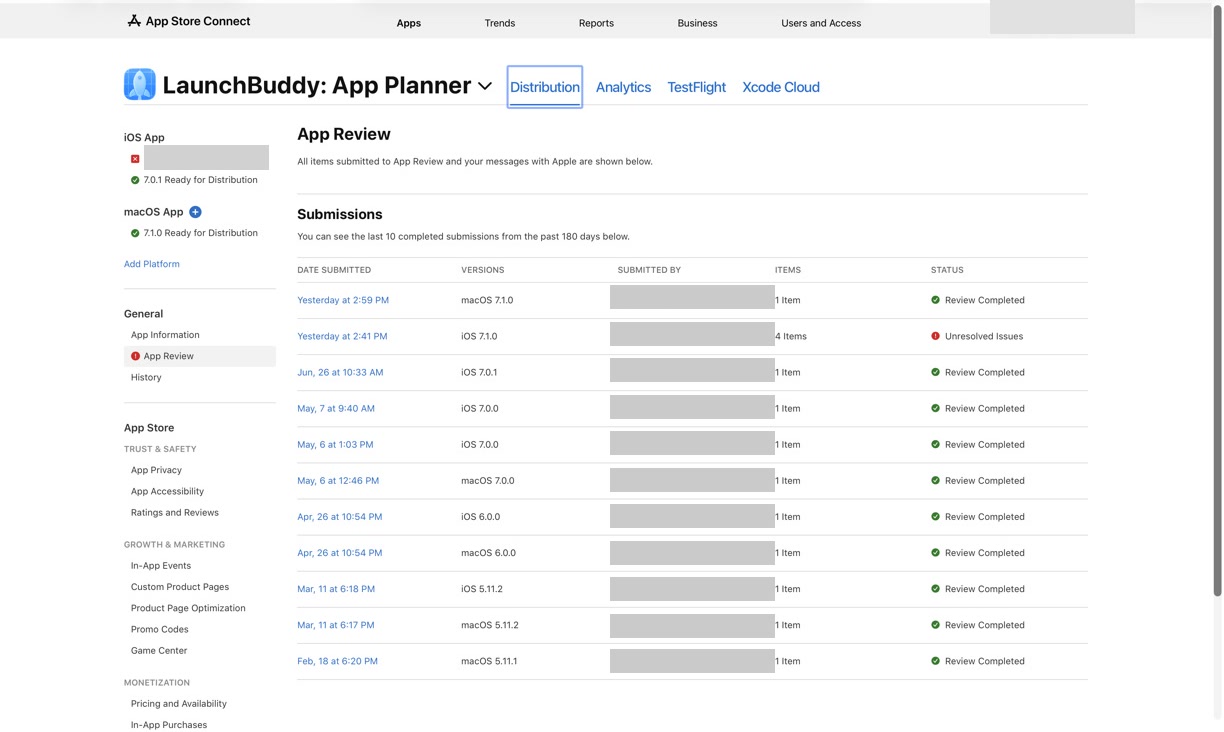
Read the App Store review timeline by status
The status is more useful than a generic timer because it identifies who controls the next move.
| Type | Status | What it means | What to do |
|---|---|---|---|
| Submission and app | Waiting for Review | Apple received the submission but has not started review | Avoid unnecessary changes; keep someone available to respond |
| Submission and app | In Review | App Review is actively reviewing the submission | Monitor App Store Connect and email |
| Submission | Unresolved Issues | Apple rejected one or more items in the submission | Read the message and resolve every rejected item |
| App | Pending Developer Release | Apple accepted the app, but manual release still requires your action | Run the final go/no-go check and release when ready |
| App | Processing for Distribution | Apple is preparing the app; Apple says it will be ready for distribution within 24 hours | Wait and verify the storefront when processing finishes |
| App | Ready for Distribution | The accepted app is ready for distribution if the required agreements are in effect | Check the intended country or region and public product page |
These definitions come from Apple’s current app and submission status reference. Waiting for Review is queue time; In Review is active review. Approval may still be followed by a manual hold and distribution processing.
Use the App Store submission tracker when you need a fuller status-to-next-action workflow. Keep App Store Connect as the authoritative record rather than copying an Apple status into a planning tool and assuming it will stay current.
Build a release buffer from events, not folklore
A useful buffer starts at the public date and works backward. Do not begin with a forum anecdote such as “updates usually take three hours.”
Record these dates:
Public target:
Latest acceptable storefront availability:
Latest approval time:
Initial submission deadline:
Internal build and metadata freeze:
Then budget for the events that can occur between them:
Initial review planning allowance
+ time to answer an information request
+ time to fix and test a rejection
+ another review planning allowance when resubmission is required
+ post-approval release and processing allowance
= working release buffer
Apple’s 24-hour and 48-hour figures can inform the review allowances, but they do not define them. Increase the contingency when the release has a fixed event, a first-time workflow, regulated content, unusual hardware, a complicated account path, several review items, or no engineer available to answer during the review window.
If the date can move without customer harm, you may accept a smaller contingency. If missing it would break an event, contract, or coordinated campaign, plan for review to last longer than 48 hours.
Worked example: a Friday feature launch
Suppose you want an update visible by Friday at 6 p.m. You choose manual release because a backend flag and announcement need a final check.
Apple says a manually released version may take up to 24 hours to appear. Thursday at 6 p.m. is therefore the edge of Apple’s stated window, with no contingency. This example uses Wednesday at 6 p.m. as the working release target.
Now create a planning model:
Friday 18:00    Latest intended storefront availability
Thursday 18:00  Edge of Apple's stated 24-hour window
Wednesday 18:00 Working manual release target
Tuesday 18:00   Desired approval checkpoint
Sunday 18:00    Initial submission target
Saturday        Final build, metadata, and reviewer-path rehearsal
This fictional schedule gives the initial submission roughly 48 hours to reach the desired approval checkpoint. It then preserves a day before the planned release action and another before the edge of Apple’s availability window. It does not guarantee approval by Tuesday. If the campaign cannot move, add a full fix-and-resubmission cycle rather than assuming the first review will pass.
The value of the timeline is not its exact number of days. It makes the risk visible: a Monday submission for a Friday launch may leave almost no room for a binary fix, retest, upload, and second review.
Reduce avoidable review delay before submitting
You cannot control Apple’s queue, but you can remove ambiguity from the submission.
Rehearse the reviewer path
Test the exact build and account path a reviewer will use. If login is required, confirm the demo credentials work. Document any setup, hardware, subscription state, or non-obvious navigation needed to reach the reviewed feature.
Write App Review notes for the submitted build, not for an older version. Keep the instructions short enough to follow and specific enough to reproduce.
Attach required evidence before review
Apple says documentation verification can extend a review. If your app needs an authorization, license, partnership document, or other supporting material, attach it in the appropriate App Review Information area before submission.
Keep a response owner available
Name one person who will monitor App Store Connect and the relevant email inbox. A fast, complete answer to an information request can avoid an unnecessary resubmission. “Submitted” should not mean nobody looks again until launch day.
Verify the whole submission packet
An App Review submission may contain the app version and other items. Check the selected build, metadata, screenshots, review information, release option, and every included item. One rejected item can leave the submission with unresolved issues.
Reply, resubmit, or wait?
Apple’s current guidance says to reserve resubmission for changes that require a new review.
- Reply instead of resubmitting when App Review requests information and there is no other issue to resolve.
- Reply after a permitted metadata or server-side correction when Apple’s message and available controls support that path.
- Resubmit when you fixed an issue in the binary and uploaded a new build.
- Edit rejected items, add them for review, and resubmit when you want Apple to review the corrected items.
- Remove rejected items when the accepted items can move forward without them. If all rejected items are removed, Apple says the submission moves to Completed and is ready for release.
- Wait when the submission remains in a normal review state and there is no actionable message.
Apple warns that resubmitting starts a new review, after which App Review can no longer reply to the previous message. Removing an otherwise valid submission simply because it has not matched an anecdotal duration can discard queue progress.
When a submission has Unresolved Issues, Apple’s resolution workflow requires every rejected item to be edited or removed before resubmission. Track the correction, test evidence, new build when required, and new submission time as a separate cycle.
For contradictory statuses or a submission with no actionable message, use the evidence checklist in App Store Connect Help before contacting Apple. An expedited review is for extenuating circumstances such as a critical bug fix or an app tied directly to an approaching event; Apple does not present it as a general scheduling shortcut.
Separate approval time from release time
After approval, the chosen release option still matters:
- Manual release waits in Pending Developer Release until an authorized user acts.
- Automatic release removes that human handoff.
- Automatic, no earlier than sets a floor; it cannot force review to finish by the chosen date.
Apple says distribution processing can take up to 24 hours. A public page may therefore lag approval or a manual release action. The manual vs automatic App Store release guide helps choose the control separately from the review buffer.
Do not announce “approved” as “available.” Verify the public product page in the intended storefront and, when it matters, the version users can actually download.
Where LaunchBuddy fits
LaunchBuddy can hold the version-scoped tasks, due date, and submission checklist around this timeline. A practical release plan might contain separate tasks for submitting, watching for reviewer questions, correcting issues, releasing manually, and checking the storefront.
Its Release Status widget summarizes the LaunchBuddy plan, including progress, due date, task counts, and checklist completion. It does not prove that Apple started review, approved the submission, or made the app available. LaunchBuddy does not upload builds, submit an app to review, accelerate App Review, or guarantee a launch date. Check App Store Connect for every official status and release action.
Treat Apple’s current figures as context, then add the contingency your deadline needs. Download LaunchBuddy and build the review buffer into your next release plan.