LaunchBuddy vs Release Pilot: Planning or Live Status?
LaunchBuddy vs Release Pilot is a choice between managing the release plan and monitoring Apple’s live record. Choose LaunchBuddy when you need version-scoped tasks, reusable submission checklists, private iCloud sync across iPhone, iPad, and Mac, and follow-up work connected to reviews and selected analytics. Choose Release Pilot when you want an iPhone dashboard for App Store Connect status, status notifications, a review-wait Live Activity, mechanical preflight checks, review replies, and optional RevenueCat metrics.
The products overlap around checklists, reviews, widgets, and App Store Connect credentials, but those similar labels hide different jobs. LaunchBuddy records what the developer intends to ship and why. Release Pilot surfaces what Apple’s systems currently report. Neither builds, signs, or uploads an app binary, and neither replaces App Store Connect as the authoritative record.
This comparison was checked against both products’ first-party pages on November 23, 2026. Release Pilot’s marketing page and current App Store listing disagree about whether its Pro trial lasts 14 or 7 days; its App Store listing and terms say 7 days, so confirm the offer shown before subscribing.
LaunchBuddy vs Release Pilot at a glance
| Decision area | LaunchBuddy | Release Pilot |
|---|---|---|
| Best fit | Planning app scope, version work, recurring release process, and evidence-backed follow-up | Watching App Store Connect state, reviews, and subscription signals from an iPhone |
| Release record | App backlog, version-scoped taskboard, release status, due date, changelog, and checklist progress | App Store state, version history, attached build, and pending submission details read from App Store Connect |
| Checklist | Default reusable submission checklists are free; custom checklists require Pro | A documented 17-rule pre-submit check for mechanical App Store Connect issues; Free allows three runs per week |
| Reviews | Pro inbox, replies, AI drafts, and review-to-task conversion | Reviews across tracked apps, phone replies, and reusable reply templates; Free allows two replies per month |
| Metrics | Pro shows selected App Store Connect download, revenue, and subscription metrics | Pro shows RevenueCat MRR, 28-day revenue, active subscribers, and customer counts |
| At-a-glance view | Release Status widgets show progress, due date, task counts, and checklist completion | Home and Lock Screen widgets prioritize app status; Pro adds review-wait Live Activities |
| Notifications | No verified live App Store Connect status-notification feature | Pro push notifications for documented app-state changes, with quiet hours and per-app controls |
| Devices | Native iPhone, iPad, and Mac workflow | Designed for iPhone; the listing requires iOS 17 or later |
| Project storage | Tasks, releases, and notes live in the user’s private iCloud account | Responses are cached in local SQLite; published credential claims conflict with the official source, so verify the push setup before connecting a key |
| Free boundary | Two apps, two releases, limited notes, default checklists, iCloud sync, and read actions | One App Store Connect account, one tracked app, three checklist runs weekly, two review replies monthly, and no revenue data |
| Paid plan | $2.99/month or $19.99/year | $4.99/month or $39.99/year; the current listing and terms document a 7-day trial |
This table isn’t a feature score. A live status card cannot explain why a feature belongs in version 2.4. A complete taskboard cannot prove which build Apple has in review. The better tool is the one that owns the record you keep losing.
The real difference is intention versus observation
Release Pilot is an App Store Connect client. Its official App Store listing says a manual refresh reads Apple directly and shows each app’s current state, version history, attached build, and pending submission details. The developer’s terms are explicit that it doesn’t submit apps, change prices, or automate App Store Connect actions.
LaunchBuddy is a project and release manager. Its durable record answers different questions:
- What is committed to the next version?
- Which checks are still open?
- Why was a task deferred?
- Which completed work is safe to mention in release notes?
- Which customer signal should become backlog work?
Apple’s state still belongs in App Store Connect. LaunchBuddy’s plan still needs human judgment. The LaunchBuddy vs App Store Connect comparison explains that boundary in detail.
The distinction matters during an incident. “In Review” is an observation. “If Apple rejects build 104 for the receipt flow, restore the fix branch, rerun the clean-install purchase matrix, and update reviewer notes” is a plan. Release Pilot is designed to surface the first quickly; LaunchBuddy is designed to preserve the second.
The two checklists prevent different failures
Both products advertise a checklist, but they don’t document the same kind of check.
Release Pilot describes a fixed 17-rule pre-submit check against mechanical App Store Connect conditions such as a missing description, an overlong keyword field, no support URL, no attached build, or incomplete in-app purchase metadata. Its site says failed checks deep-link to App Store Connect. The developer also warns that the checklist cannot catch every rejection reason or evaluate Apple’s judgment about content, design, or a business model.
LaunchBuddy’s checklists are process templates attached to releases. Default checklists are included in Free, while Pro adds custom reusable checklists. They can cover work an API preflight cannot verify:
Receipt Box 2.4
- Test restore purchases on a clean install
- Verify an existing subscriber after account migration
- Confirm support and privacy links in the candidate build
- Match reviewer instructions to build 104
- Check that What's New mentions only shipped behavior
LaunchBuddy adds and tracks those tasks; it doesn’t inspect the binary or certify that someone performed them correctly.
Use Release Pilot’s preflight when the recurring failure is an incomplete App Store Connect record. Use LaunchBuddy when the failure is an app-specific test, owner, handoff, or release decision that Apple cannot infer. Using both can be reasonable because one checks the store record while the other tracks the operating process.
Release Pilot is stronger for live status awareness
Release Pilot’s distinctive workflow starts after Apple has a version or submission state to report. Pro documents:
- push notifications for app-state changes, including rejection notices;
- quiet hours, per-app mute, and a rejection-only notification option;
- Home and Lock Screen widgets that prioritize the app needing attention; and
- a Live Activity showing elapsed time while an app waits for review.
Those features answer “Did Apple move?” without reopening a planning board. There are two caveats.
First, a notification is not the source of truth. Release Pilot’s terms say APNs delivery is best-effort and its displayed data may not always be current. Its support page warns that notifications can take 5–30 minutes, while the official repository documents a 15-minute App Store Connect polling job. Open the record and verify Apple’s status before changing a launch plan.
Second, elapsed review time isn’t a release forecast. A Live Activity can make waiting visible, but it cannot predict when App Review will finish or whether Apple will approve the submission.
LaunchBuddy’s Release Status widget has a different purpose: it shows planned progress, due date, task counts, and checklist completion. It does not claim Release Pilot’s App Store state notifications or review countdown. Choose the widget whose stale state would hurt you more.
LaunchBuddy is stronger for version scope and follow-up
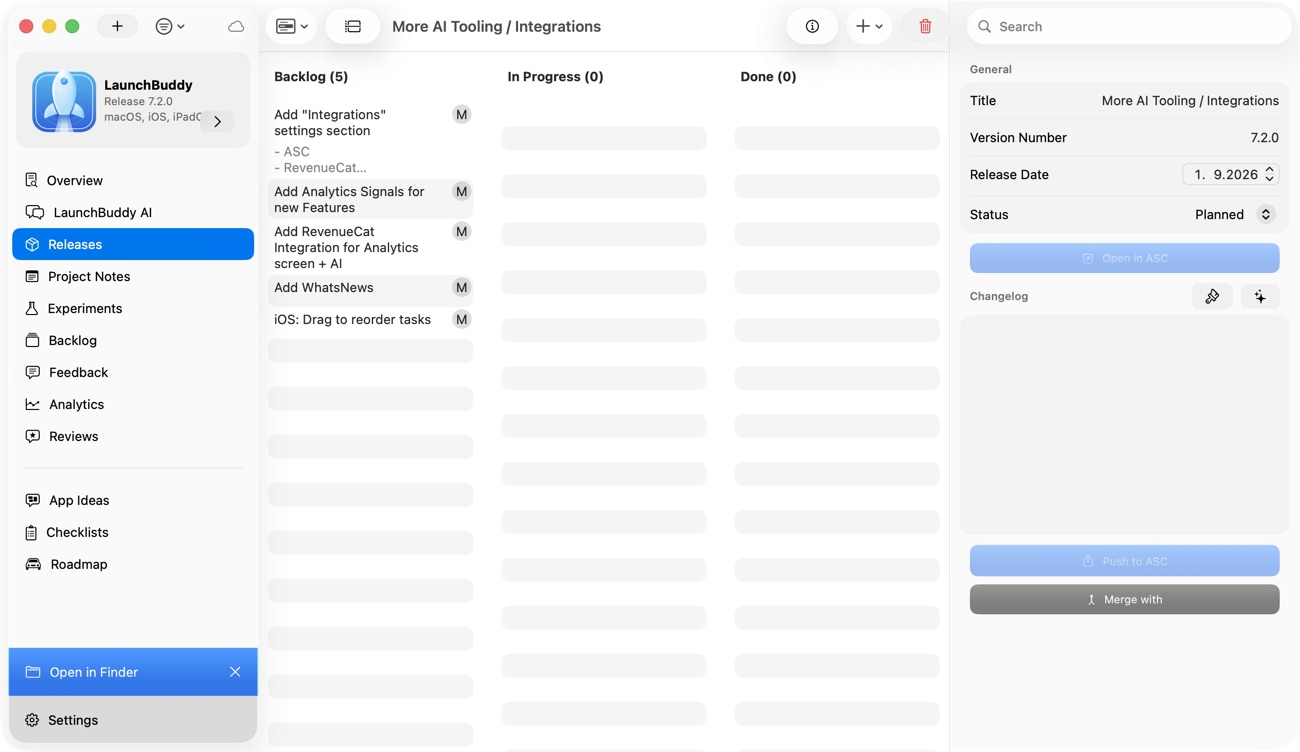
LaunchBuddy keeps backlog work separate from the version that will ship it. A release combines task scope, status, date, checklist progress, and a changelog draft. Completed work can inform customer-facing copy, while deferred tasks remain visibly outside the release.
That structure is useful before a build exists and after Apple marks it live. A customer review can become a structured task, selected metrics can prompt an investigation, and an unfinished item can move to a later release without being mistaken for shipped work. The iOS app release management workflow shows how those records fit together.
Release Pilot’s public documentation doesn’t claim a product backlog, version-scoped taskboard, custom process templates, release-note upload, or project notes. Don’t treat that as a flaw in an App Store status client. It is the boundary that makes the choice clearer.
Review workflows overlap until feedback becomes product work
Both products can read and reply to App Store reviews with configured App Store Connect access.
Release Pilot focuses on response speed from an iPhone. It collects recent reviews across tracked apps, supports direct replies, and offers reusable response templates. Free includes two replies per month; Pro makes replies and templates unlimited.
LaunchBuddy Pro supports a reviews inbox and replies on iPhone, iPad, and Mac. It also adds editable AI reply drafts and review-to-task conversion. Sending an AI-drafted reply is an approval-gated action, and a review can become a structured backlog item with details, type, estimate, and priority.
The dividing question is what happens after the reply:
Customer says purchase restoration fails

Response record:
- Acknowledge the report
- Avoid promising an unverified fix
- Publish through the authorized review channel

Product record:
- Capture affected version and evidence
- Reproduce with a defined account state
- Set a done condition
- Decide whether the task blocks the next release
Release Pilot is a focused fit for the response record. LaunchBuddy is the stronger fit when the report must continue into backlog and release planning. In either tool, follow a deliberate App Store review management workflow rather than treating every low rating as a confirmed defect.
Their metrics come from different systems
Release Pilot Pro documents a RevenueCat Today view with MRR, revenue over the last 28 days, active subscribers, and customer counts. That is useful when RevenueCat is already the operational subscription source.
LaunchBuddy Pro documents selected downloads, revenue, and subscription metrics from App Store Connect. It places those signals near release plans and ASO experiment records. Apple’s complete analytics and financial reports remain authoritative for their respective definitions and reconciliation.
These aren’t interchangeable dashboards. Before comparing a number, write down its source, definition, date window, currency treatment, and whether it represents a transaction, proceeds, an active entitlement, or an estimate. Choose Release Pilot for the documented RevenueCat pulse; choose LaunchBuddy when selected Apple metrics need to lead into release or experiment work.
Privacy is local-first in both products, but the data paths differ
LaunchBuddy stores project tasks, releases, notes, and related project data in the user’s private iCloud account. LaunchBuddy doesn’t host that project data on its own servers. Its App Store Connect features require Pro and API credentials, and its AI disclosure controls let users choose whether relevant private notes and local project context may be included.
Release Pilot’s privacy policy says the App Store Connect issuer ID, key ID, and private key stay in the iOS Keychain with a device-only accessibility setting. It says short-lived tokens are signed on the phone, Apple responses are cached in local SQLite, and the private key is not sent to the developer’s server.
The product’s official source creates a material contradiction. In the repository’s v1 source, push registration reads the private key and sends it to the worker. The corresponding worker handler encrypts and stores that key, and the database schema stores observed app state and a push log. The current repository architecture also describes a worker polling App Store Connect with stored encrypted credentials, even though the same README says the key never leaves the device.
That source predates the first App Store release, and this article did not inspect the shipped binary. It therefore cannot establish which behavior is in the installed app. Until the developer reconciles the policy and implementation, don’t rely on a device-only credential guarantee when enabling push. Ask for clarification, use a dedicated key, and plan to revoke it after testing.
Release Pilot also says RevenueCat receives an anonymous installation ID and Apple purchase receipt to validate its own subscription. The published policy says its Cloudflare Worker stores an APNs token and receives app-state data for push delivery. Those services are separate from the optional RevenueCat metrics connection.
For either product:
- Create a dedicated App Store Connect key with no more access than the workflow needs.
- Keep the original private-key file out of chat, source control, and ordinary project notes.
- Revoke the key in App Store Connect when the integration is no longer needed.
- Treat Apple as the final authority even when a local cache is convenient.
Compare the plans by the first blocked action
LaunchBuddy Free and Release Pilot Free both support a meaningful trial, but their limits measure different things.
Choose LaunchBuddy Free to test two app projects and two releases with taskboards, default submission checklists, iCloud sync, widgets, and read-only Shortcuts or macOS MCP actions. Choose Release Pilot Free to track one app and one App Store Connect account, run up to three pre-submit checks per week, send up to two review replies per month, and use its Today view without RevenueCat data.
LaunchBuddy Pro costs $2.99 monthly or $19.99 yearly. It removes app and release limits and adds custom checklists, connected App Store features, AI, ASO experiments, and supported approval-gated writes. Release Pilot Pro costs $4.99 monthly or $39.99 yearly. It documents unlimited apps and App Store Connect accounts, push notifications, Live Activities, RevenueCat data, and unlimited preflight checks and review replies.
The LaunchBuddy Free vs Pro guide lists LaunchBuddy’s exact feature prerequisites. For Release Pilot, use the current App Store purchase sheet as the final price and trial check because its marketing page currently conflicts with its listing and terms.
Run one release through a two-record test
Use the same low-risk update to test both mental models. Suppose build 104 fixes purchase restoration and updates onboarding copy.
Record the plan in LaunchBuddy
- Create version 2.4 and state its one-sentence goal.
- Assign only the restoration fix and onboarding change to that release.
- Apply the default checklist or a custom Pro checklist.
- Record build 104 as the candidate, not as approved.
- Verify completed work before approving release notes.
Observe Apple state in Release Pilot
- Connect a dedicated App Store Connect API key.
- Confirm the app, version, build, and current state match Apple’s record.
- Run the pre-submit check and resolve supported mechanical issues in App Store Connect.
- Configure only the status notifications that require action.
- When a notification arrives, reopen the record before updating the plan.
Score the handoff
Could I identify the exact candidate build?             Yes / No
Could I name every open app-specific release check?     Yes / No
Could I verify Apple's current state?                   Yes / No
Could I explain the next action and its owner?          Yes / No
Did a review become a reply, a task, both, or neither?  Clear / Unclear
Did either tool duplicate an authoritative record?      Yes / No
If Apple’s state keeps surprising you, Release Pilot addresses the monitoring gap. If scope, checks, and follow-up keep dissolving into memory, LaunchBuddy addresses the planning gap. If both gaps are real, keep one ownership rule: Release Pilot observes Apple; LaunchBuddy owns the plan; App Store Connect owns the official record.
Choose the missing record
Choose Release Pilot for an iPhone-first view of App Store status, preflight issues, review replies, state notifications, review-wait Live Activities, and RevenueCat signals. Choose LaunchBuddy for cross-device app planning, version scope, reusable release process, review-to-backlog follow-up, and selected App Store context tied to the next decision.
If the planning record is what your release process is missing, download LaunchBuddy and test your next update on the free plan.