Monthly Subscription With a 12-Month Commitment: Setup Guide
Apple’s monthly subscription with a 12-month commitment is a billing plan on a one-year auto-renewable subscription. The customer pays once a month for 12 months rather than paying the annual price up front. After the 12th payment, it starts another 12-month commitment unless the customer has canceled the renewal.
This isn’t a standard one-month subscription and it isn’t a fifth In-App Purchase type. The annual product ID and subscription group stay the same; you add a monthly billing option to that existing or new one-year product.
Before adopting it, check the hard availability boundary. The app must be built with the 26.5 SDK or later. Customers need iOS 26.4, iPadOS 26.4, macOS 26.4, tvOS 26.4, or visionOS 26.4 or later. The plan isn’t available on watchOS or in the United States and Singapore.
Understand what the customer is committing to
Each successful payment creates one independent transaction and grants one month of access. The commitment covers the full 12-payment sequence.
Cancellation during that sequence turns off the next annual commitment. It doesn’t erase the remaining scheduled payments in the current commitment, except where regional rules require different treatment. If the customer completes all 12 payments and leaves renewal on, another commitment begins.
Keep these two clocks separate:
| Clock | What it controls | Source to read |
|---|---|---|
| Current billing period | Whether the current month grants access | Transaction.expirationDate and verified entitlement state |
| Full commitment | Progress through the 12 payments and when the commitment ends | Transaction.commitmentInfo |
Don’t grant a year of uninterrupted access merely because the commitment end date is in the future. Apple’s StoreKit guidance says to evaluate each monthly transaction for access. A failed monthly renewal can interrupt the entitlement even though the original commitment hasn’t reached its planned end.
Check whether the billing plan fits
The plan can reduce the amount due at purchase while preserving an annual commitment, but it also creates 12 billing events and a more complex support path. Make the tradeoff explicit before configuring it:
Existing annual product ID:
Subscription group and level:
Up-front annual price:
Proposed monthly price:
Total of 12 monthly payments:

Eligible storefronts:
Minimum supported OS:
App SDK:

Customer reason for monthly billing:
Current-period entitlement owner: app | server | both
Server notifications implemented: yes | no
Support owner for cancellation and billing issues:
Stop if the app can’t distinguish the current billing period from the overall commitment. Also stop if the paywall can’t show both the monthly amount and total commitment amount. Apple requires both before purchase.
If the product’s service level or group structure is still unsettled, resolve that first with the App Store subscription groups guide. Group order controls upgrade, downgrade, and crossgrade behavior; the billing plan doesn’t replace that model.
Configure the annual product in App Store Connect
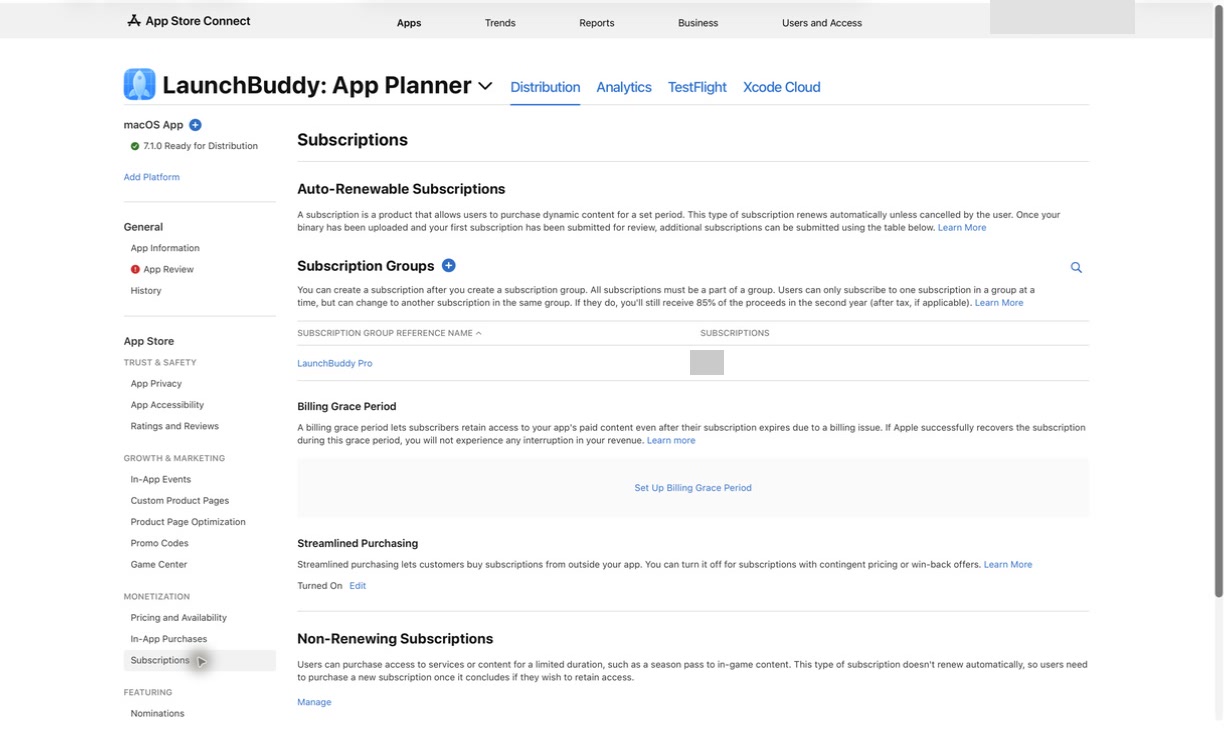
An Account Holder, Admin, or App Manager can set availability. Apple’s current App Store Connect instructions use this sequence:
- Open the app in App Store Connect and select Subscriptions under Monetization.
- Open the relevant subscription group.
- Select an existing one-year auto-renewable subscription, or create one with 1 Year as its duration.
- Under 1 Year Upfront, select Set Up Availability and choose the storefronts for the annual up-front plan.
- Under Monthly with 12-Month Commitment, select Set Up Availability.
- Choose the storefronts for monthly billing. A storefront must already have up-front annual availability before it can have the monthly option.
- Under Subscription Prices, add the up-front and monthly prices in the base territory.
- Review Apple’s automatically calculated storefront prices, edit deliberate exceptions, and confirm.
The total of the 12 monthly payments must be at least the up-front annual price and no more than 1.5 times that price. The United States and Singapore can’t receive the monthly plan.
Save a configuration receipt instead of relying on the setup screen:
| Storefront | Annual up-front | Monthly payment | 12-payment total | Up-front enabled | Monthly enabled |
|---|---|---|---|---|---|
| Example A | Local price | Local price | Calculated total | Yes | Yes |
| Example B | Local price | Local price | Calculated total | Yes | No |
That receipt catches three easy mistakes: enabling monthly billing where the annual plan is absent, assuming every storefront has the base-territory price, and presenting a monthly equivalent that isn’t the actual monthly charge.
Read and present the correct StoreKit pricing terms
Build against the 26.5 SDK or later. A configured annual product returns entries in Product.SubscriptionInfo.pricingTerms:
.upFrontfor the standard annual payment;.monthlyfor the 12-month commitment, when it’s available for the customer’s storefront and device.
Don’t assume the monthly entry exists. A customer may be in an excluded storefront or on an unsupported OS. If StoreKit doesn’t return the .monthly pricing term, omit that purchase option rather than reconstructing it from a remote price table.
For custom purchase UI, read the localized monthly display price and total commitment price from the .monthly entry:
if let commitmentTerms = product.subscription?.pricingTerms.first(
    where: { $0.billingPlanType == .monthly }
) {
    let monthlyPrice = commitmentTerms.billingDisplayPrice
    let totalPrice = commitmentTerms.commitmentInfo.price

    // Display both amounts before purchase.
}
The paywall should make the commercial contract readable without arithmetic:
[localized monthly amount] per month
12 monthly payments
[localized total commitment amount] in total
Renews for another 12-month commitment unless canceled
Apple presents a system disclosure sheet the first time an Apple Account buys this billing plan, but that isn’t a substitute for accurate paywall terms. The disclosure appears once per Apple Account, so your own presentation still needs to remain clear on later purchases.
Subscription offers are billing-plan specific. Read offers from the .monthly pricing-terms entry when merchandising an introductory, promotional, win-back, or code offer for the commitment plan. Don’t assume an offer attached to the up-front plan also applies to monthly billing.
Initiate the selected billing plan
The annual and monthly options share one product ID, so the purchase call must identify which billing plan the customer chose:
let result = try await product.purchase(
    options: [.billingPlanType(.monthly)]
)
Handle success, pending, user cancellation, and unknown future results just as you would for another StoreKit purchase. Verify a successful transaction before granting access, then finish it after processing.
Use Transaction.currentEntitlements or equivalent verified current state to decide access. For a commitment-plan transaction, check the current billing period:
expirationDateis in the future;revocationDateis absent; andisUpgradedis false.
Use commitmentInfo.expirationDate only to describe the overall commitment. It isn’t the access expiration for the current month.
Handle cancellation, plan changes, and failed billing
The ordinary word “canceled” is too ambiguous for this plan. Your app and server need to distinguish at least these cases:
| Event | Commitment result | Access result |
|---|---|---|
| Customer disables renewal during the commitment | Current commitment continues; the next one is canceled | Continue evaluating each remaining monthly transaction |
| Upgrade to a higher service level | Commitment ends and the higher plan starts immediately; a prorated current-period refund may apply | Follow the verified upgraded entitlement |
| Downgrade to a lower service level | Change waits until the current commitment ends | Keep current-plan access while valid monthly transactions continue |
| Monthly payment fails | Apple enters billing retry for up to 90 days | Revoke access until billing recovers |
| Billing recovers | Commitment schedule shifts from the recovery date | Restore access from the recovered transaction |
| Current billing period is refunded | Current commitment ends | Revoke access from the latest revoked transaction |
| A prior billing period is refunded | That prior transaction is revoked; the commitment continues | Don’t treat it as a current commitment cancellation |
Billing Grace Period doesn’t apply to monthly subscriptions with a 12-month commitment. That is a critical exception to the standard Billing Grace Period workflow. On DID_FAIL_TO_RENEW, the customer is in billing retry but isn’t entitled through grace. Restore access only after verified recovery.
If your server uses App Store Server Notifications V2, keep the two renewal flags distinct:
- the ordinary renewal value describes whether the next monthly billing period continues;
- the commitment renewal value describes whether a new 12-month commitment starts after the current one.
When a customer cancels the next commitment, Apple continues sending monthly renewal transactions and DID_RENEW notifications for the remaining periods. Don’t revoke access in response to the cancellation notification alone.
Test the whole commitment, not only the first purchase
Start with StoreKit Testing in Xcode 26.5 or later:
- Add the monthly billing plan to a one-year subscription in the StoreKit configuration.
- Verify the paywall shows both localized amounts.
- Purchase with
.billingPlanType(.monthly). - Inspect
billingPlanTypeandcommitmentInfoin the transaction. - Confirm access uses the current transaction expiration, not the commitment expiration.
- Cancel renewal mid-commitment and verify access continues only through valid remaining monthly periods.
- Exercise an upgrade, downgrade, current-period refund, and prior-period refund.
Then move the release-critical paths to Sandbox. The StoreKit Testing vs Sandbox comparison explains what each environment proves. Sandbox adds App Store Connect product data, signed transactions, server notifications, and an accelerated end-to-end commitment sequence.
Use one state-transition record per check:
Environment:
App version and build:
Product ID:
Storefront:
Billing plan returned: monthly | up-front only

Starting billing period:
Starting commitment progress:
Action:
Expected transaction or notification:
Expected access:
Observed result:
Pass | blocker:
At minimum, prove initial purchase, the full 12-period accelerated sequence, cancellation during the commitment, final expiration after canceled renewal, billing failure, billing recovery, and a failure that outlasts the retry window. Also verify the uploaded build in TestFlight; a local or development-Sandbox pass doesn’t prove that the distributed binary contains the same product logic.
Roll out with a storefront and lifecycle gate
Start with the storefronts your team can verify and support, then expand deliberately. Use a small launch packet:
Product and billing plan:
First storefronts:
Up-front and monthly prices verified:
Paywall disclosure reviewed:

Minimum OS fallback checked:
StoreKit purchase path passed:
Server notification path passed:
Cancellation path passed:
Billing failure and recovery passed:

Support copy ready:
Production owner:
First review date:
Rollback trigger:
Removing the monthly billing option stops new purchases and prevents existing commitments from renewing into another commitment; it doesn’t erase active commitments. Plan support and entitlement handling for those remaining monthly periods.
After launch, separate product availability, purchase starts, successful monthly transactions, billing recovery, and new-commitment renewal. A single subscription count can’t show where this billing plan is succeeding or failing. Use App Store Connect and your verified transaction pipeline for plan-specific behavior. The App Store Connect analytics guide explains how to choose comparison windows and preserve competing explanations.
Where LaunchBuddy fits
App Store Connect owns the product, prices, storefronts, and official subscription reporting. StoreKit and your app or server own purchase handling and entitlements. LaunchBuddy doesn’t configure billing plans, inspect customer transactions, receive server notifications, or validate access.
LaunchBuddy can keep the storefront receipt, implementation tasks, test transitions, support preparation, and post-launch review attached to the relevant release. Release planning, taskboards, default submission checklists, and iCloud sync are available on the Free plan within its two-app, two-release, and limited-project-note limits. Pro adds custom checklists and unlimited apps, releases, and project notes. With App Store Connect API credentials, Pro also shows selected subscription metrics; use Apple’s tools for commitment-plan lifecycle details.
Download LaunchBuddy and keep the billing-plan rollout checks with your next release.
