LaunchBuddy vs Keelport: Which Indie Release Manager Fits?
LaunchBuddy vs Keelport comes down to workflow depth versus App Store Connect breadth. Choose LaunchBuddy if you want version-scoped planning, reusable submission checklists, built-in AI, and a mandatory approval queue for supported automation writes. Choose Keelport if you want broader App Store Connect imports, including TestFlight feedback and performance data, a documented 66-tool MCP surface, Apple Vision Pro support, and a currently free app.
Both products organize indie Apple-app projects, bugs or tasks, ideas, releases, reviews, analytics, and changelogs. Both can sync project data through the user’s iCloud account and expose an optional local MCP server on Mac. Neither product’s public documentation claims to build, sign, or upload an app binary, so Xcode, Transporter, Fastlane, or CI still owns that part of the release.
This comparison was checked against the products’ current first-party pages on October 16, 2026. Keelport is evolving quickly, so verify any deciding feature in the installed app before moving a live release.
LaunchBuddy vs Keelport at a glance
| Decision area | LaunchBuddy | Keelport |
|---|---|---|
| Best fit | Release scope, recurring submission discipline, app-aware AI, and controlled automation | Rich App Store Connect context, TestFlight and performance follow-up, and broad agent access |
| Planning model | Apps, backlogs, version-scoped taskboards, release status, due dates, and default or custom reusable submission checklists | Projects, bugs, features, ideas, releases, release tasks, comments, attachments, and checklist templates |
| App Store Connect | Pro reviews and replies, review-to-task, selected downloads, revenue and subscription metrics, and release-note upload | Reviews and responses, sales and proceeds, analytics, TestFlight feedback and crash reports, performance metrics, and submission history |
| TestFlight | Plan beta work as release tasks and checklist items; direct TestFlight feedback import is not in the verified feature set | Imports beta feedback, screenshots, and crash reports; converts feedback to bugs or features |
| Built-in AI | Pro App Chat, Idea Chat, playbooks, changelog and reply drafts; usage limits apply | The listing documents Apple Intelligence feedback summaries and an MCP server for external AI clients |
| MCP on Mac | Localhost-only; reads are free, while Pro writes become proposals that require approval | Localhost-only and off by default; 66 tools are advertised for reads and changes across the workflow |
| Devices | iPhone, iPad, and Mac | iPhone, iPad, Mac, and Apple Vision Pro |
| Project storage | Private iCloud sync; LaunchBuddy does not host tasks, releases, or notes on its own servers | Local SwiftData with optional private CloudKit sync; no developer-operated server |
| Current price boundary | Free for two apps and two releases; Pro is $2.99/month or $19.99/year | The current US App Store listing shows Free and does not list In-App Purchases |
This isn’t a feature score. Keelport exposes Apple records that LaunchBuddy does not claim to import. LaunchBuddy supplies an in-product AI and approval model that Keelport’s public pages do not describe as an equivalent global queue.
The overlap is real
These products are closer than a generic task manager and an App Store Connect client. Either can hold a project backlog, organize work around releases, generate a changelog from planned work, sync across Apple devices, surface reviews and analytics, and let an MCP-compatible coding client work with app data.
That means labels alone will not settle the decision. A useful comparison starts with three questions:
- Which Apple data must appear beside the plan?
- What should an AI client be allowed to change?
- Do you want AI inside the release manager, or do you already use an external MCP client?
The answers reveal meaningful boundaries that a long checklist can hide.
Keelport goes deeper into App Store Connect
Keelport’s current App Store listing documents a broad read-and-triage surface:
- customer reviews with ratings, territory, and developer responses;
- sales with daily units, proceeds, and territory breakdowns;
- impressions, page views, crash rate, and conversion rate;
- TestFlight screenshots and crash reports;
- launch-time, hang, memory, and battery performance metrics by version and device; and
- version submission history from review through sale.
It can turn a review into a bug and TestFlight feedback into a bug or feature. That makes Keelport the stronger fit when the recurring problem is converting Apple-delivered operational evidence into tracked work without switching back to App Store Connect.
LaunchBuddy’s verified App Store Connect scope is narrower. With Pro and API credentials, it can read and reply to reviews, turn a review into a task, show selected download, revenue, and subscription metrics, and upload approved release notes. It does not claim direct TestFlight feedback, crash-report, performance-metric, or submission-history imports.
Neither breadth is automatically better. If crash and beta evidence drive most release decisions, Keelport removes a handoff. If selected store signals are enough and the bigger problem is controlling scope and recurring submission work, LaunchBuddy may be the more focused workspace. The LaunchBuddy vs App Store Connect guide explains where LaunchBuddy deliberately stops.
LaunchBuddy makes the release process more prescriptive
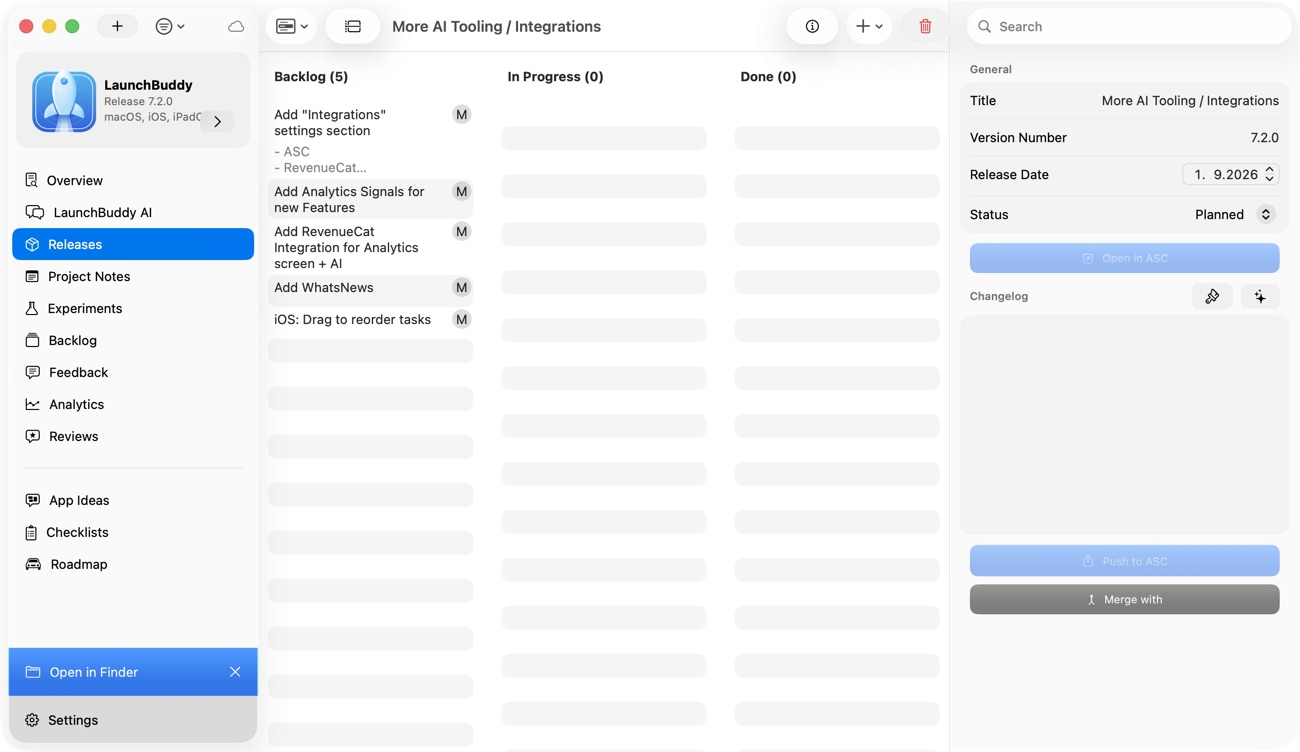
LaunchBuddy organizes work around an app and the version that will ship it. A release has a taskboard, status, date, changelog, and submission checklist. Default checklists are included in Free; Pro adds custom reusable checklists. Reviews can become backlog work, but assigning that work to a version remains a separate product decision.
Keelport also has releases, release tasks, staged bugs and features, checklists, and checklist templates. Its public listing additionally documents severity, priority, status, tags, platforms, effort estimates, comments, and attachments. It is not merely an App Store dashboard.
The distinction is emphasis:
- LaunchBuddy treats repeatable submission checks as a central release primitive.
- Keelport treats bugs, features, beta feedback, and Apple operational data as a connected tracker.
Choose based on the record you need after a release. LaunchBuddy’s record answers, “What did we commit to this version, and did we run our shipping process?” Keelport’s record can also answer, “Which TestFlight report or performance signal produced this bug?”
MCP safety is an authority decision, not a tool-count contest
Both MCP servers run locally on Mac. Localhost limits who can reach the server over the network, but it does not decide what a configured client may do or where that client sends returned context. Review the MCP client’s own data handling in either setup.
LaunchBuddy separates reads from writes:
Read
MCP client -> local LaunchBuddy server -> project or release result

Write
MCP client -> local LaunchBuddy server -> approval proposal
           -> approve or reject in LaunchBuddy -> change applied
Reads are available on the free plan. Supported write tools require Pro and do not mutate LaunchBuddy data until the proposal is approved. The LaunchBuddy MCP server guide covers that boundary and the currently verified write categories.
Keelport advertises 66 MCP tools. Its listing says an AI client can file bugs, stage features, generate changelogs, query reviews, reply to feedback, and convert TestFlight crashes into tracked bugs. The developer’s privacy policy says the server is off by default, binds only to localhost, and lets configured clients read and modify Keelport data.
Keelport’s version 1.5 release notes call deletion tools “confirm-gated,” but its public pages do not describe a LaunchBuddy-style approval queue for every supported write. That does not prove Keelport lacks other client-side confirmations. Inspect the discovered tool descriptions and test a reversible change before enabling a real workflow.
Use this authority ladder:
| Required authority | Better starting point |
|---|---|
| Report release state without changing it | Either product, beginning with reads |
| Create or update broad tracker records from an external client | Keelport documents the broader surface |
| Require an in-product approval before each supported write applies | LaunchBuddy documents this explicitly |
| Pull TestFlight feedback into an agent-assisted triage flow | Keelport documents direct access |
Do not choose by advertised tool count. Choose the smallest authority surface that completes the repeated job.
Built-in AI and external AI solve different setup problems
LaunchBuddy Pro includes App Chat, Idea Chat, release and review playbooks, changelog drafts, and review-reply drafts. It can use app context such as tasks, releases, and cached reviews. AI usage limits apply, and generated output still needs verification. Supported changes wait for approval.
Keelport’s listing emphasizes the MCP connection to clients such as Cursor and Claude, plus Apple Intelligence summarization for long TestFlight feedback. Its first-party pages do not document a built-in subscription AI chat equivalent to LaunchBuddy’s App Chat.
Choose LaunchBuddy when you want the release manager to provide the AI experience and its approval workflow. Choose Keelport when your coding client is already the AI workspace and needs deeper access to tracker and Apple data. In both cases, an AI summary is a triage aid, not evidence that a crash is fixed or a release is ready.
Both are private-by-design, with different edges
LaunchBuddy says its project data stays in the user’s private iCloud account and that it does not host tasks, releases, or notes on its own servers. When using LaunchBuddy AI, only provide the notes and project context you intend the feature to process. When using MCP, the connected client’s privacy terms become a separate boundary.
Keelport’s privacy policy is more explicit about local storage with optional private CloudKit sync. It stores project and imported App Store Connect data in SwiftData, and iCloud sync can be disabled. App Store Connect credentials are stored in Keychain and used for direct requests to Apple’s API, according to the policy. The developer says the app has no analytics, telemetry, crash-reporting SDK, ads, or developer-operated servers.
Keelport also supports Markdown export. That is useful for backups or git archives, but an exported file has left the app’s private database. Keep credentials and sensitive customer context out of repositories.
Device and price boundaries may decide the comparison early
LaunchBuddy supports iPhone, iPad, and Mac. One Pro subscription covers those platforms, although its MCP server and menu-bar features are Mac-only. The free plan supports two apps and two releases, limited project notes, default submission checklists, iCloud sync, widgets, and read actions. Pro costs $2.99 monthly or $19.99 yearly and adds unlimited capacity, custom checklists, App Store Connect features, AI, ASO experiments, and approval-gated writes. The LaunchBuddy Free vs Pro comparison lists the exact prerequisites and limits.
Keelport supports those three platforms plus Apple Vision Pro. Its US listing currently shows Free, with no In-App Purchases section, and describes no subscription for hosting the roadmap. Treat that as a current storefront fact, not a permanent pricing promise.
The immediate choices are straightforward:
- Need Apple Vision Pro or no paid plan today: start with Keelport.
- Need only two apps and two releases, iCloud sync, default checklists, and MCP reads: LaunchBuddy Free can be enough.
- Need LaunchBuddy’s connected Apple features, AI, custom checklists, or writes: include Pro in the comparison.
Run one release through both products
A comparison is more reliable when both tools receive the same messy update. Use a version with one bug fix, one feature, one TestFlight report, one customer review, and one deferred idea.
In Keelport
- Create the project, connect App Store Connect if needed, and define the release.
- Stage the bug and feature for that version.
- Import App Store Connect data and convert the relevant TestFlight report into a bug or feature.
- Generate a changelog, then remove any statement the shipped build does not prove.
- Ask the MCP client to report blockers and perform one harmless, reversible tracker update.
- Verify the record in Keelport and the official release state in App Store Connect.
In LaunchBuddy
- Create the app and release, then assign only committed tasks to the version.
- Apply the default submission checklist or a custom Pro checklist.
- Manually turn the TestFlight finding into a release task; LaunchBuddy does not claim to import it.
- With Pro and API credentials, convert the customer review into backlog work if it is actionable.
- Draft the changelog from completed tasks and verify each line against the build.
- Ask an MCP client to report blockers. With Pro, submit one write proposal and review it in the approval queue.
Afterward, score the records rather than the demos:
Release scope was obvious:              /5
Apple evidence stayed attached:         /5
Recurring checks were hard to skip:     /5
Agent authority matched my risk:        /5
The official Apple state stayed clear:  /5
I duplicated little or no data:         /5
The winning tool is the one that reduces your actual failure mode. A broader import surface is wasted if incomplete submission steps cause the trouble. A polished checklist is insufficient if TestFlight crashes repeatedly disappear between App Store Connect and the backlog.
Can LaunchBuddy and Keelport work together?
They can, but their overlap makes duplication likely. If you use both, assign one owner per record:
| Record | Suggested owner |
|---|---|
| Bugs, features, and TestFlight evidence | Keelport |
| Release commitment and submission checklist | LaunchBuddy |
| Build, TestFlight groups, submission, and official status | Apple’s tools |
| Public release notes | One chosen drafting record, then App Store Connect |
Do not mirror every bug, task, comment, and status. Use a handoff rule such as: only a release-blocking Keelport item becomes a LaunchBuddy release task; everything else stays in Keelport. If maintaining that boundary creates more work than it saves, choose one product.
Frequently asked questions
Does Keelport replace App Store Connect?
No. Keelport imports a broad set of App Store Connect data, but Apple’s system remains authoritative for builds, TestFlight configuration, submissions, agreements, pricing, and distribution. Its public listing does not claim binary building, signing, or upload.
Does LaunchBuddy import TestFlight feedback?
Direct TestFlight feedback import is not part of LaunchBuddy’s verified feature set. Track beta findings as release tasks and use App Store Connect as the feedback source.
Which MCP server is safer?
There is no universal answer. LaunchBuddy explicitly requires in-product approval before its supported writes apply. Keelport documents a localhost-only server, broad read-and-modify access, and confirmation for deletion tools in its release notes. Start read-only, inspect current tool descriptions, and test a reversible write.
Which product has better analytics?
Keelport documents broader operational data, including crash rate, conversion, TestFlight feedback, performance metrics, and submission history. LaunchBuddy provides a focused set of App Store Connect metrics beside release planning and ASO experiment records. Use App Store Connect when you need Apple’s complete authoritative view.
Choose the missing layer
Choose Keelport when TestFlight evidence, performance signals, Apple Vision Pro, and broad MCP access should live inside the tracker. Choose LaunchBuddy when reusable submission discipline, built-in app-aware AI, and approval-gated automation are the missing layer.
If LaunchBuddy matches that second workflow, download LaunchBuddy and test your next release on the free plan.