LaunchBuddy vs Milestones: Which Project Planner Fits?
LaunchBuddy vs Milestones is a choice between an iOS release workspace and a general solo project planner. Choose LaunchBuddy when each app version needs a committed taskboard, an App Store submission checklist, selected App Store Connect context, and approval-gated automation. Choose Milestones when you want to divide any kind of project into phases, manage recurring work and subtasks, use Apple Watch, or use its documented MCP tools to update the planner.
The overlap is substantial. Both are native Apple-platform apps for one person, organize projects into smaller units of work, sync project data through the user’s iCloud account, and offer a local MCP server on Mac. Neither builds, signs, or uploads an app binary.
This comparison was checked against LaunchBuddy’s product facts and current website plus Milestones’ official product guide, free-plan page, changelog, privacy policy, and App Store listing on November 26, 2026. Features and storefront prices can change, so confirm a deciding capability in the current app before subscribing.
LaunchBuddy vs Milestones at a glance
| Decision area | LaunchBuddy | Milestones |
|---|---|---|
| Primary job | Plan and follow through on indie iOS app releases | Plan solo projects of many kinds |
| Work model | App → backlog and version-scoped release → tasks and submission checklist | Project → milestone → tasks and subtasks |
| Release process | Built-in default App Store submission checklists; custom reusable checklists require Pro | General tasks, recurring tasks, subtasks, custom statuses, and project backlog; no documented App Store-specific checklist |
| Apple context | Pro reviews, selected analytics, review-to-task, and approved release-note upload with App Store Connect API credentials | Public documentation does not claim App Store Connect integration |
| MCP on Mac | Reads are free; Pro writes create proposals that require approval in LaunchBuddy | Pro server can read and update projects, milestones, tasks, workspaces, and tags |
| Other quick access | Widgets on iPhone, iPad, and Mac; Mac menu bar release status; Shortcuts and Siri | Apple Watch app and complications, widgets, Shortcuts and Siri, Spotlight, and Mac Quick Entry |
| Project storage | LaunchBuddy project data is stored in the user’s private iCloud account | Local-first data with optional CloudKit sync through the user’s iCloud account |
| Free boundary | Two apps, two releases, limited project notes, default checklists, iCloud sync, widgets, and MCP reads | Two active projects; unlimited milestones and tasks, iCloud sync, Apple Watch, Siri, Shortcuts, and archive |
| Paid plan | $2.99/month or $19.99/year | $5.99/month, $29.99/year, or $79.99 lifetime in the US; regional prices vary |
This isn’t a feature score. Milestones goes broader in general project planning; LaunchBuddy goes deeper around an App Store release. The better fit depends on which missing context causes work to slip.
The core difference is what the middle layer means
In Milestones, the middle layer is a milestone: a phase such as Prototype, Beta, Launch, or Marketing. A milestone has its own status, due date, progress, and tasks. One project can therefore describe a long journey that isn’t tied to software versions at all.
In LaunchBuddy, the comparable middle layer is a release: a specific app version with committed tasks, status, target date, changelog, and submission checks. Possible work can remain in the app backlog without appearing to be part of the next version.
That distinction changes the questions each record answers:
Milestones
Project: Trail Notes
Milestone: Public beta
Question: Which phase is active, and what remains in it?

LaunchBuddy
App: Trail Notes
Release: 2.4
Question: What is committed to this version, and is its release process complete?
You can name a Milestones milestone “2.4” and use it as a release. Likewise, a LaunchBuddy release can represent a project phase. The labels aren’t decisive. What matters is the behavior around them: general project controls in Milestones, or app-version scope and submission workflow in LaunchBuddy.
LaunchBuddy makes the App Store release the unit of work
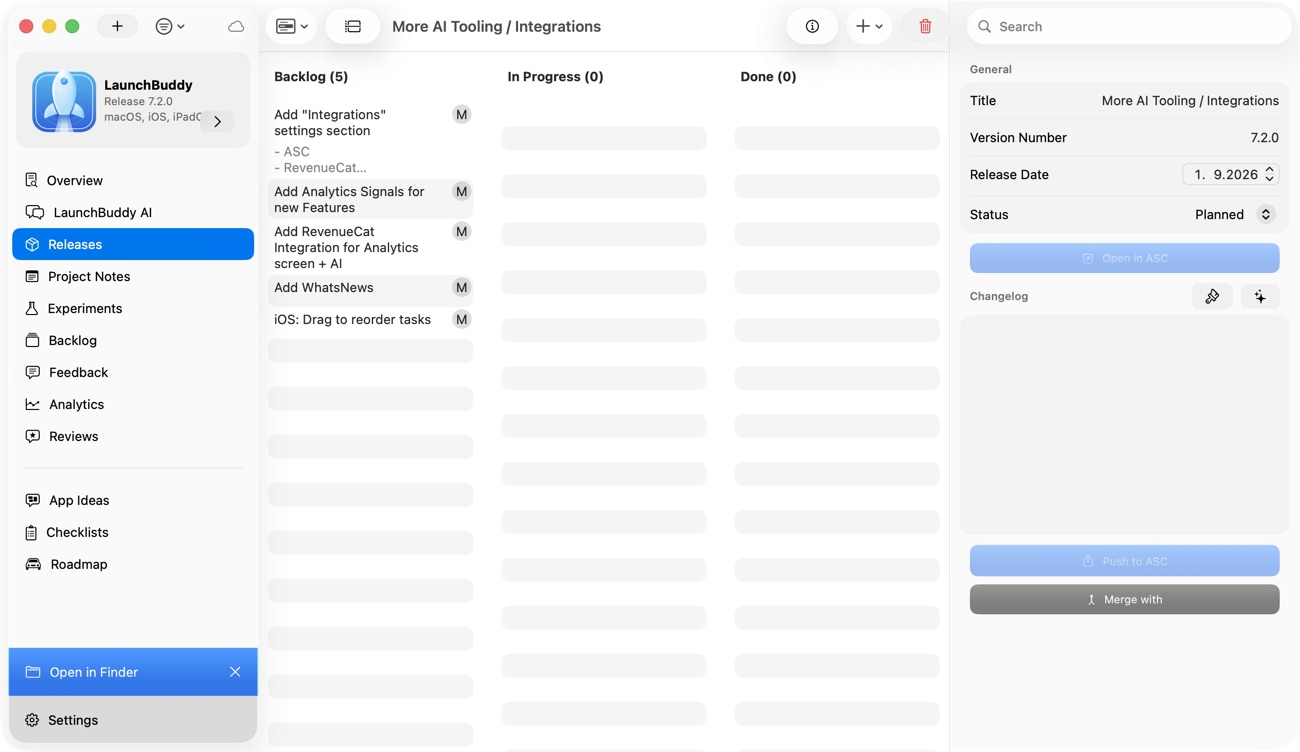
LaunchBuddy keeps an app backlog separate from release tasks. When a task is accepted for version 2.4, it sits beside that version’s status, date, changelog, and App Store submission checklist. The default checklists are available on Free; Pro adds custom reusable checklists.
That structure is useful when the recurring failure is release-specific:
- a screenshot task disappears behind code work;
- an idea is mistaken for committed scope;
- What’s New copy includes a feature that moved to the next version;
- a build is ready, but privacy, review notes, or live-page checks remain open; or
- customer feedback never becomes planned product work.
With Pro and App Store Connect API credentials, LaunchBuddy also provides a reviews inbox, selected download, revenue, and subscription metrics, review-to-task conversion, and release-note upload. Those are selected companion workflows, not a replacement for Apple’s system. App Store Connect remains authoritative for builds, TestFlight, submissions, pricing, availability, agreements, and full reporting.
LaunchBuddy does not build, sign, notarize, upload, or submit the binary. The broader iOS release management guide shows how the planning layer fits around Xcode and Apple’s tools.
Milestones provides a fuller general-purpose planner
Milestones is built around a Project → Milestone → Task hierarchy. Its current first-party product guide also lists smart Today, Upcoming, and Inbox views; tags and priorities across projects; multi-select edits; custom statuses; workspaces; attachments; a project backlog; recurring tasks; and Kanban views. Version 2.1 added free subtasks with configurable task-start and completion behavior.
Those features matter when the app release is only one part of a larger personal system. A solo developer could keep these milestones in one project:
Project: Trail Notes

Milestone: Version 2.4
- Fix duplicate sync alert
- Verify upgrade from 2.3
- Prepare App Store screenshots

Milestone: Website refresh
- Rewrite pricing page
- Replace support screenshots

Milestone: Launch follow-up
- Review support messages
- Write retrospective
Milestones can show due work across all three phases, repeat a weekly support-review task, attach files, and expose the plan on Apple Watch. Its free plan includes the Watch app, while Pro adds Home Screen and Lock Screen widgets, recurring tasks, Kanban, workspaces, attachments, and the project backlog.
Milestones’ public documentation does not claim an App Store submission checklist, App Store Connect reviews or analytics, review-to-task, or release-note upload. You can model that work with ordinary tasks, subtasks, and recurring items, but you own the template and its maintenance.
Reusable checklist or recurring task?
These features sound similar but solve different problems.
A LaunchBuddy submission checklist attaches a release process to an app version. A default checklist can add common submission tasks; a custom Pro checklist can preserve app-specific checks such as testing a sync migration or validating a subscription path.
A Milestones recurring task creates work again on a schedule. That is a better fit for “review support every Friday” than “run these 14 checks once for every version.” You can still copy or rebuild a release task set in Milestones, but its documented recurring model is time-based rather than an App Store release primitive.
Use this rule:
- Choose LaunchBuddy when the trigger is a new app version.
- Choose Milestones when the trigger is a date or repeating personal routine.
- If you need both, test how much manual duplication the handoff creates before keeping two planners.
Neither mechanism verifies the work outside the planner. Checking “Test purchases” doesn’t prove the StoreKit flow passed, and checking “Upload build” doesn’t prove Apple accepted the intended binary.
MCP writes have different authority models
Both products offer a local MCP server on Mac, but their public write paths are materially different.
LaunchBuddy’s read tools are available on Free. They can inspect next-release status, task and checklist progress, backlog tasks, cached reviews when the required integration is available, and approval status. Pro write tools create proposals for supported LaunchBuddy changes. The proposal must be approved or rejected in LaunchBuddy before it applies.
LaunchBuddy MCP write
client request → proposal → review in LaunchBuddy
               → approve or reject → verify the record
Milestones Pro documents a localhost MCP server that can list, create, update, complete, and reorder planner records. Its current public documentation describes those updates as tool operations and does not document an equivalent product-level proposal queue.
Milestones MCP update
client request → planner update → verify the record
Don’t turn that documentation gap into a safety verdict. The MCP client may provide its own confirmation, and the installed app can change. Inspect the discovered tools and client controls before enabling writes.
Choose the smaller authority surface that completes the repeated job. If every automated change must wait inside the planner for a separate decision, LaunchBuddy’s proposal model is the clearer fit. If direct creation and reorganization of general project records is the goal, Milestones documents the broader direct-update path. The LaunchBuddy MCP server guide explains its exact read, proposal, and verification boundaries.
Apple devices favor different moments in the day
Both products run on iPhone, iPad, and Mac and sync project data through iCloud. Their extra surfaces differ.
Milestones includes an Apple Watch app on the free plan. It can show due work, add or start tasks, check them off, and provide watch-face complications. Its Mac app also offers Quick Entry, while Spotlight, Siri, and Shortcuts help capture or find work.
LaunchBuddy has no documented Apple Watch app. Instead, it offers app overview, taskboard, release status, and idea-capture widgets on supported iPhone, iPad, and Mac versions, plus app and release access in the Mac menu bar. Widget reads are free; completing a task from a widget requires Pro.
Choose based on the interruption you want to remove:
- At the wrist: Milestones is the documented fit.
- At a glance by app version: LaunchBuddy’s release-status and taskboard widgets fit better.
- While coding on Mac: compare Quick Entry with LaunchBuddy’s app-specific menu bar and read-only MCP context.
Privacy is more than the word “iCloud”
LaunchBuddy stores tasks, releases, notes, and other project data in the user’s private iCloud account rather than on LaunchBuddy-hosted project servers.
Milestones stores data locally first, works offline, and optionally syncs it through CloudKit in the user’s iCloud account. It requires no Milestones account. Its official product guide says the developer does not host task content, while its privacy policy discloses analytics, crash-reporting, and subscription-service providers. Project storage and product telemetry are separate questions.
MCP adds another boundary to either app. A local server limits where the connection listens; it does not prevent the connected client from sending returned project context to its model provider. Review the client’s data policy, request only the records needed, and keep credentials out of task notes and prompts.
Neither product is documented as a team workspace. LaunchBuddy’s verified feature set has no team roles or real-time collaboration. Milestones explicitly says it is for one person’s projects, without sharing, assignees, comments, or permissions.
Compare the free plans before the advanced features
LaunchBuddy Free supports two apps and two releases, limited project notes, release taskboards, default submission checklists, iCloud sync, widgets, and MCP reads on Mac. Pro is $2.99 per month or $19.99 per year and adds unlimited capacity, custom checklists, App Store Connect features, AI, ASO experiments, and approval-gated writes. AI usage limits apply, and connected Apple features require API credentials.
According to the current Milestones plan page, Free supports two active projects at a time, with unlimited milestones and tasks inside them. Archived projects don’t count toward that limit. The plan also includes iCloud sync, Today, Upcoming, Inbox, tags, priorities, Apple Watch, Siri, Shortcuts, and archive. Pro is currently $5.99 per month, $29.99 per year, or $79.99 lifetime in the US and adds unlimited active projects plus its advanced planning and MCP features.
The limits count different objects. One LaunchBuddy app with several planned versions can encounter the release limit. One Milestones project can contain unlimited milestones on Free, so it may hold many version-shaped milestones.
For exact LaunchBuddy prerequisites and plan boundaries, see LaunchBuddy Free vs Pro.
Run the same update through both planners
A feature table won’t reveal whether the hierarchy matches your thinking. Use the same low-risk update for 30 minutes in each app:
App: Trail Notes
Version: 2.4
Committed:
- Fix duplicate sync alert
- Improve empty-state copy

Required before release:
- Upgrade test from 2.3
- Screenshot review
- What's New approval

Not committed:
- Offline maps
Test LaunchBuddy
- Create app release 2.4 and move only the two committed changes into it.
- Leave Offline maps in the app backlog.
- Apply the default submission checklist and add the three release-specific checks.
- Draft a changelog from completed work, without treating incomplete tasks as shipped.
- Ask the MCP server to report blockers. If testing Pro writes, propose one harmless task update and inspect the approval before applying it.
- Verify build and submission state in App Store Connect, not in the planner.
Test Milestones
- Create a Trail Notes project and a Version 2.4 milestone.
- Add the two committed tasks and place Offline maps in the Pro backlog or a later milestone.
- Represent each release check as a task or as subtasks under a “Prepare submission” task.
- Add one real repeating routine, such as a weekly support review, to test recurrence rather than simulating a release checklist.
- View the same work in the milestone, a smart list, Kanban, and Apple Watch if those surfaces matter.
- If testing MCP, perform one reversible task update, then inspect the final record.
Score only the workflow you exercised:
| Question | Weight |
|---|---|
| Was committed version scope obvious? | 3 |
| Were repeatable checks hard to skip? | 3 |
| Did general project work fit without awkward labels? | 2 |
| Did automation have the right amount of authority? | 3 |
| Did the device surfaces remove a real interruption? | 2 |
| Was App Store evidence close enough to the plan? | 3 |
| Did you avoid duplicating the same task elsewhere? | 4 |
A score is useful only when both apps contain the same update. Do not award points for a feature you didn’t use.
Choose by the record you need after shipping
Choose LaunchBuddy when you want the lasting record to answer:
- What shipped in this app version?
- Which submission checks were completed?
- What did the public changelog say?
- Which reviews or selected store signals should become follow-up work?
- Which agent changes were proposed, approved, and applied?
Choose Milestones when the record should answer:
- Which phase of this project is active?
- What is due across all personal projects?
- Which recurring routines and subtasks remain?
- What can be captured or completed from Apple Watch?
- Which project records can an MCP client organize directly?
If neither record addresses the bottleneck, look at a different category. A full App Store Connect client, TestFlight tool, or build pipeline solves a different job; the App Store Connect alternatives guide maps those boundaries.
If the app-version record is the one you need, download LaunchBuddy and test your next release on the free plan.