AI App Store Connect Workflow for Indie iOS Developers
An AI App Store Connect workflow is becoming one of the most practical ways for indie iOS developers to make releases feel less scattered.
App Store Connect already holds the important App Store state: app versions, builds, TestFlight testing, metadata, screenshots, App Review status, pricing, subscriptions, analytics, and customer feedback. AI can help with the writing, summarizing, triage, and checklist work around that state. The hard part is connecting both to the actual release you are trying to ship.
That is where LaunchBuddy fits. It is built as a project management app for iOS developers, and with App Store Connect integration and AI features, it can help keep release tasks, App Store status, AI drafts, and final launch decisions in one workflow.
What AI should do in an App Store Connect workflow
AI is most useful when the release context is already structured. If you ask a generic AI tool to “write release notes,” it can produce polished text that says very little. If you give it the selected build, completed tasks, TestFlight feedback, metadata goals, and known exclusions, it can draft something much closer to the truth.
Good AI-assisted App Store Connect tasks include:
- Drafting App Store release notes from completed work
- Turning technical tasks into user-facing benefits
- Summarizing TestFlight feedback by release
- Drafting App Review notes from saved context
- Suggesting App Store metadata alternatives
- Brainstorming ASO keyword candidates
- Creating launch copy for a new feature
- Summarizing what changed after a version ships
- Turning a release checklist into next actions
Those are high-leverage tasks because they reduce blank-page friction and context switching. They still leave the final decision with the developer.
AI should not silently decide:
- Whether a build is ready for App Review
- Whether a feature should be promised in metadata
- Whether a keyword is relevant enough to use
- Whether pricing, availability, or subscription changes are safe
- Whether App Privacy answers are accurate
- Whether a TestFlight issue blocks release
- Whether generated copy should be pasted into App Store Connect unchanged
The safest AI App Store Connect workflow is simple: collect the facts, draft from those facts, review every claim, then save the final decision with the release.
Start with the release, not the AI prompt
AI gets better when the input is specific. Before generating anything for App Store Connect, define the release.
For each version, track:
- Version number
- Release goal
- Target build
- Completed user-facing features
- Fixed bugs
- Performance or reliability improvements
- TestFlight feedback that affected the release
- App Store metadata changes
- Screenshots or app preview updates
- App Review notes
- Known exclusions
- Follow-up tasks for the next version
This is the context AI needs to write responsibly.
If the source material lives in memory, git commits, a notes app, App Store Connect fields, TestFlight emails, and a half-finished task list, the AI output will reflect that mess. It might overemphasize internal refactors, invent user benefits, or forget a late beta fix.
A release in LaunchBuddy gives AI a better starting point because the work is already organized around the version. The App Store Connect integration can provide state, while the project management layer explains what that state means.
Use App Store Connect status as AI context
App Store Connect status is not only useful for tracking progress. It also changes what AI should draft.
For example:
- If the build is still processing, do not finalize release notes yet.
- If the selected build changes, recheck every generated claim.
- If external TestFlight feedback adds a bug fix, update the release summary.
- If App Review is waiting, keep launch copy and follow-up tasks ready.
- If the version is approved but pending developer release, shift AI help toward launch notes, support replies, and post-release monitoring.
A connected workflow should help answer:
- Which build is selected for this version?
- Is the build ready for TestFlight?
- Has beta feedback been reviewed?
- Is the App Store version prepared?
- Are metadata fields still accurate?
- Are screenshots still current?
- Is the version waiting for review, in review, or ready to release?
When those answers are close to the release plan, AI can work from the right state instead of stale assumptions.
For a status-focused guide, read the App Store submission tracker. For API-specific release context, read the App Store Connect API workflow.
Draft App Store release notes from real work
Release notes are the most obvious AI use case because they arrive when the developer is already juggling build status, metadata, screenshots, review notes, and launch timing.
A practical AI release notes workflow looks like this:
1. Create the release version.
2. Attach completed tasks and fixed bugs.
3. Confirm the selected App Store build.
4. Add TestFlight feedback that changed the final scope.
5. Mark internal-only changes that should not be mentioned.
6. Ask AI for release note options.
7. Verify every sentence against the selected build.
8. Save the final release notes with the version.
The important step is not the prompt. It is the source material.
AI should help turn this:
- Reworked build status polling
- Fixed stale selected-build state
- Added release checklist templates
- Improved copy generation prompt
- Handled feedback screenshot attachments
Into something users and reviewers can understand:
This update makes releases easier to track from planning through App Store submission.

LaunchBuddy now keeps build status and release checklists closer to your project work, improves AI-assisted release note drafts, and makes TestFlight feedback easier to review before you ship.
That draft still needs developer review, but it is much better than starting from a blank “What’s New” field.
For a deeper writing workflow, read AI release notes for iOS apps.
Use AI for metadata ideas, not blind metadata changes
App Store metadata has higher stakes than a private task summary. App name, subtitle, description, keyword field, promotional text, screenshots, and release notes affect discovery, conversion, trust, and App Review.
AI can help brainstorm:
- Description improvements
- Subtitle alternatives
- Promotional text options
- Keyword candidates
- Screenshot caption ideas
- Localized copy drafts
- App Review note wording
- Feature launch summaries
But every generated idea needs review against:
- What the app actually does
- What changed in this version
- Apple’s metadata rules
- Character limits
- Existing positioning
- Keyword relevance
- User expectations
- The selected build
This is especially important for ASO. A keyword that looks attractive in an AI draft can still be irrelevant, too competitive, redundant, or unsupported by the product page. A good workflow saves the final keyword decision with the release so you can learn from it later.
For field-specific guidance, read the App Store keyword field and App Store metadata management guides.
Turn TestFlight feedback into release decisions
TestFlight feedback is a strong input for AI because it often arrives as scattered comments, screenshots, crash reports, and tester notes. The value is not only summarizing it. The value is deciding what it means for the release.
Use a triage workflow like this:
1. Feedback arrives for a TestFlight build.
2. Match the feedback to the release version and build.
3. Categorize it as crash, bug, usability issue, copy issue, idea, or no action.
4. Decide whether it blocks release, becomes a current task, or moves to a future version.
5. Ask AI to summarize the accepted changes.
6. Update release notes, metadata, or checklist items if needed.
AI can help summarize repeated themes:
- “Three testers mentioned confusion during onboarding.”
- “Two screenshots point to the same layout issue on smaller iPhones.”
- “Crash feedback is tied to build 84, not the selected release candidate.”
- “Most comments are feature requests for the next version, not blockers.”
Those summaries are useful only when they become release decisions. LaunchBuddy can keep the feedback, decision, and follow-up task connected to the version instead of leaving them in App Store Connect alone.
For more detail, read the guide to TestFlight feedback management.
Build a reusable AI App Store Connect checklist
The strongest workflow is repeatable. You should not have to reinvent the release process every time you upload a build.
Here is a practical checklist for an AI App Store Connect workflow:
Release setup:
- Version created
- Release goal written
- Tasks attached
- Target build selected
- Known exclusions documented

App Store Connect status:
- Build uploaded
- Build processing complete
- TestFlight status checked
- App Store version status checked
- Selected build confirmed

Feedback and testing:
- Internal testing reviewed
- External testing reviewed, if used
- TestFlight feedback triaged
- Blocking issues resolved or deferred
- Final build confidence recorded

AI-assisted drafts:
- Release notes drafted from completed work
- App Review notes drafted from saved context
- Metadata ideas generated, if needed
- Keyword candidates reviewed manually
- Launch copy drafted, if useful

Review:
- Generated claims checked against selected build
- Internal-only details removed
- App Store metadata reviewed
- Screenshots and app previews verified
- Privacy, pricing, and subscriptions checked

Submission and follow-up:
- App Review checklist complete
- Submitted for review
- Review status tracked
- Release timing decided after approval
- Live App Store page verified
- Follow-up tasks created for the next version
This checklist gives AI a defined role. It helps with the work that benefits from summarization and drafting, while keeping high-risk decisions visible.
For a field-by-field submission process, use the App Store Connect release checklist. For a broader automation view, read App Store Connect automation.
What not to hand over to AI too early
AI-assisted release workflows can fail when they sound confident about incomplete context.
Be careful with:
- Publishing release notes without checking the selected build
- Letting AI rewrite metadata without ASO review
- Treating every TestFlight comment as equally important
- Generating App Review notes that mention unsupported behavior
- Summarizing git commits without filtering internal changes
- Making privacy or subscription claims from incomplete data
- Automating submission before your checklist is reliable
The risk is not that AI writes awkward copy. The larger risk is that it writes convincing copy that is not true for the release.
A good workflow makes verification part of the process. If a sentence cannot be traced to a task, build, feedback item, or release decision, remove it or rewrite it.
Why LaunchBuddy fits AI App Store Connect workflows
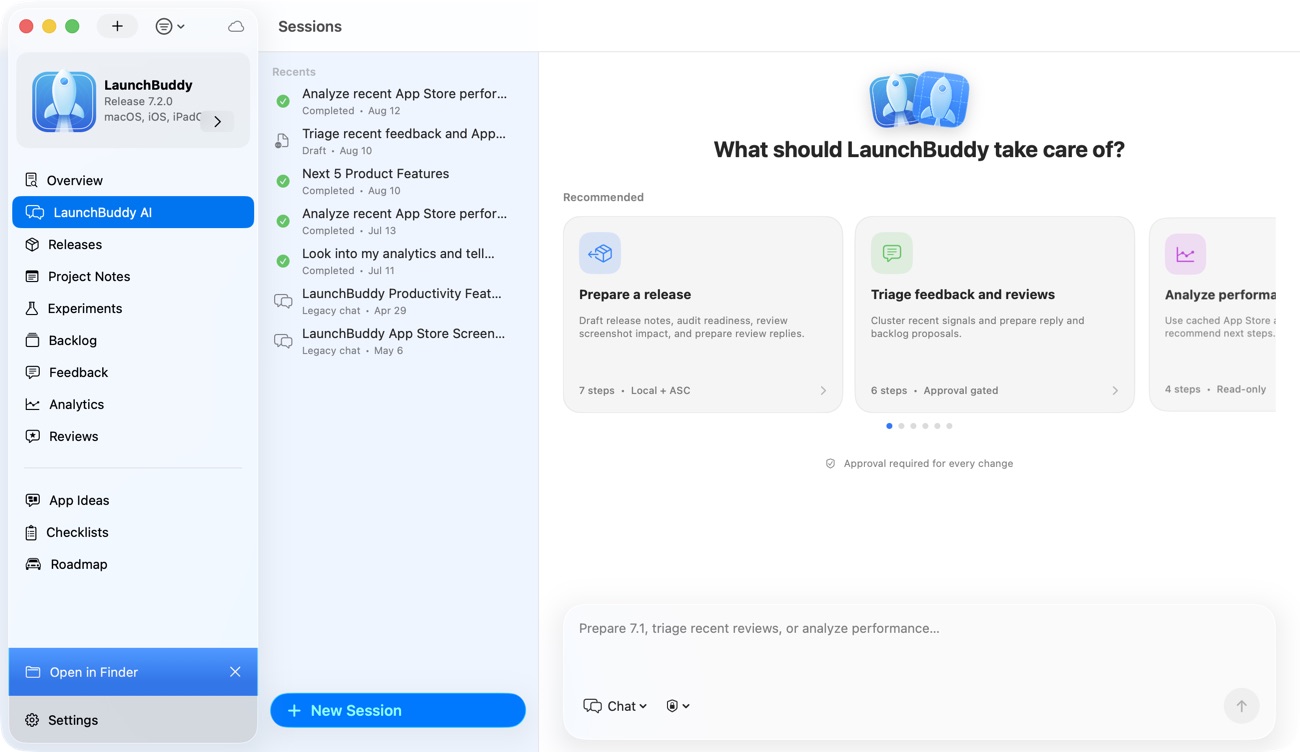
LaunchBuddy is not trying to replace App Store Connect, Xcode, CI, Fastlane, command-line tools, or specialized API automation. Those tools still matter.
LaunchBuddy fits the release-management layer:
- Organize iOS projects and tasks
- Group work into release versions
- Keep App Store Connect status close to release work
- Reuse App Store submission checklists
- Connect TestFlight feedback to decisions
- Draft clearer release notes and metadata ideas with AI
- Save final copy and launch decisions for future reference
- Reduce the number of places an indie developer has to check before shipping
Ship with AI, App Store Connect, and human judgment connected
An AI App Store Connect workflow should not turn an iOS release into a black box. It should make the release easier to understand.
Start with the version. Keep tasks, build status, TestFlight feedback, metadata work, release notes, App Review notes, and follow-up decisions attached to that version. Let AI draft from the context you already trust. Then review the output with the judgment only you can bring to your app.
That is the practical path: less context switching, better release notes, clearer metadata decisions, and fewer App Store details left to memory.
That is the workflow LaunchBuddy is designed to support.
